
Introduction
A creator usually does not lose the character in one obvious mistake. They describe the heroine in one note, change a few words in the video prompt, copy an older version into the voice plan, and later cannot remember which face was approved because the character was never built as a single character asset in My Assets. The episode now gives the lead a new face in every cut: one in the portrait, another in the rain scene, and a third in the final confrontation.
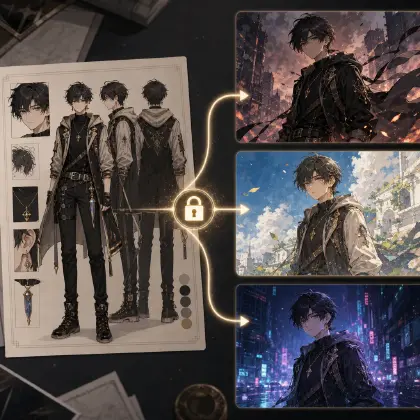
A character reference library stops that drift by giving every recurring role a home. Build the identity in Character Sheet References, connect it to a AI Short Drama guides shot plan, and keep the working episode inside a creative world so prompts, references, and review notes stay attached.
The script still leads the work. It names the character, defines the emotional beats, and decides when a costume or expression can change. The library simply keeps the same person present while the story moves through different shots.
What Belongs in the Library
Start with a character ID. The ID should be stable and boring: MAYA_COURIER_V1, LEO_HUSBAND_V1, AVA_SISTER_V1. Shot cards should use the ID instead of rewriting the character from memory.
Add visual anchors. These are the details that keep the character recognizable: face shape, eye color, hair silhouette, body proportion, wardrobe silhouette, signature accessory, scar, tattoo, prop, or color palette. Pick the anchors that actually matter to recognition.
Add reference images or reference prompts. A strong library usually includes front view, side view, back view, face close-up, expression sheet, outfit lock, and key prop crop. Not every supporting character needs the full set, but every recurring lead does.
Add expression range. Short drama depends on acting. A lead needs neutral, restrained smile, shock, anger, fear, grief, resolve, and possibly deception. If you only approve a glamour portrait, the role may drift when the script asks for ugly emotions.
Add wardrobe rules. Decide what is fixed, what can change, and what changes only when the script says so. A red courier jacket may be part of identity. A raincoat over it may be scene-specific. A completely different outfit may require a new approved version.
Add voice lane. Character identity includes sound. Store voice age impression, pace, texture, emotional range, pronunciation notes, and forbidden drift in the same library or linked voice plan.
Separate Reference Roles
A common failure is asking one reference to do everything. A dramatic portrait may control face but also drag in lighting, camera angle, outfit, and background. That creates unintended drift.
Use separate roles. The identity reference controls who the character is. The outfit reference controls what they wear. The pose reference controls body position. The scene reference controls the room or exterior. The style reference controls visual treatment. The voice lane controls performance.
When the shot changes, update only the role that should change. If Maya moves from apartment to elevator, the scene reference changes. Her identity reference does not. If she adds a raincoat, the outfit reference gets an approved variant. Her face and voice remain stable.
This separation also makes review easier. If a shot fails, you can tell whether the failure came from identity, pose, scene, outfit, style, or voice. That is much cheaper than rewriting the entire prompt.
Version the Library Lightly
Keep versioning simple. A character does not need a complex asset management system on day one, but the library should show which card is approved. Use clear labels like MAYA_COURIER_V1 for the base episode look and MAYA_RAINCOAT_V1 for an approved outfit variant. Avoid silent replacements where an old portrait disappears and nobody knows which version the shot list used.
Light versioning matters when you regenerate. If a rooftop shot uses the raincoat variant and an apartment shot uses the courier jacket variant, both can still point to the same face and voice identity. That keeps wardrobe changes intentional instead of accidental.
Example 1: Library Creation Prompt
Create a character reference library for an AI short drama cast.

Script summary:
Maya, a night courier, finds evidence that her husband Leo filed for divorce before asking her. Ava, Maya's sister, may be involved.

For each recurring character, output:
- Character ID
- Role in story
- Visual anchors
- Mutable traits
- Forbidden drift
- Required reference assets
- Expression range
- Wardrobe rules
- Voice lane
- Per-shot usage note

Rule:
The library must be reusable across apartment, elevator, rooftop, and rain scenes without redesigning the characters.

This prompt turns a script summary into cast assets.
Example 2: Character Asset
Character ID: MAYA_COURIER_V1
Role: lead, 27, night courier, controlled under pressure
Visual anchors: oval face, tired gray eyes, short black bob tucked behind left ear, red courier jacket with white sleeve stripe, small silver key necklace, chipped red nail polish
Mutable traits: lighting, pose, emotion, rain, jacket zipped or open
Forbidden drift: long hair, bright glamour makeup, missing necklace, black blazer, changed nail color, younger teen face
Reference assets: front view, side view, back view, neutral bust, six-expression sheet, jacket detail crop, necklace crop
Wardrobe rules: red courier jacket is core identity for episode one; raincoat may be added over it in exterior scenes
Voice lane: low, controlled, tired, slow under pressure, emotional crack only at final rooftop decision
Usage note: every shot card must cite MAYA_COURIER_V1 and state which mutable traits change in the scene

This card is compact enough to reuse and specific enough to catch drift.
Example 3: Shot Reference Assignment
Assign reference roles for this shot before render.

Shot: Maya confronts Leo in an elevator after finding the divorce agreement.

Reference roles:
Identity: MAYA_COURIER_V1 and LEO_HUSBAND_V1
Outfit: Maya red courier jacket, Leo navy office coat
Pose: Maya holding folded paper at chest height; Leo leaning against elevator wall
Scene: narrow elevator with brushed metal walls and harsh ceiling light
Prop: folded divorce agreement with visible signature line
Voice: Maya controlled low voice, Leo defensive pace

Review:
Reject if either character looks redesigned, if the paper disappears, if elevator lighting turns into a luxury lobby, or if Leo's voice loses age identity.

This assignment prevents references from fighting each other.
Common Mistakes
The biggest mistake is storing the character only as prose. Text helps, but recurring roles need visual references and review rules.
Another mistake is approving only a front portrait. Side views, back views, and expression sheets matter once the character moves through scenes.
Creators also confuse style with identity. A style reference should not redesign the face. Keep style and identity separate.
Finally, do not let supporting characters share vague descriptions. If two characters matter in the same story, give them distinct IDs and anchors.
FAQ
How large should a character reference library be?
For a lead, start with front, side, back, face close-up, expression sheet, outfit rule, prop crop, and voice lane. Supporting roles can use a smaller card.
Should the library include voice?
Yes. In short drama, voice consistency is part of character continuity. Store voice lane rules with the character or link them directly.
When do I create a new character version?
Create a new version when the script changes identity-facing elements: major outfit change, age jump, injury, disguise, transformation, or episode-level redesign.