
Generate Viral Dramas with
Short Drama Generator
Upload your script, watch it become cinematic. No skills required.
Any Genre, Any Style
From romantic series to animated adventures, create content for every audience.
Core Benefits of the AI Short Drama Generator
Create binge-worthy short dramas with consistent characters and stories in any genre.

Built for Binge-Watching
Every episode ends on a cliffhanger. Shape the pacing for scrolling audiences, with hooks that lead viewers straight into the next episode.

Consistent Characters
Keep the same face, outfit, and recognizable style across episodes, so your series feels like one connected story.

Any Short Drama Genre
Create romance, revenge, CEO drama, werewolf stories, time travel, and more. Adjust the visual style, tone, and dramatic tension to suit your audience.
How to Create Viral Short Dramas with Arcloop
Go from a script or rough idea to a complete, share-ready drama in three clear steps.
-
Share Your Story
Paste a script or describe your story idea. Arcloop analyzes the plot, characters, conflict, and tone, then prepares the structure for your short drama.
-
Generate Your Drama
Arcloop builds your characters, scenes, shots, dialogue, and audio while keeping the visual style and story flow consistent from scene to scene.
-
Edit and Publish
Review each scene, replace individual clips, adjust voiceovers and background music, add simple animations, then export your drama for TikTok, Reels, or anywhere you share.
Explore The Features Of The AI Short Drama Generator Workflow
Arcloop brings story planning, character design, scene generation, dialogue, voice, and editing into one connected workflow, so you can stay focused on the story.
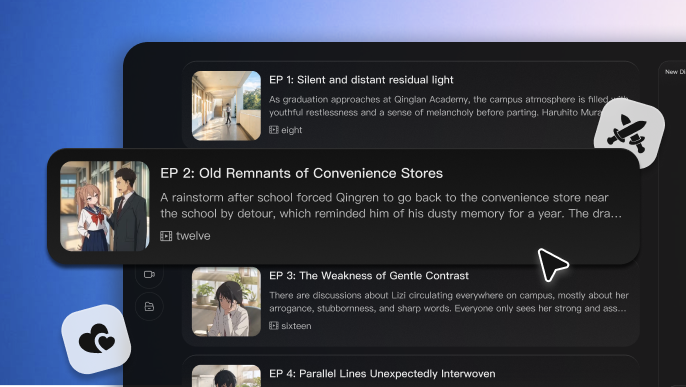
Turn Your Idea into Structured Episodes
Start with a premise, prompt, or full script. Arcloop identifies the characters, conflict, dialogue, locations, and dramatic beats, then organizes your story into connected scenes and shots.
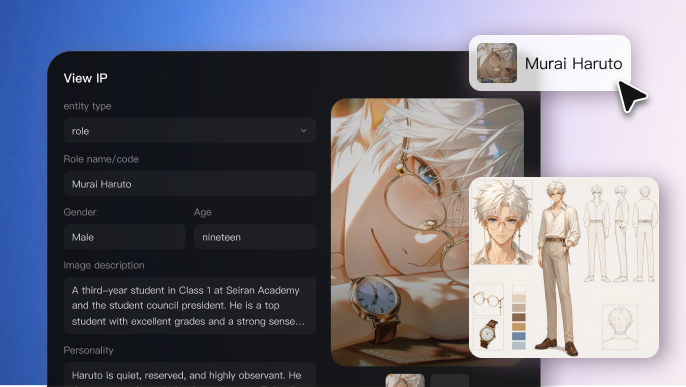
Keep Characters Consistent Across Every Scene
Lock in each character’s face, outfit, personality, and visual identity, while keeping locations and style consistent from one scene to the next.
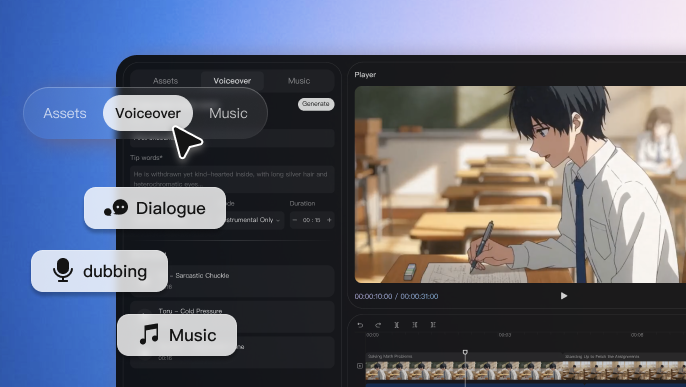
Bring Dialogue, Voice, and Music Together
Create cinematic shots with natural dialogue, character voices, narration, and background music already synchronized to the scene.
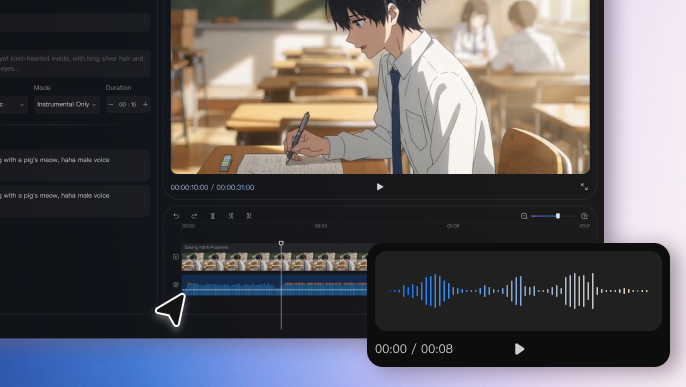
Direct and Refine Every Scene
Replace a single clip, adjust the voice or music, or refine an individual scene without regenerating the entire drama.
Who Is This AI Drama Generator For?
From beginners to professionals, Arcloop makes short drama production faster, simpler, and easier to scale.
Frequently Asked Questions
What does an AI short drama generator do?
The AI short drama generator turns a script or story idea into a complete narrative video. Arcloop helps develop the story, create recurring characters, generate scenes and dialogue, add voices and music, and assemble everything into a connected short drama.
Can I create a short drama from just a basic story idea?
Yes. Start with a premise, plot hook, character conflict, or rough outline. Arcloop can expand it into a structured story with characters, scenes, dialogue, and dramatic beats. You can also paste a finished script when you want more control over the narrative.
How does Arcloop keep characters consistent across scenes?
Arcloop creates reusable character assets and carries their defining features across the project, including facial appearance, clothing, voice, and visual identity. This helps recurring characters remain recognizable from one scene and episode to the next.
Can I edit the generated drama?
Yes. You can review the drama scene by scene, rewrite dialogue, replace individual clips, adjust voiceovers and background music, and add simple animations without rebuilding the entire project.
Can I create short dramas in different languages?
Yes. Arcloop supports multilingual storytelling, including dialogue, voiceovers, narration, and subtitles, so you can adapt the same story for audiences in different markets.