
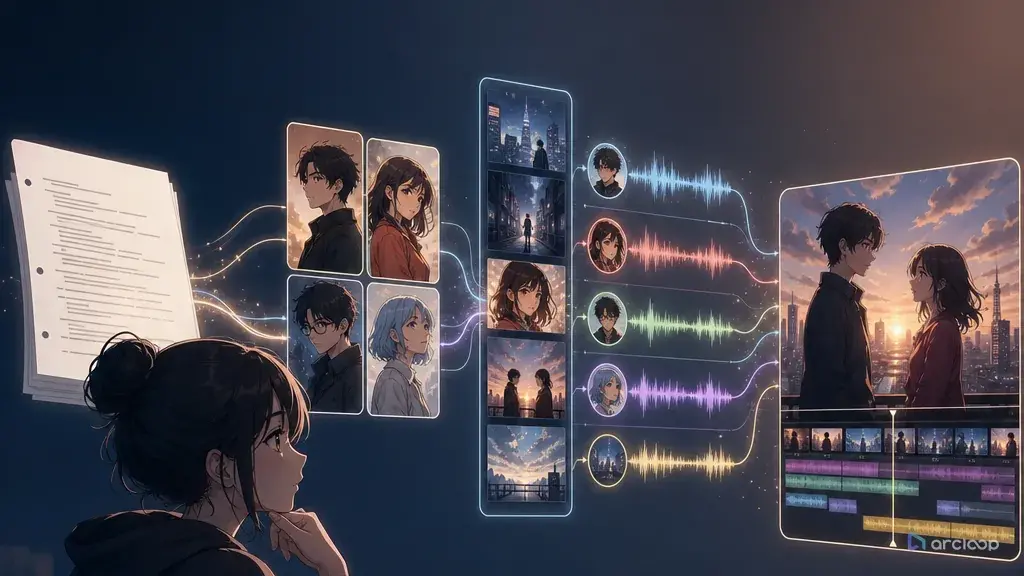
Introduction: The Script Is Ready, the Video Plan Is Not
The scene reads perfectly on the page. Mara finds a second house key in her husband's coat, he walks in with groceries, and the final line should make viewers tap the next episode. Then production starts. The first AI video cut gives Mara a new hairstyle, the key becomes a ring, the groceries vanish, and the voice line lands over the wrong reaction. The workflow skipped the production layer between script and render.
An AI short drama generator from script should not treat the script as one long prompt. It should parse the material first, whether the input is a rough beat outline, a micro-drama script, or a formatted screenplay. The useful output is a set of controllable assets: character references, scene cards, beat labels, shot lists, voice lanes, prop continuity, subtitle space, review criteria, and budget assumptions.
ArcLoop keeps those layers in the same production path. Start in a creative world, use AI Short Drama guides templates for scene structure, and build recurring roles as character assets — bind their reference images once, then pull them into any shot with a single @ reference. The goal is simple: the script stays the source of truth while each renderable shot gets a smaller, reviewable job.
This guide covers "AI short drama generator from script," "AI short drama script to video," and "screenplay to video generator" in one workflow: parse the page, label beats, build references, approve shots, assign voices, then render drafts.
Core Principles for Script-to-Video Short Drama
Treat script format as production data. A scene heading gives location, time, and lighting logic. An action line gives visible behavior. A character cue gives a speaker lane. A prop mention may become continuity. If all of that is flattened into "make a dramatic video," the generator loses the map.
Break story into beats before shots. A beat is a visible or audible change: hook, setup, pressure, clue, reaction, reveal, decision, or cliffhanger. "Nora sees the duplicate bracelet" is stronger than "Nora feels betrayed" because it names what the audience must see.
Create characters once, then reuse them. Short drama depends on repeated faces, outfits, voices, and emotional habits. Use a stable character ID, identity anchors, mutable traits, and forbidden drift notes.
Separate props from decoration. A phone, key, divorce agreement, hospital bracelet, receipt, or necklace may carry the plot. Put it in the scene and shot card with location, visibility, and reject rules.
Assign voices before final render. Dialogue timing changes shot duration and edit rhythm. Mark who speaks, whether the line is on-camera or off-screen, where the pause lands, and which reaction carries silence.
Approve the cheap layers first. Final render should begin only after character references, scene order, shot list, prop continuity, subtitle zones, and retry budget are approved.
Step-by-Step Script or Screenplay to Video Workflow
Start with clean intake. Paste the script with speaker names, action lines, and scene breaks. If the source is rough, convert it into an outline: location, characters, conflict, key prop, dialogue intent, and ending beat.
Parse the scene structure. Extract location, time, active characters, entrances, exits, props, relationship pressure, and emotional turn. A hidden clinic bracelet may become both wardrobe continuity and an insert shot.
Label the key beats. Choose the hook, setup, clue or prop insert, confrontation, reaction, reveal, and cliffhanger. Keep those labels stable through storyboard, shot list, voice plan, and review.
Build the character library. For each recurring role, create a character ID with visual anchors, wardrobe rules, emotional range, voice lane, and forbidden drift. For leads, add views and expression sheets through Character Sheet References.
Turn each beat into a shot card with runtime, aspect ratio, character IDs, action, camera, dialogue coverage, prop continuity, subtitle-safe area, and review criteria. Keep one primary job per shot.
Assign voice and timing. Mark speaker, emotion, pace, pause, and coverage. A line can play on the speaker, under a reaction, over a prop insert, or off-screen.
Review before render. Check character library, beat order, shot list, prop visibility, voice lanes, subtitle space, and budget. Generate rough drafts first.
The Script Becomes a Story Outline; Recurring Roles Become Reusable Assets
ArcLoop's advantage is that the script does not have to leave the workspace to become a plan. In ArcLoop Worlds, the screenplay becomes a Story Outline, recurring roles become character assets you build once in My Assets, and each beat becomes a shot that pulls those assets in with a single @ reference — nothing has to scatter across separate tools to become a plan.
Use AI Short Drama guides for vertical episodes, shot lists, hooks, reveals, and approve-before-render gates. Use Character Sheet References when identity drift is the main risk.
The review order should be strict: script order, character identity, prop continuity, voice timing, subtitle space, then visual polish. If the bracelet disappears or the line plays over the wrong face, polish will not fix the beat.
This also helps cost control. Estimate draft passes, final passes, voice generation, retries, and risky shots. Spend render time where the episode actually needs it.
Example prompt 1: Screenplay Intake and Beat Breakdown
Break this short drama screenplay excerpt into a Story Outline, character assets, and a shot list for ArcLoop before video generation.

Output:
1. Scene card with location, time, mood, active characters, core conflict, and ending beat.
2. Beat list using stable labels: hook, setup, pressure, clue, reaction, reveal, decision, cliffhanger.
3. Character library draft with IDs, visual anchors, wardrobe rules, voice lanes, mutable traits, and forbidden drift.
4. Prop continuity list with location, visibility, and reject rules.
5. Per-scene shot list with runtime, aspect ratio, action, camera, dialogue coverage, subtitle-safe area, and review criteria.
6. Approve-before-render checklist and draft/final budget notes.

Screenplay:
INT. CLOSED FLOWER SHOP - NIGHT
ARI, 24, wearing a delivery vest over a black dress, counts cash beside wilted white lilies.
The door bell rings though the sign says CLOSED.
NOEL enters carrying the missing wedding bouquet.
ARI
You said the bride never came.
NOEL sets the bouquet down. A hospital bracelet is tied around the stems.

This preserves screenplay signals instead of compressing the scene into a vague dramatic request.
Example prompt 2: Character Library and Voice Lane Spec
Create the recurring character library for the approved short drama script.

Character: ARI
Role ID: ARI_LEAD_V1
Visual anchors: heart-shaped face, short black bob with one uneven side clip, gray eyes, delivery vest over black dress, silver thumb ring, small bandage on right wrist.
Mutable traits: apron added in shop scenes, rain on jacket in exterior scenes, emotion changes from guarded to furious to numb.
Forbidden drift: no long hair, no changed thumb ring, no new uniform color, no missing wrist bandage, no softened age impression.
Voice lane: low, quick, controlled delivery; pauses before accusations; does not shout until the final confrontation.
Reference needs: front view, side view, expression sheet, delivery vest lock, bouquet close-up, bracelet close-up.

Continuity rule:
Every shot card must reference ARI_LEAD_V1. Do not rewrite Ari as a fresh character in later scenes.

This keeps face, wardrobe, prop, and voice reusable across the episode.
Example prompt 3: Approved Script-to-Video Shot Card
Shot: Shot 4 (bracelet bouquet reveal)
Source beat: reveal - Ari sees the hospital bracelet tied around the missing wedding bouquet.
Runtime: 6 seconds
Format: vertical 9:16
Characters: ARI_LEAD_V1 on screen; NOEL_HANDS_V1 only as hands placing the bouquet.
Identity references: Ari expression sheet, Ari delivery vest lock, Noel hand/coat sleeve reference.
Setting: closed flower shop counter at night, wilted white lilies in background, door sign blurred behind Ari.
Action: Noel's hands place the bouquet in the center; Ari reaches toward the stems, stops at the hospital bracelet, then slowly looks up.
Camera: start tight insert on bracelet for 2 seconds, slow tilt to Ari's face for 4 seconds.
Dialogue coverage: no Ari line; Noel off-screen says, "I did not know how to tell you."
Voice lane: Noel low and ashamed, line begins only after Ari stops moving.
Continuity anchors: Ari's silver thumb ring, right wrist bandage, bouquet ribbon, hospital bracelet tied to stems.
Review criteria: bracelet readable, Ari identity stable, Noel's face not invented, lower third clean, no extra text on bracelet.

A card like this can be rendered, reviewed, and replaced without disturbing the script.
Common Mistakes in AI Short Drama Script to Video
The first mistake is generating the whole script as one clip. A clue, reaction, confrontation, and cliffhanger usually need separate jobs.
Another mistake is ignoring screenplay syntax. Scene headings, action lines, character cues, parentheticals, and transitions are useful signals. Preserve them as production notes.
Creators also describe characters from scratch in every scene. Create a character library once and reference IDs in every shot card.
A fourth mistake is delaying voice decisions. Dialogue is not just audio. It decides shot duration, mouth visibility, reaction coverage, and edit rhythm.
Another failure is treating props as background dressing. If the story depends on a bracelet, key, phone, receipt, contract, or necklace, it needs continuity rules and review criteria.
Finally, do not final-render before approval. Final polish should improve an approved plan, not rescue an unplanned one.
FAQ
Can an AI short drama generator work from a rough story instead of a screenplay?
Yes. Convert the rough story into a scene outline with character names, location, conflict, key prop, dialogue intent, and ending beat. Then build shot cards.
What is the difference between script-to-video and screenplay-to-video?
Script-to-video often starts from rough beats or dialogue. Screenplay-to-video starts from formatted headings, action lines, character cues, and dialogue blocks. ArcLoop can use either.
Why is script-first better than prompt-first?
Short drama depends on continuity across characters, props, dialogue, and cuts. Script-first keeps those relationships visible. Prompt-first tends to treat every clip as a separate image problem.
How many shots should one short drama scene become?
Use the fewest shots that make the beat readable. Many scenes work with three to six shots: hook, insert, reaction, confrontation, reveal, and cliffhanger.
What should be approved before final render?
Approve the character library, beat order, per-scene shot list, prop continuity, voice lanes, subtitle-safe areas, draft strategy, and retry budget. Then send only approved shots into final quality.
Where should I start if my biggest issue is character drift?
Start by building a character asset for the role that keeps drifting, bind its reference images so the model has something fixed to read, then reference it with @CharacterName in every shot card in ArcLoop Worlds instead of re-describing the face each time.