Reference images are ready. Video generation and the interface walkthrough are still pending; this draft does not report a completed test.
A good product image gives you a starting design. Bringing that product into a person's hands introduces more questions: does its shape change, does the person stay recognizable, and does the room still match? This guide uses Vidu Q4 Preview in Arcloop to build a 12 second product scene from three separate image references.
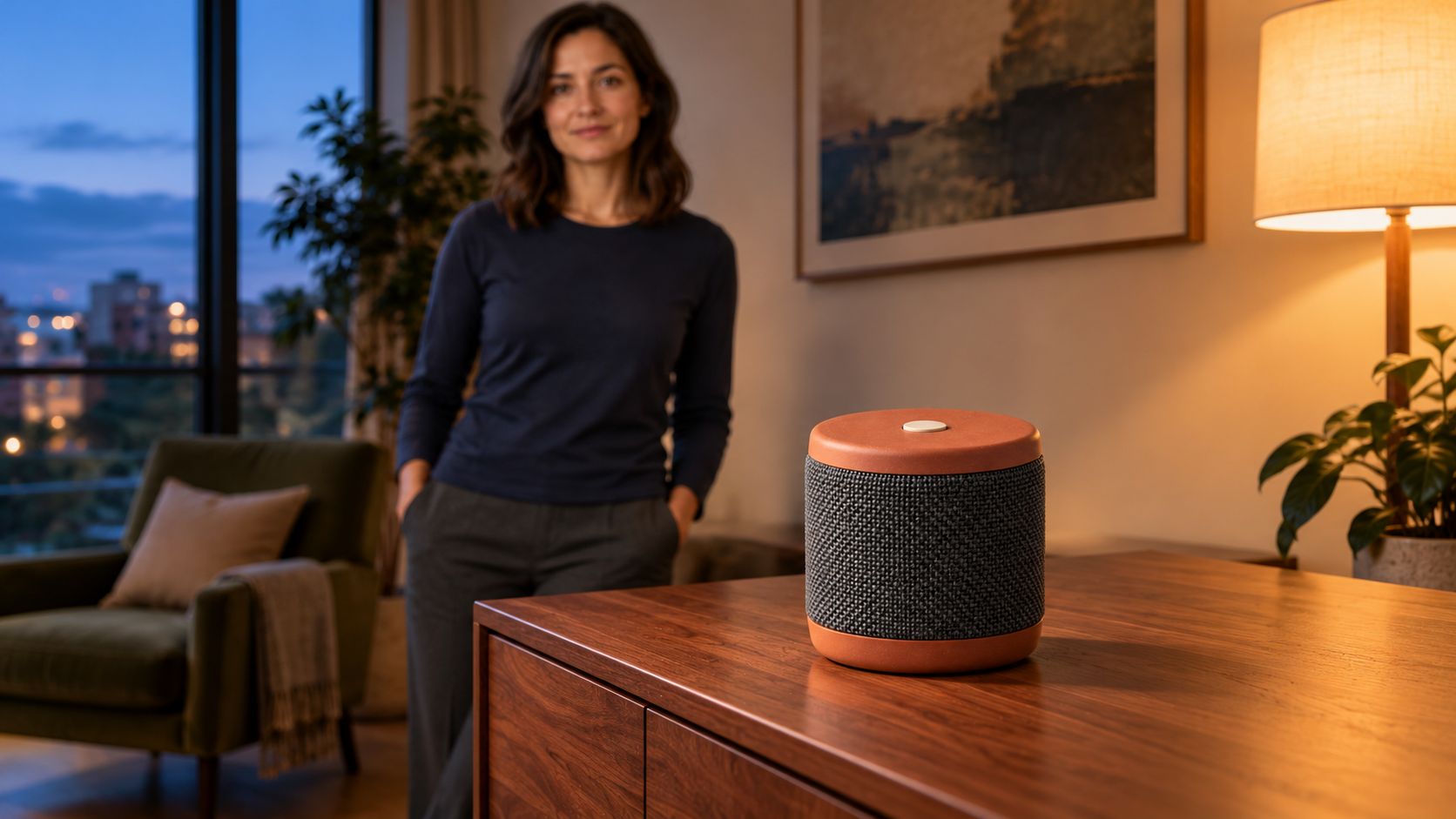
The example is a fictional portable speaker. A woman places it on a cabinet in her apartment, steps back, and leaves the product clearly visible. The short action gives us a practical way to check product handling and reference consistency.
Give each image one role
A finished opening frame is useful when you already like the composition. Separate references are useful when you have a product photo, a character image, and a location that need to become one scene. The framing still has to be generated.
That distinction suits a small business with existing product photography, a creator using a recurring presenter, or a team making the same product appear in several real settings. References supply the design information. The prompt supplies the action and composition.
This example uses reference to video. The speaker, person, and apartment each have their own image so you can identify which reference needs improvement if a detail drifts.
How to Make a Product Video with Vidu Q4 in Arcloop
Step 1. Decide what the product must do on camera
Keep the demonstration small: carry the speaker, place it on the cabinet, and release it. Its appearance is the focus. We are not showing battery life, sound quality, or another feature the footage cannot establish.
| Time | Main action | Detail to keep visible |
|---|---|---|
| 0 to 3 seconds | She approaches the cabinet holding the speaker. | The speaker's full silhouette and her face. |
| 3 to 6 seconds | She places it on the cabinet. | The base meets the surface and her fingers release it. |
| 6 to 9 seconds | She steps back while the camera continues its slow move. | The speaker keeps its shape and position. |
| 9 to 12 seconds | Focus settles on the stationary speaker. | The grille, top button, and contact shadow. |
The same plan can work for a vase, a small appliance, or a book. Rewrite the handling action around the actual object's size and weight.
Step 2. Prepare three clear reference images
If you already sell the product, start with your actual photograph. Show its shape clearly and avoid reflections that hide important edges. For this fictional example, use the following image prompt.
Product reference prompt
Create one photorealistic product reference photograph of an original compact portable speaker. A short upright cylinder with a matte terracotta top and base, charcoal woven grille around the middle, and one small round ivory button centered on top. No handle, display, cable, lettering, or logo. Show the entire speaker in a front three quarter view on a plain light gray surface. Soft neutral studio light, realistic fabric weave, clean visible edges, natural contact shadow. One object, no collage, no illustration or animation.
This image defines the product's proportions, color blocks, grille, and button. A product hidden in someone's hand is a weaker design reference than an unobstructed view.
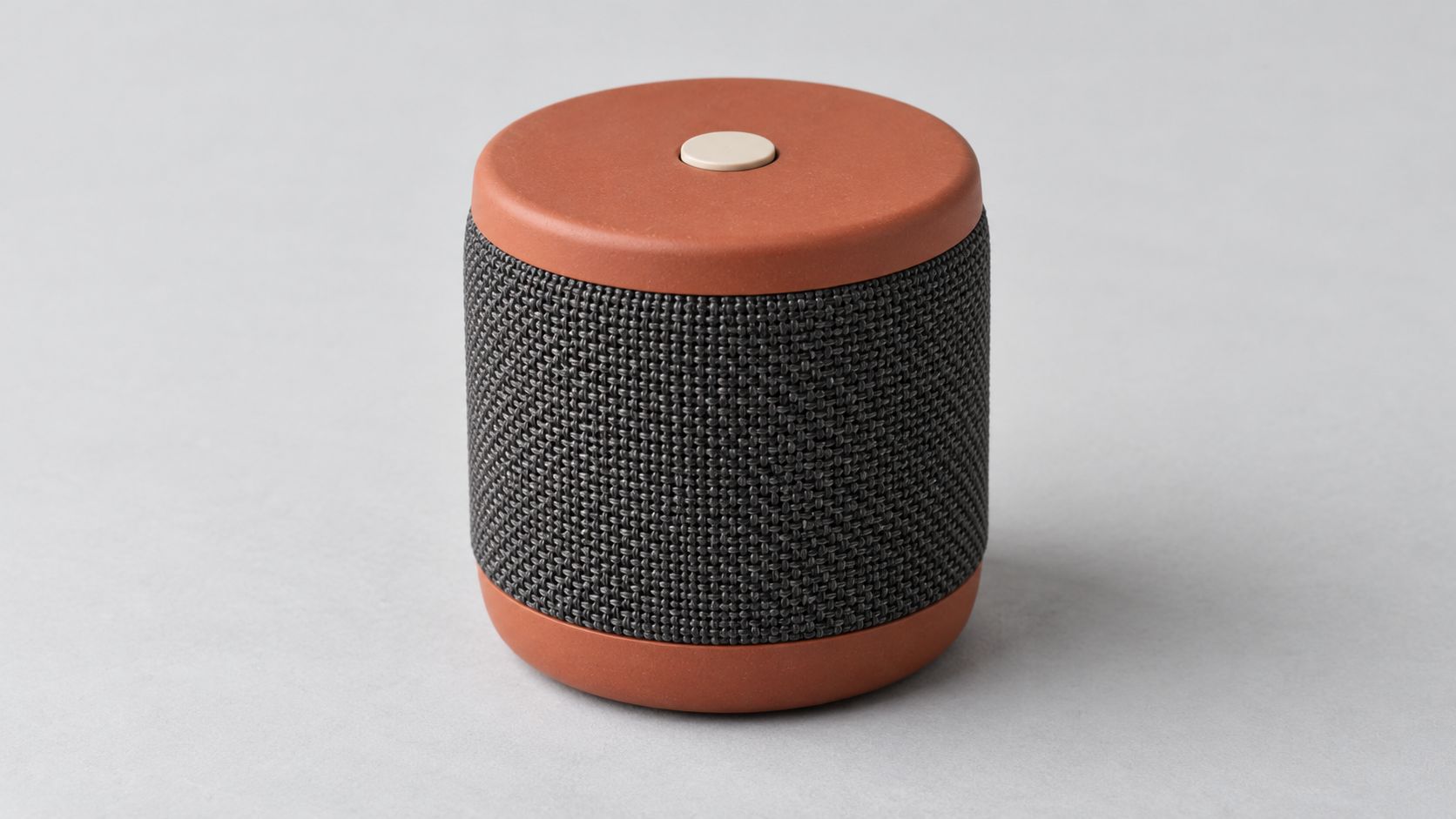
The product reference keeps the entire design visible, including the single top button.
Person reference prompt
Create one photorealistic reference photograph of an original adult woman in her thirties with shoulder length dark hair, brown eyes, and a relaxed neutral expression. She wears a plain navy long sleeve cotton shirt and charcoal trousers. Frame from her head to her upper thighs, with both hands relaxed and visible. Soft daylight, pale gray background, natural skin and fabric texture. One person, no accessories, no product, no text, no logos, no illustration or animation.
This reference establishes the person's face, hair, clothing, and build. It leaves the carrying pose to the video prompt.
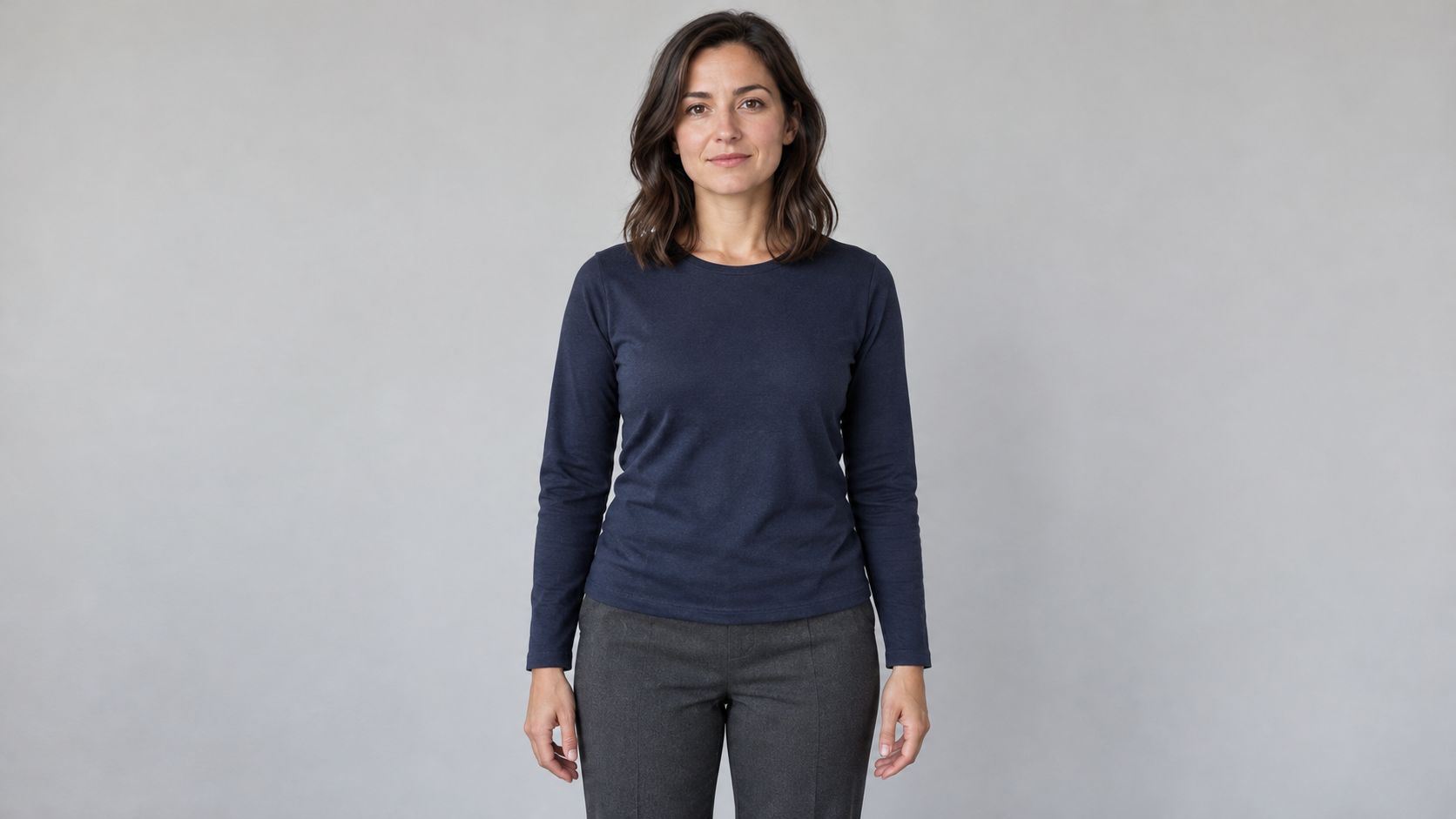
The presenter reference supplies identity and clothing without introducing another product.
Location reference prompt
Create one photorealistic interior location photograph of a modest contemporary apartment listening corner at dusk. A low walnut cabinet stands against a warm cream wall. Leave the cabinet top empty. An olive fabric chair sits in the left background. A large window on the left provides soft blue evening light, balanced by a warm floor lamp on the right. Eye level medium wide framing with a clear walking space in front of the cabinet. Real room scale, natural wood grain, restrained lived in details. No people, no speakers, no readable text, no logos, no illustration or animation.
The empty cabinet gives the product a clear destination. Keeping a second speaker out of the location image avoids competing product designs.
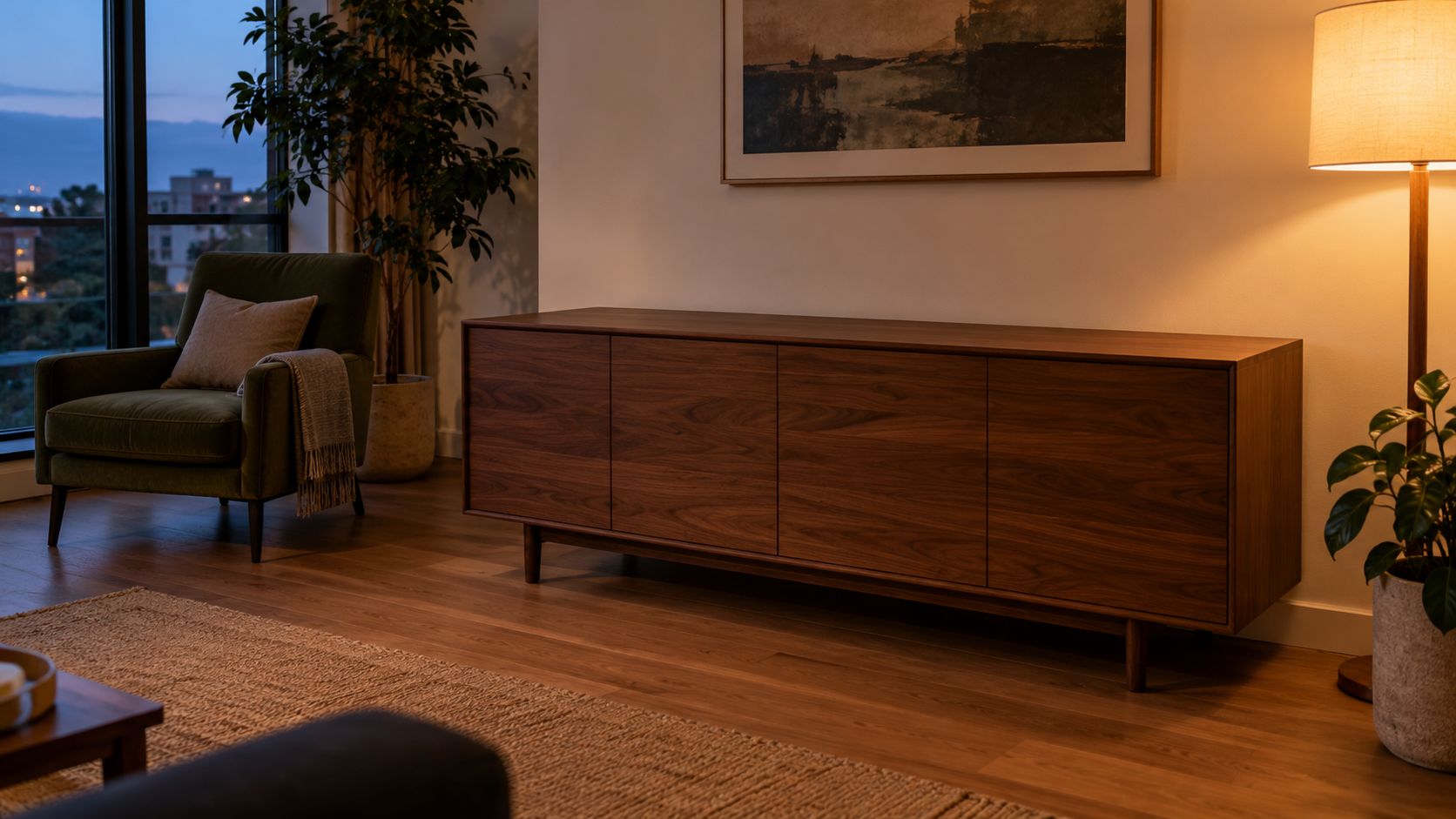
The location reference supplies the cabinet and lighting. These three images were prepared with the built in image generation tool outside Arcloop, specifically for this product video.
Step 3. Combine the references in one video request
Open Arcloop, attach all three images, and name them clearly. Replace the bracketed placeholders in this prompt with the actual asset names or reference mentions in your request.
Complete video prompt
Create one 12 second photorealistic product film in a real apartment at dusk. Use [PRODUCT IMAGE] for the speaker design, [PERSON IMAGE] for the woman's identity and clothing, and [ROOM IMAGE] for the apartment layout, cabinet, chair, window, and lighting. The three references describe one scene.

Preserve the speaker's short cylindrical proportions, matte terracotta top and base, charcoal woven grille, and single ivory top button. Keep the same speaker throughout. It is small enough to carry comfortably with both hands.

Use one continuous shot with a slow lateral camera move from left to right. Begin at the woman's waist height in a medium view that includes her face, hands, the full speaker, and the cabinet. Soft blue evening light comes from the left window. Warm practical light comes from the right floor lamp. Realistic skin, cotton, fabric weave, and wood grain. Restrained commercial photography with natural contrast.

0 to 3 seconds: The woman takes one small step toward the cabinet while holding the speaker upright with both hands. Keep its grille and top visible.

3 to 6 seconds: She lowers the speaker onto the empty cabinet. Its base contacts the wood before her fingers release it. Her hands move away without passing through the speaker.

6 to 9 seconds: She takes one small step back and looks at the speaker. The camera continues the same slow lateral move. Keep the speaker stationary on the cabinet with a clear contact shadow.

9 to 12 seconds: Shift focus gently from her face to the speaker and hold. Keep the full product inside the frame, with the top button and grille readable. Leave the woman softly visible in the background.

No dialogue, generated text, logos, extra products, added controls, floating objects, transformations, abrupt camera moves, illustration, or animation.
The timing organizes the intended action within one generation request. It is not frame accurate control, and a continuous shot is a prompt request rather than a guaranteed output. It does not require four separately generated clips. Keep the first version focused on the placement action before adding extra angles.
Step 4. Check the model, references, and settings
Choose Vidu Q4 Preview in reference to video mode. Use 12 seconds, 1080p, 16:9, and generated audio disabled for this visual example. Confirm that the request includes the product, person, and room images, then review the displayed estimate before generating.
Arcloop's Vidu Q4 integration accepts 1 to 15 reference images. You do not need to fill every slot. Add another image only when it explains a detail that the current images leave unclear.
Step 5. Inspect the product before polishing the camera move
Watch the whole clip once, then pause before placement, during release, and at the final hold. Compare those frames directly with the references.
| Check | What to inspect |
|---|---|
| Product design | The cylinder's proportions, terracotta sections, grille, and button. |
| Handling | Fingers release after contact; the base rests on the cabinet. |
| Person | The same face, hair, shirt, and body proportions. |
| Location | The cabinet, chair, window, and light direction remain coherent. |
| Final framing | The full product is visible and large enough to recognize. |
If the product changes, replace an unclear product image or simplify the handling action. If the face is too small, ask for tighter framing while leaving the product visible. If the room is being copied too literally, state which layout details matter and which can be reframed.
Keep the other references and settings fixed while making that change. This helps you see whether the correction addressed the original problem. A more elaborate camera move is useful only after the product survives the action.
Frequently Asked Questions
Should I use one opening image or separate references?
Use an opening image when the person, product, and room are already arranged as you want them. Arcloop's Vidu image to video guide explains that starting point. Use separate references when the model needs to compose those elements into a new view, as in this example.
Can the location reference contain the product already?
It can, but check that it shows exactly the same design as the product reference. An older product version or a different color can introduce conflicting instructions. For this example, an empty cabinet makes the intended placement clearer.
Will lettering on my product stay accurate?
Inspect it in the generated video. Image references can guide a design without keeping every small printed detail intact during motion. A clean product close view makes mistakes easier to spot before you use the clip in a campaign.
What should I budget for retries?
Use the estimate shown for each Arcloop request and keep a record of the attempts you make. Image preparation and video revisions contribute to the total. Choose the resolution needed for the review before committing to another render.