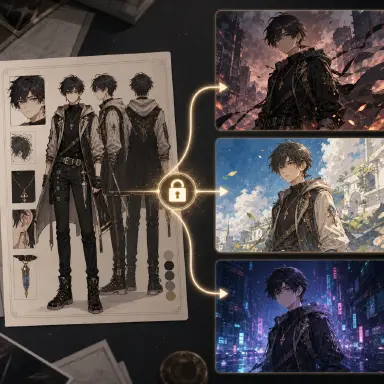
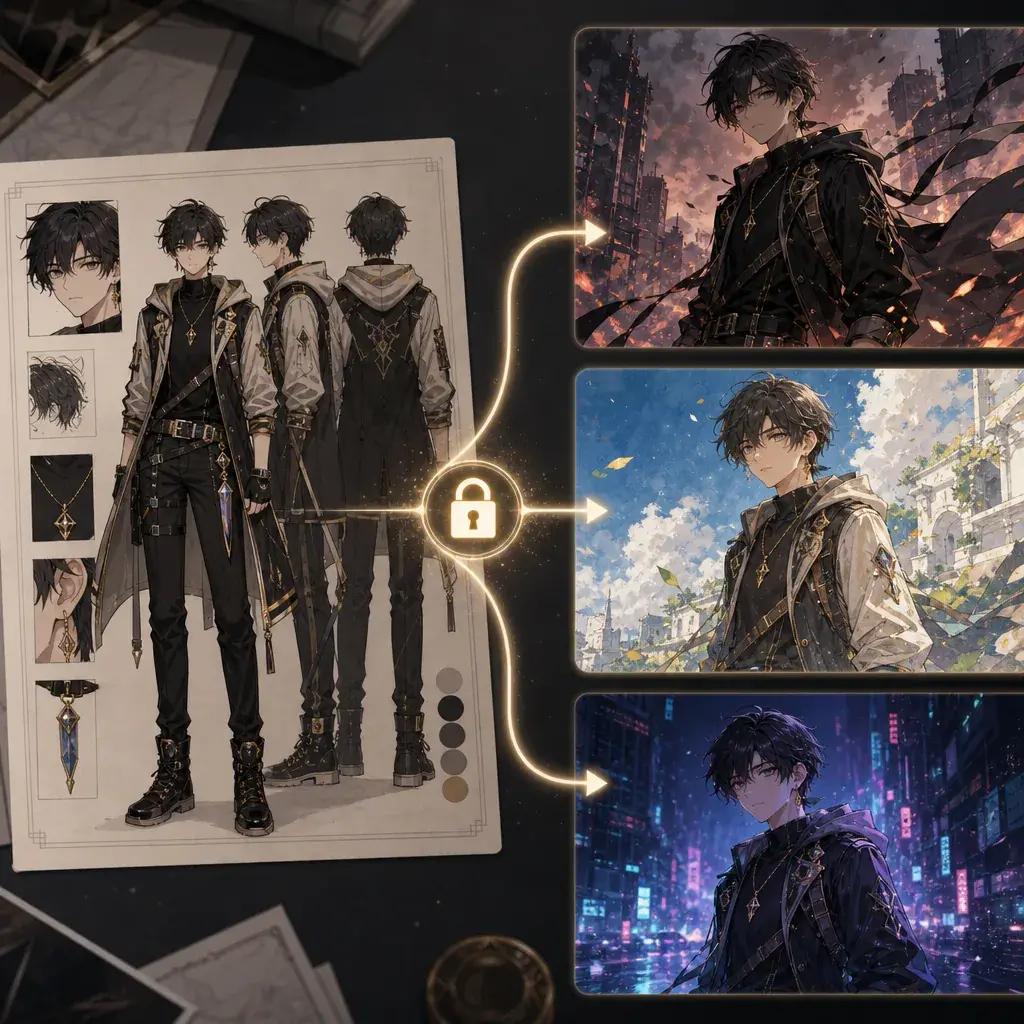
Why Style Swaps Break Character
Changing style is easy. Keeping the same character while changing style is the hard part. You may start with a strong OC design, then try a watercolor pastoral look, a Y2K street portrait, a comic album panel, or a glass future scene. The output looks attractive, but the face changes, the hair shape shifts, the accessory disappears, and the outfit becomes a new design. The style worked. The identity failed.
The fix is to separate identity from style. Identity should come from a character sheet or a clear reference image. Style should come from a reusable recipe: base surface, line or brush behavior, and palette. The prompt should say which input controls identity and which text controls style. Without that separation, style words can overwrite the OC.
This guide connects the character-sheet workflow with the style-pack workflow. Start with an original character sheet, keep a small set of non-negotiable identity anchors, then apply one style pack at a time. Use OC Character Sheet Front Turnaround as the identity lock.
Lock Identity Anchors Before Touching Style
A useful identity anchor is visible, repeatable, and specific. Hair silhouette, eye shape, face structure, signature accessory, jacket cut, shoes, scar, pendant, or color-blocked outfit can work. Vague personality words are not enough. "Confident" is a mood. "Short silver bob, gray eyes, clear ear device, graphite collar" is an identity lock.
Choose three to five anchors. More is not always better. If every lace edge, button, charm, pocket, and hair strand becomes mandatory, the style swap may fail because the prompt is too crowded. Pick the details that make the OC recognizable at a glance.
Then decide what can change. Lighting, texture, line style, color treatment, background, and pose can usually change. A style swap should not be forced to preserve the exact original rendering method. The same OC can become a cel screenshot, travel journal drawing, newspaper halftone panel, or impasto oil painting if identity anchors stay visible.
Text-Only Style Swap Workflow
The simplest workflow uses a character description and a style recipe in one prompt. It is fast and good for early exploration. Use the six-block structure: subject character, outfit, composition and pose, background environment, light/color/style, and negative constraints.
The subject and outfit blocks lock identity. The style block swaps the surface. The negative block prevents copied symbols, readable text, and protected style shortcuts. Try Newspaper Halftone Retro Comic when you want a clear style swap with strong constraints.
Text-only swaps are best when the OC is simple and the target image does not need perfect face continuity. For recurring characters, use a character sheet as the identity reference and treat text-only prompts as drafts.
Reference-Image Style Swap Workflow
When the workflow supports image references, use the uploaded character sheet as the strict identity reference. The prompt should explicitly say what to preserve: face shape, hair silhouette, eye color, outfit shape, accessory, and body proportions. It should also say what the style recipe may change: paper texture, line treatment, palette, background, and lighting.
Do not attach a style image that contains a character you do not own and then ask the model to copy it. Use text recipes or abstract style boards when possible. If you use a visual style reference, describe it in neutral material terms and avoid copying protected characters, logos, captions, or unique symbols.
The review step is simple: compare output to the sheet. If the face, hair, and anchor accessory survive, the style swap is usable. If a beautiful image redesigns the OC, reject it for continuity work.
Order the Prompt: Identity First, Style Second, Constraints Third
In ArcLoop, that order maps onto how the product actually works: identity comes from the character asset (its main image and reference images, pulled into the shot with an @ reference), style is a written recipe you add to the shot description, and constraints are just the extra lines you type — no redesign, no text, no logos, no imitating a named artist. Locking identity through the asset is what keeps the character stable while everything else in the description changes.
This matters because that style language does not have to live only inside one prompt — a description like "raw xuan paper with visible fiber absorbency; dry-brush breaks, wet ink blooms, and calligraphic contour strokes; palette of ink black, pine-soot gray, cinnabar seal red, and pale jade wash" can sit in a visual reference asset under My Assets, next to the character asset, so it stays reviewable and reusable instead of being retyped for every shot — without asking the model to copy a named artist.
Keep the prompt reviewable. If the output changes the OC's eye shape or removes the pendant, strengthen the identity sentence. If the output preserves identity but ignores style, move the style recipe into its own line and make the surface, line, and palette more concrete.
Debugging Identity Swaps
When a style swap fails, reduce the problem before increasing prompt length. First check whether the identity sheet is readable: front view, side view, face close-up, outfit silhouette, and signature accessory should be visible without dramatic lighting. If the sheet is weak, regenerate the sheet instead of fighting every output.
Next decide whether the failed area is local or global. If the face drifts but the body, pose, and background pass, use a face or head correction with a narrow mask. If the outfit changes but the face survives, use an outfit lock and keep the identity reference unchanged. If the entire body changes, the style may be overpowering the subject, so lower style strength and simplify the background before touching the character anchors.
Keep the tuning knobs few. In many reference workflows, three controls explain most identity-swap behavior: denoise for how much the image may change, guidance for how strongly the prompt is followed, and reference or LoRA strength for how strongly the identity or style enters. Move one knob at a time. A beautiful result that cannot be reproduced is not a production asset.
Finally, separate style from camera texture. A dark anime mood, a clean smartphone-camera realism layer, and a newspaper halftone surface are different layers. They can be tested on the same OC, but only if the prompt says which layer is allowed to change and which identity anchors must survive.
Example 1: Reference Sheet to Warm Pastoral Style
Use the uploaded character sheet as the strict identity reference for Lio, an original herbalist OC. Preserve Lio's round face, short moss-green hair, amber eyes, small copper leaf pendant, cream shirt, brown vest, and soft boots. Do not redesign the character.

Subject character: Lio, same identity as the reference sheet, gentle expression, copper leaf pendant visible.
Outfit: preserve the reference outfit shape, but render fabric as simple countryside cloth with natural folds.
Composition and pose: medium-wide view, Lio kneeling beside a garden bed and holding a small bundle of herbs.
Background environment: hillside vegetable garden, old wooden gate, distant village roof shapes, no readable signs.
Light, color, and style: rough cold-press watercolor paper as the base; soft sepia pencil line, transparent wash layering, and feathered grass strokes; palette of meadow green, apricot cream, robin-egg blue, and baked clay. Use warm late-afternoon light and gentle edges.
Negative constraints: no protected studio or artist imitation, no copied character, no attribution captions, no readable text, no logo, no outfit redesign, no extra fingers.
This prompt lets the style change the surface, not the character.
Example 2: Same OC to Y2K Street Portrait
Use the uploaded character sheet as the strict identity and outfit reference for Nami, an original OC. Preserve Nami's angular bob haircut, green-gray eyes, black star hairpin, cropped denim jacket shape, orange shoulder bag, and slim boots. Do not change age, face shape, or signature accessory.

Subject character: Nami, same identity as the reference sheet, direct playful expression, black star hairpin visible.
Outfit: preserve the cropped denim jacket and orange shoulder bag, add only Y2K-friendly glossy accessories with no brands.
Composition and pose: close half-body street portrait, slight wide-angle perspective, one hand closer to the lens holding a blank flip phone, head tilted.
Background environment: night sidewalk near a blank convenience-store glow and subway entrance shapes, no readable signage.
Light, color, and style: glossy mini-lab photo paper with faint flash glare as the base; sharp gel-pen-like contour accents, hard camera flash edges, and smooth skin color blocks; palette of chrome silver, baby blue, bubblegum pink, and asphalt black. Keep the flash bold but the face readable.
Negative constraints: no protected artist imitation, no copied celebrity pose, no attribution captions, no readable text, no brand logos, no face redesign, no broken foreground hand.
The prompt allows accessories to shift, but it protects the hairpin, jacket, bag, face, and boots.
Example 3: Same OC to Ink Wash Scene
Use the uploaded character sheet as the strict identity reference for Ren, an original wandering scholar OC. Preserve Ren's long tied black hair, narrow eyes, pale jade hair cord, layered gray robe silhouette, bamboo scroll case, and calm posture. Keep body proportions and face shape from the reference.

Subject character: Ren, same identity as the reference sheet, calm expression, pale jade hair cord and bamboo scroll case visible.
Outfit: preserve the layered robe silhouette and sash placement, simplify small fabric details for ink wash readability.
Composition and pose: three-quarter figure standing on a narrow bridge, one hand resting on the scroll case, robe edge moving lightly in wind.
Background environment: misty river crossing, bamboo silhouettes, cliff pavilion in the distance, large empty sky space.
Light, color, and style: raw xuan paper with visible fiber absorbency as the base; dry-brush breaks, wet ink blooms, and calligraphic contour strokes; palette of ink black, pine-soot gray, cinnabar seal red, and pale jade wash. Use negative space as part of the composition.
Negative constraints: no protected artist imitation, no copied IP costume, no attribution captions, no readable calligraphy, no sect logo, no redesign, no dense fantasy effects.
This prompt keeps Ren's identity while letting line, paper, and palette do the style work.
Ways a Style Swap Ruins the Character
The biggest mistake is asking for "same character in a new style" without naming the anchors that define the character. The model cannot know which details are sacred unless you say so.
Another mistake is letting outfit and style fight. If a reference sheet has a modern jacket and the target style is ink wash, preserve the jacket silhouette but simplify the rendering.
Creators also use a famous image as a style reference when a text recipe would be safer. Material words are usually enough.
Finally, do not accept a beautiful redesign when continuity matters. A style test and a reusable character asset have different standards.
FAQ
How many identity anchors should I lock?
Use three to five anchors: face shape, hair silhouette, eye detail, outfit silhouette, and one accessory. Add more only if the character still drifts.
Can a style swap change the outfit colors?
Only if color is not part of the identity. For recurring OCs, preserve core outfit color zones and let the style recipe affect texture, lighting, and edge treatment.
Where do identity and style live in an ArcLoop shot?
Identity comes from the character asset — bind reference images to it and pull it into the shot with @. Style stays as text in the shot description, and constraints are additional lines in that same description. Keeping the two separate is what lets you say plainly what must not change.