AI Video Agent Architecture for Drama Production
A screenplay-first video agent is not one model call. For drama work, it is closer to a small production desk: read the script, keep the characters consistent, plan the visuals, render the assets, then check what drifted.
For Arcloop, the architecture question is not "which model makes the clip?" It is: what has to happen between a screenplay and a story world creators can keep using?
The answer starts before rendering. The script has to become working story material before Arcloop can make continuity systems, visual plans, marketing briefs, or video-ready shot plans.
That is the agent architecture this page owns: not one script-breakdown article, not one image-model article, but the full system from screenplay to story assets the team can keep using.
Quick answer
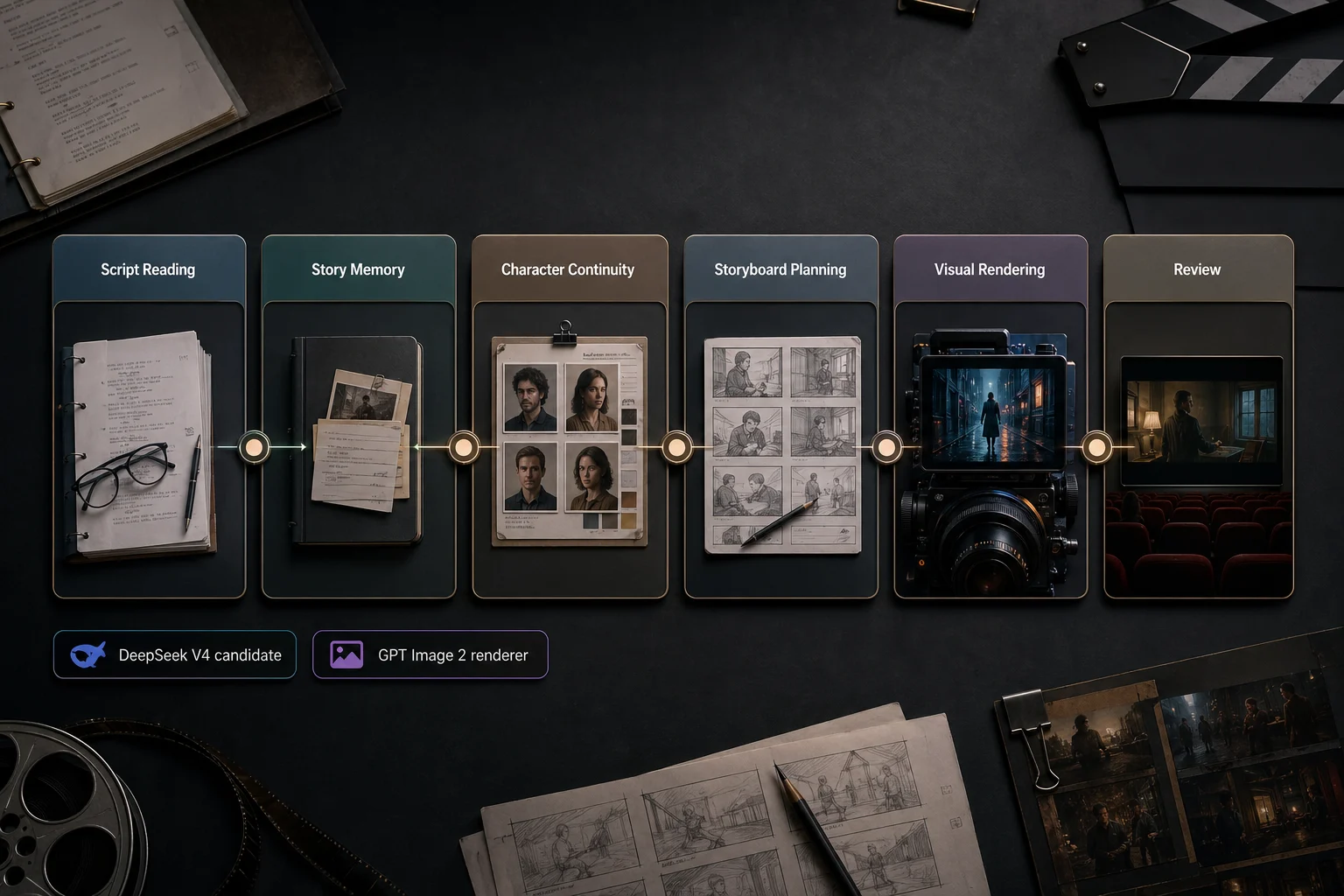
AI video agent architecture for drama production should be layered, not model-centric. The system reads scripts, stores story memory, applies character and continuity rules, plans visual assets, sends constrained briefs to rendering models, and reviews outputs against the script. Each layer has a clear handoff artifact so failures can be traced and corrected.
Split the agent into production layers
The strongest architecture separates script reading from visual rendering:
- Read the screenplay or episode outline.
- Build story memory from scenes, characters, props, and turns.
- Keep character and continuity rules in one place.
- Plan storyboards, marketing assets, and shot references.
- Render images or video from those choices.
- Review the result against the script.
That separation keeps the visual model from discovering the story on its own. It renders a choice the agent has already made.
Layer 1: script reading and story memory
The first layer reads the script and turns it into working notes: scene maps, cast presence, prop trails, relationship shifts, emotional beats, continuity flags, and visual candidates.
This is where long-context script reading matters. Long dramas carry callbacks, secrets, injury states, wardrobe changes, and relationship turns across many scenes. The architecture needs a reading layer that can hold those details before any visual work begins.
The model choice can change. The product requirement stays the same: the agent needs story memory that later steps can use.
Layer 2: character and continuity system
Once the script has been read, the agent needs a place to keep identity rules.
This layer turns story memory into:
- character bibles
- relationship state
- wardrobe and injury continuity
- prop ownership
- location and time-state notes
- recurring visual motifs
Without this layer, every storyboard, cover, and image request has to rediscover the same character from scratch.
Layer 3: storyboard and asset planning
The planning layer decides which scenes deserve visual treatment.
It answers questions such as:
- Which scene is strong enough for a storyboard grid?
- Which beat has enough force to carry the episode cover?
- Which prop or reveal can carry a promo image?
- Which scene needs a shot reference board before video generation?
This layer is where the agent chooses the visual job. Rendering comes after the choice.
Layer 4: visual rendering
Visual rendering comes after the story choices. An image or video model can render visual boards, marketing assets, and shot references once the agent has chosen the story signal.
That division keeps the production path cleaner:
| Layer | Main job | Example result |
|---|---|---|
| Script memory | Understand the script | scene map, prop trail, relationship turn |
| Continuity | Preserve repeatable rules | character bible, wardrobe state, motif logic |
| Planning | Choose visual jobs | storyboard plan, cover hook, promo angle |
| Rendering | Create visual assets | character sheet, visual board, cover, shot reference |
| Review | Catch drift | continuity notes, revision requests |
Layer 5: review and revision loop
Generation is not the finish line.
A review pass checks whether the result still matches the script:
- Does the character identity stay consistent?
- Did the prop or clue survive the visual step?
- Does the image reflect the correct relationship state?
- Does the storyboard preserve scene order?
- Does the cover sell the episode hook instead of the whole genre?
This gives review a real baseline: the script, the character rules, and the planned beat.
Handoff boundaries keep the system debuggable
The architecture is only useful if each layer leaves behind a concrete artifact. Otherwise, every failure looks like a model problem.
| Boundary | Handoff artifact | Failure it prevents |
|---|---|---|
| Script reading to continuity | scene map, cast map, prop trail | the same character or object being reinterpreted in every request |
| Continuity to planning | character bible, wardrobe state, relationship state | storyboards that ignore identity, injury, or relationship changes |
| Planning to rendering | storyboard plan, cover brief, shot reference brief | visual models guessing which moment matters |
| Rendering to review | generated asset plus intended beat and constraints | beautiful images that drift from the script |
| Review to revision | change request tied to a scene, prop, or character rule | vague regeneration loops with no production memory |
This is why the architecture page stays at the system level. Model tutorials belong in narrower pages; this page defines the production desks and their handoffs.
Where long-context script reading fits
This page is the architecture page. The model-specific script reader belongs in a narrower guide.
For long-context script parsing, read DeepSeek V4 Script Breakdown for Drama Production. That page owns the DeepSeek V4 search intent and explains how Arcloop is testing long-script understanding.
On this page, the only architecture claim is:
- the script-reading layer reads the screenplay
- the continuity layer preserves characters, props, and states
- the planning layer chooses storyboard, cover, promo, and shot jobs
- the rendering layer creates assets from those choices
- the review layer checks drift against the script
Example: a revenge short drama moving through the agent
Imagine a creator uploads a multi-episode revenge short drama. The lead is a former idol trainee who returns under a new name, hides a scar from an old stage accident, and uses a music-show contract to expose the agency that betrayed her.
The agent first identifies the recurring cast, the hidden identity, the scar continuity, the contract as a payoff object, the agency office as a power location, and the rooftop confrontation as a storyboard and cover candidate.
Then Arcloop can use that read in several directions:
- update the character bible for the lead, rival trainee, manager, and agency boss
- create a 3x3 storyboard grid for the rooftop confrontation
- prepare an episode cover brief around the contract reveal
- prepare channel variants for the idol-stage and agency-office settings
- keep continuity notes available for video planning
The agent stays tied to the script instead of starting over at every step.
Next steps in the handbook
Use the architecture page as the map, then move into the job you need:
- For script parsing: DeepSeek V4 Script Breakdown
- For character continuity: AI Character Bible
- For visual assets: GPT Image 2 for AI Drama Visual Assets
- For input cleanup: Hollywood Screenplay Format
Ready to build from a script? Start an AI video agent project in Arcloop.
What this does not claim
This architecture does not claim that one model automatically makes a good drama.
It does not create taste, subtext, pacing, or emotional truth by itself. If the script is thin, the agent only processes thin material more efficiently.
The grounded claim is stronger: a screenplay-first video agent can turn long scripts into story memory that supports character systems, storyboard planning, visual assets, and interactive story worlds.
FAQ
What is an AI video agent for drama production?
An AI video agent is a layered system that turns scripts into story memory, character rules, storyboard plans, cover briefs, promo assets, and video-ready production notes.
Where does long-context script reading fit?
Long-context script reading fits in the first layer. For the model-specific version, use the script breakdown page. This architecture page stays focused on the full production system.
Do image models still fit?
Yes. Image models can render visual boards, marketing assets, and shot references after the script has already been broken down.
Why not generate video directly from the script?
Because direct generation skips memory, continuity, and visual planning. The agent needs to know the scene event, character state, prop logic, and relationship turn before visual generation becomes reliable.
How does this support interactive story worlds?
Interactive story worlds need memory. Characters, relationships, props, settings, and story beats must persist so the world can be remixed, revisited, and extended instead of consumed once.