

AI Video Agent for Interactive Story Worlds

Arcloop starts from a simple idea: a script can become an interactive story world, not just a finished clip.

For creators, the first valuable result is not a poster line or a disconnected video shot. It is a working map of the world: who exists, what they want, what changed, which props matter, which scenes deserve visuals, and where a viewer could enter or extend the story.

That is the difference between a video generator and a screenplay-first agent. The generator answers one request. Arcloop keeps the story organized so the same world can support episodes, covers, promo images, storyboards, and video plans.

Quick answer

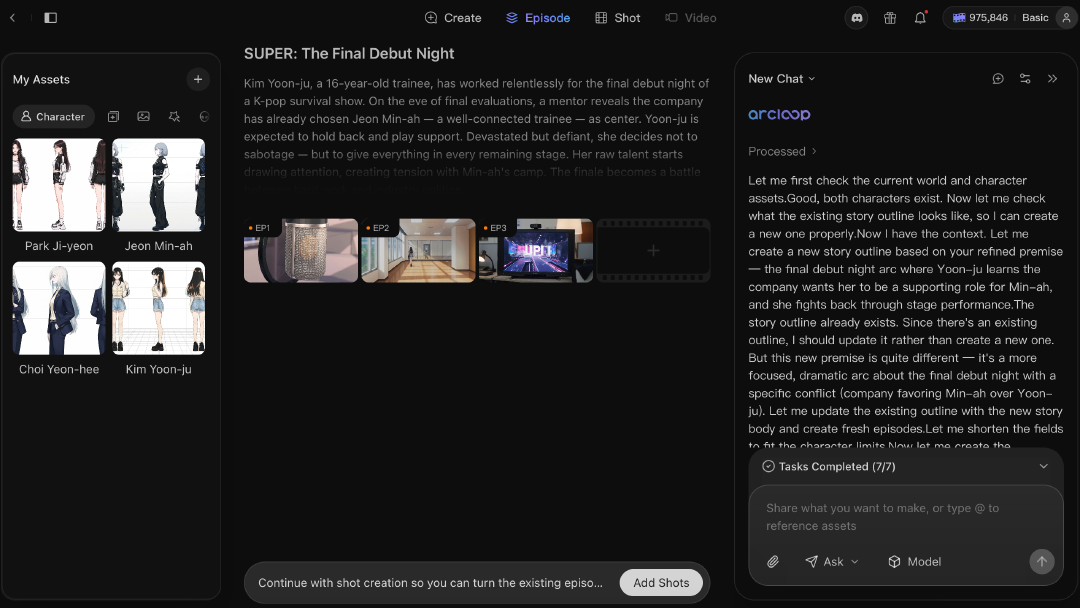
Arcloop is a screenplay-first AI video agent for interactive story worlds. It turns scripts into reusable production memory: scene maps, character rules, storyboard plans, cover briefs, promo briefs, and video-ready shot plans. The goal is to generate many assets from the same story system instead of rewriting prompts for every output.

Arcloop interactive story world map showing a screenplay becoming story memory, character continuity, visual boards, covers, promo assets, video plans, and viewer entry paths.

Arcloop makes the script the world engine

An interactive story world needs memory before it needs rendering.

Arcloop turns screenplay-shaped input into a working package the creator can keep using:

  • Story memory: scene maps, character presence, prop trails, emotional turns, and relationship shifts.
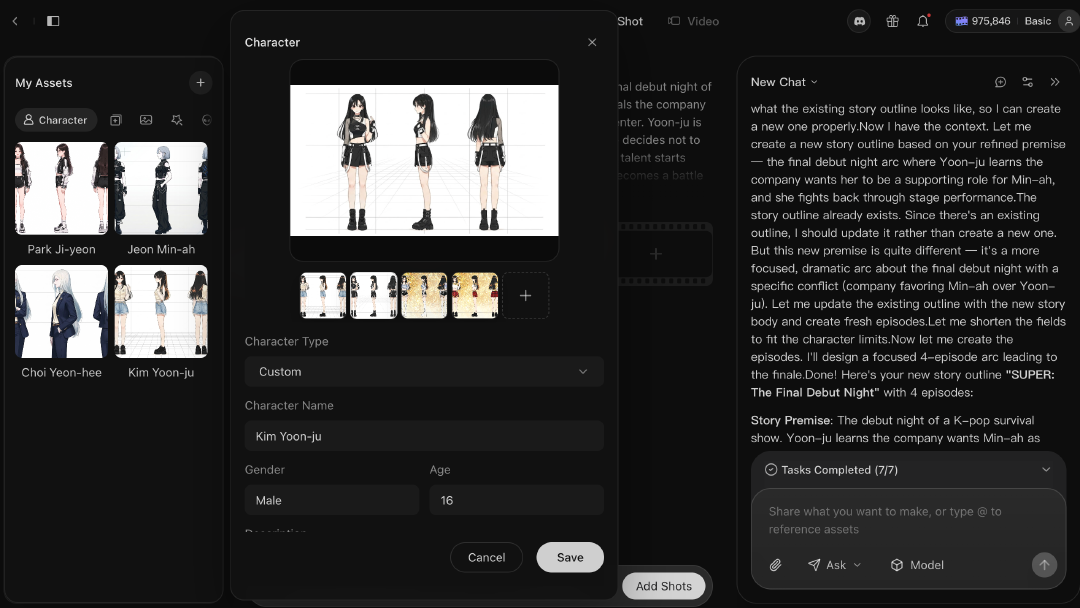
  • Character continuity: repeatable identity, wardrobe, voice, motivation, injury, and relationship state.
  • Visual decisions: storyboard candidates, cover hooks, promo angles, and shot-reference moments.
  • Production briefs: notes that image and video models can use without rediscovering the story.
  • World entry paths: moments that can become interactive choices, remix points, or future episode branches.

The product promise is practical: fewer one-off guesses, more story material that survives the next episode.

How the script turns into world material

The path is straightforward: start with a screenplay or episode outline, break it into scenes, capture character and continuity rules, plan storyboards and visual boards, build cover and promo briefs, then generate and review images or video.

This handbook explains the production assets behind that path. The focus is episodic drama, short drama, manga drama, comic video, and creator studio work where the same characters and story rules need to hold across many outputs.

Why one generation step is not enough

An AI video agent has to turn a script into scene lists, cast maps, character bibles, storyboard grids, episode covers, promo images, and video-ready shot plans.

If a team jumps straight from script to image, the world gets rediscovered every time. That is where characters drift, props vanish, and covers start selling the genre instead of the episode.

Use this handbook as the production map

Use this table as the shortest route into the right article.

If you are trying to...Best page to read nextWhat you get from it
Understand the full agent architectureAI Video Agent Architecture for Drama ProductionHow script memory, continuity, visual planning, rendering, and review fit together
Break down a screenplay into usable structureDeepSeek V4 Script Breakdown for Drama ProductionA scene, cast, prop, relationship, and visual-priority story map
Understand why screenplay format mattersHow Hollywood Screenplay Format Helps AI Script BreakdownWhy scene headings, character cues, and action lines make parsing easier
Build character continuity into the agentWhat Is an AI Character Bible for Drama Production?Repeatable rules for identity, voice, visuals, and relationships
Turn scenes into shot planningHow to Turn a Script Into a Storyboard Grid for AI VideoA bridge from scene logic to visual beat order
Render approved visual boardsGPT Image 2 for AI Drama Visual AssetsCharacter sheets, scene setting boards, 3x3 storyboard contact sheets, and shot reference boards
Build episode covers from the scriptHow to Generate Episode Covers and Promo Images From a Drama ScriptA way to choose the episode hook before generating images
Keep a long series visually coherentHow to Create Consistent Episode Covers for a Drama SeriesA cover system for multi-episode projects

Each page owns one job

This handbook is split by the job a creator is trying to finish:

  • the hub explains the screenplay-first agent and interactive world direction
  • the architecture page explains the full production stack
  • the DeepSeek page focuses on long-script breakdown
  • the screenplay-format page explains how to prepare the input
  • the character bible page protects cast identity and relationships
  • the storyboard page turns scenes into panel order
  • the GPT Image 2 page turns approved briefs into visual assets
  • the cover pages handle single-episode hooks and long-series consistency

Keeping those jobs separate helps readers move faster and keeps search intent clean.

The simplest reading order

If you want the shortest path through the topic, read these first:

  1. DeepSeek V4 Script Breakdown for Drama Production
  2. How Hollywood Screenplay Format Helps AI Script Breakdown
  3. What Is an AI Character Bible for Drama Production?
  4. How to Turn a Script Into a Storyboard Grid for AI Video
  5. GPT Image 2 for AI Drama Visual Assets

That order moves from reading the script to preserving continuity, planning visuals, and rendering images.

What this handbook covers

This cluster stays focused on a small set of production problems:

  • script breakdown
  • screenplay format as an input surface
  • character continuity
  • storyboard planning
  • 3x3 visual boards
  • episode cover selection
  • long-series cover systems
  • promo image assets
  • video-ready shot planning

The claim is narrow on purpose: start from the script, build the world material first, then ask visual models to render from that material.

Where Arcloop fits

Arcloop is a screenplay-first video agent for interactive story worlds. Its role in this handbook is to help creators start from screenplay-shaped input, turn that into working story material, and make visual steps easier to control.

That means connecting:

  • screenplay parsing
  • story assets
  • character and relationship continuity
  • storyboard planning
  • cover and promo briefs
  • image generation
  • video-ready shot planning
  • worlds and character systems that can keep growing

FAQ

What is AI drama production?

AI drama production uses AI models and a focused production system to turn scripts into story worlds, character bibles, storyboard grids, covers, promotional images, and video-ready shot plans.

Why start with script breakdown?

Script breakdown creates the scene, character, prop, relationship, and continuity map that later visual tools need. Without it, every image or video request has to rediscover the story.

Is this only about image generation?

No. Image generation comes later. The larger system converts a script into world material before visuals are generated.

What do I read first?

Start with the DeepSeek V4 script breakdown guide if your problem is turning long scripts into working story notes. Start with the AI video agent architecture page if your problem is understanding how the full system fits together. Start with the GPT Image 2 guide if your immediate problem is rendering approved character sheets, scene setting boards, 3x3 storyboard contact sheets, or shot reference boards.

How does Arcloop use this agent pattern?

Arcloop is building around a screenplay-first pattern: read the script, create story assets, then use those assets for storyboard, image, cover, promo, and video work.