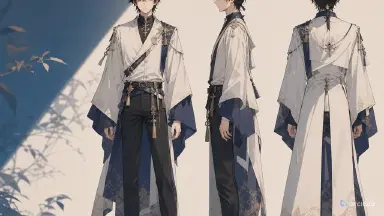
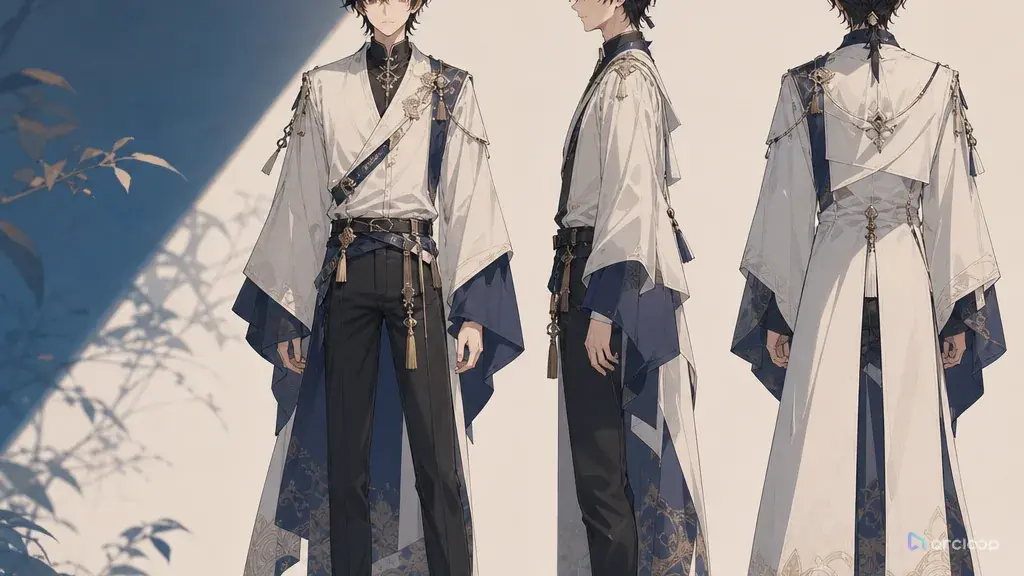
The problem
You've got a great-looking character image — the face is stable, the outfit looks good, the vibe is right. Then you get into actual AI anime drama shots and the character falls apart on the very next one: the jawline changes in profile, the outfit shifts on a turn, the back view could be a different person entirely. Add blocking issues in a group shot and viewers immediately clock it as a different show. Burning more generations at that point is just gambling on a lucky match.
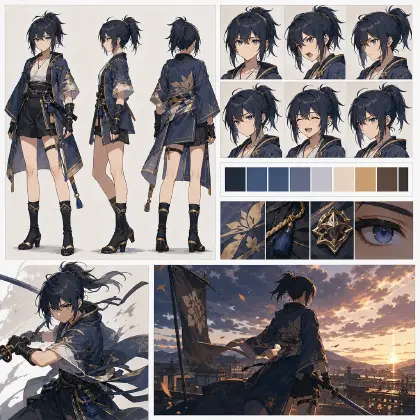
A character turnaround sheet isn't an art-department nicety — it's the production foundation for both AI short drama and AI anime drama. Start by locking front, side, and back with a character turnaround template, then carry it into the AI anime drama workflow and creative workspace for storyboarding, video, voiceover, and monetization reuse. That's what turns a character from one nice image into an asset that actually holds up across shots.
How it works
A character turnaround sheet usually covers front, side, and back views. For AI video, it solves the problem of who a character stays as through camera movement and changing blocking. With only a front-facing image, the system has no idea what the nose bridge looks like in profile, how the hair falls from behind, what the back of the outfit looks like, what shoes they're wearing, or where props sit — it has to guess. The more it has to guess, the more the character drifts.
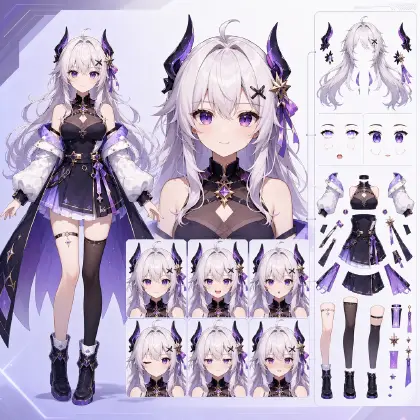
A turnaround sheet works alongside a reference portrait. The reference portrait carries the face viewers will actually remember; the turnaround sheet carries body and outfit structure; an expression set carries the emotional range. Together, they go into the character asset library and get referenced by the storyboard, video, voiceover, and edit. The full pipeline is still concept → script → storyboard → video → voiceover → edit, and a character turnaround sheet sits between script and storyboard.
You'll also run into related terms — a character profile, a four-view turnaround, a character reference sheet, a character asset library. The character profile establishes who this person is, what they look like, and what can't change. The turnaround sheet covers front, side, and back. A four-view turnaround adds a three-quarter angle so a cut to a half-profile doesn't fall apart. A character reference sheet compiles the reference portrait, turnaround, expressions, outfit, props, and color palette onto one page for review. A character asset library folds all of that, plus voice and blocking notes and storyboard reference language, into a long-term record. The turnaround sheet isn't the finish line — it's the core piece of the character asset library.
AI anime drama needs turnaround sheets more than most formats, because anime-style characters usually get told apart by hair silhouette, outfit cut, and signature props rather than photorealistic detail. Without one, every character starts looking the same. Start with the character turnaround template, then carry it into the AI anime drama workflow and the storyboard template.
Step-by-step
Step one: define the character's anchors. A turnaround sheet isn't about cramming in every detail — it's about locking the 3 to 5 anchors that matter most: face shape, hair silhouette, outfit cut, a signature accessory, footwear or a weapon.
Step two: build the reference portrait. It should be front-facing, neutral expression, clean background, even lighting. This is the face standard the turnaround sheet works from.
Step three: generate the turnaround sheet. Require the same stance and proportions across the front, side, and back views, with a simple background. Don't let each view strike a different pose — otherwise it's hard to tell later whether a difference is an action or an actual design drift. If the character often turns to look back, talks in a half-profile, or holds a prop, add a fourth, three-quarter view to the standard right away.
Step four: add outfit and prop notes. Back-view details get overlooked the most — collar, belt, cape, the end of the hair, backpack, where a weapon hangs. Characters turn around constantly in short-drama shots, and these details directly affect consistency.
Step five: write the do-not-change list and the flexible list. Do-not-change covers face shape, hair silhouette, eye color, overall outfit silhouette, and signature props. Flexible covers expression, pose, camera, setting, and lighting. Separating the two keeps your prompts from fighting each other.
Step six: connect the turnaround sheet to the storyboard. When a shot references it, make clear it controls identity and outfit, not what happens in that shot. Action comes from the storyboard, voice comes from the voiceover profile.
Step seven: factor in monetization. Whether the same character can carry 20 episodes comes down to how stable the turnaround sheet is. The clearer it is, the cheaper cover images, posters, compilations, and character IP extensions become later.
Copy-and-use prompt examples
Example 1: generating a character turnaround sheet
Generate a character turnaround sheet for the lead of an AI anime drama. Character: Su Yan, 18, a calm member of a supernatural-powers club — oval face, gray-blue eyes, short black hair, a crescent-moon hairpin on the left side, a dark teal school jacket, a white shirt, silver-trimmed cuffs, black ankle boots. Include front, side, and back views in the same neutral stance, consistent proportions, consistent outfit silhouette, with the hairpin and cuff details matching across all three. Plain light-gray background, even lighting, suitable for a character asset library. No action poses, no exaggerated expressions, no text labels, no redesigning the outfit.
Example 2: turning a turnaround sheet into a character asset
Build an AI short drama character asset from this turnaround sheet. Output fields: reference portrait standard, front anchor, side anchor, back anchor, expression range, outfit do-not-change list, prop do-not-change list, flexible items, storyboard reference language, video generation red lines, voiceover profile tag. The goal is script-to-video production without repeated wasted generations, and characters that don't change appearance every shot. Monetization add-on: list reusable cover-image poses and recurring visual memory points for this character.
Example 3: referencing the turnaround sheet in a shot
Generate a 5-second AI anime drama shot using Su Yan's character turnaround sheet to control identity and outfit. Shot: she moves sideways down a hallway, hears a sound behind her, stops, and turns to look back. Blocking: character enters from the left of frame, stays in profile through the middle, ends in a three-quarter front angle. Keep the gray-blue eyes, short black hair, crescent-moon hairpin, dark teal school jacket, and silver-trimmed cuffs unchanged. Lighting: warm evening light in the hallway. No changing faces between shots, no hairpin disappearing, no redesigning the back of the outfit, no adding new characters.
Common failures and fixes
Failure one: the three angles on the turnaround sheet look like three different people. Fix: go back to the reference portrait and require the same face shape, the same proportions, the same hair silhouette.
Failure two: the back of the outfit was never designed. Fix: add back-view anchors — especially the collar, waist, cape, straps, and where a weapon sits.
Failure three: the turnaround sheet is too busy. Fix: use a plain background and a neutral stance. A turnaround sheet is a production asset, not a promotional poster.
Failure four: the shot prompt re-describes the character from scratch. Fix: reference the character asset and only write what happens in that shot. Don't rewrite the character's whole design in every prompt.
Failure five: not factoring the turnaround sheet into cost planning. The extra time it takes upfront pays for itself many times over in fewer video re-runs, less editing rework, and fewer redone cover images.
FAQ
What's the difference between a character turnaround sheet and a reference portrait?
A reference portrait locks the face and the overall vibe. A turnaround sheet locks proportions and outfit structure across front, side, and back. You need both — neither replaces the other.
Do live-action-style AI short dramas need turnaround sheets too?
Any character who appears often, yes. Live-action style can simplify things compared to anime style, but any character who turns around, changes settings, or shows up across multiple episodes needs a turnaround sheet or an equivalent asset.
Once the turnaround sheet is done, can the character still change appearance?
It cuts the risk a lot, but it doesn't fix everything in one pass. You still need to keep referencing the character asset library consistently in your storyboard, your video prompts, your lighting, and your review process.