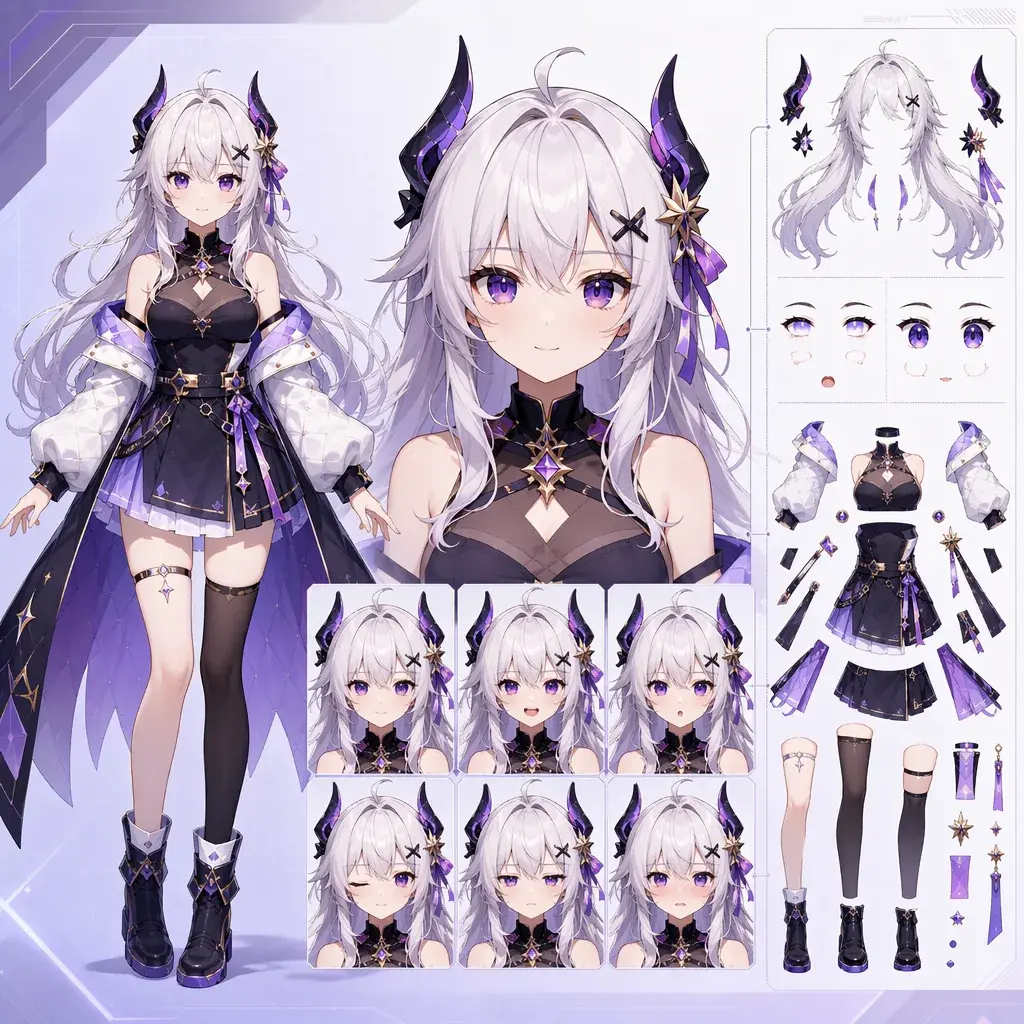
Por que uma ficha riggável é diferente de um pôster
Um personagem de Live2D ou VTuber precisa fazer muito mais do que ficar bonito em uma única imagem. O design precisa piscar, falar, inclinar a cabeça, reagir, ficar parado (idle), expressar emoções e aguentar o uso repetido em close. Um prompt de pôster dramático pode esconder as mãos, torcer o corpo, cobrir os olhos, encher a roupa de detalhes minúsculos e ainda assim parecer impressionante. Isso não faz dele uma boa base para riggar.
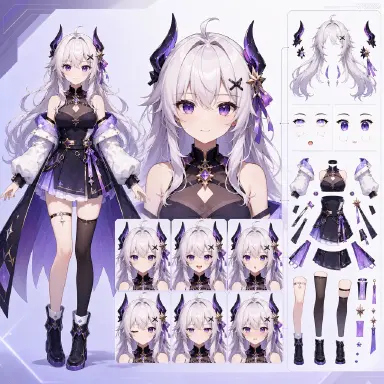
O ponto de partida certo é uma ficha de personagem riggável. Ela deve mostrar um design de frente ou levemente em três quartos, silhueta limpa, partes do rosto visíveis, grupos de cabelo legíveis, acessórios simples, variedade de expressões e formas de roupa que se separam de forma limpa. Mesmo que o resultado da IA não seja um arquivo final de produção em camadas, o prompt pode tornar o design mais fácil de refinar por uma pessoa depois.
Use este guia quando estiver planejando avatares de Live2D, conceitos de VTuber, personagens assistentes, mascotes de stream ou performers OC. O foco é na ficha que vem antes da rig: o que colocar no prompt, o que evitar e como manter o personagem expressivo. Comece pela ficha de avatar riggável quando o avatar precisar de controles limpos de frente.
Princípios para manter o design animável
O primeiro princípio é priorizar a riggabilidade em vez do drama. Ângulos extremos, acessórios enormes, olhos escondidos, braços cruzados e cabelo emaranhado dificultam a animação.
O segundo princípio é ter uma lógica de partes bem definida. Cabelo, olhos, sobrancelhas, boca, pescoço, ombros, mangas, mãos, acessórios e painéis de roupa devem ser visualmente distintos.
O terceiro princípio é a variedade de expressões. Um personagem de VTuber precisa de expressões neutra, sorridente, de surpresa, raiva, preocupação, vergonha e foco muito mais do que de um único rosto glamouroso perfeito.
O quarto princípio é o detalhe controlado. Formas grandes e memoráveis riggam melhor do que dezenas de correntinhas, tiras de renda, logos ilegíveis e microenfeites.
O quinto princípio é o propósito do avatar. Um streamer aconchegante, uma idol de fantasia, um assistente cyberpunk, um apresentador de terror e um mascote educativo precisam de silhuetas e faixas emocionais diferentes.
Como montar uma ficha riggável passo a passo
Comece pelo papel do avatar. Defina o que o personagem faz na tela: conversa com os espectadores, faz música, explica tutoriais, apresenta streams, narra histórias ou reage em cenas de roleplay.
Escolha o enquadramento. Use vista de frente ou levemente em três quartos de frente. Mantenha os ombros visíveis. Evite poses de ação. Se as mãos forem importantes, mostre-as claramente.
Defina a silhueta. Comprimento do cabelo, franja, mangas, gola, orelhas, chifres, headset, capa curta e formato da saia definem como o avatar é reconhecido em tamanhos pequenos. Mantenha a silhueta memorável, mas sem emaranhados.
Adicione notas de separação de partes. Peça mechas de cabelo bem definidas, sobrancelhas visíveis, formatos de olhos distintos, boca simples, pescoço visível, linha dos ombros, bordas de manga simples e acessórios que não cubram o rosto.
Adicione miniaturas de expressões. Elas devem usar o mesmo rosto e o mesmo penteado. Não redesenhe o personagem a cada expressão.
Adicione limites de rig. Sem textos minúsculos, sem acessórios cobrindo o rosto, sem braços cruzados, sem perspectiva extrema, sem sombras pesadas sobre os olhos, sem fundo poluído. Combine a ficha com Ficha de expressões do OC para manter a consistência quando a atuação facial for importante.
O que uma ficha precisa ser capaz de responder
Uma ficha útil responde a perguntas que um rigger ou artista vai fazer depois. Onde a franja se separa do cabelo lateral? A boca consegue abrir sem que a gola esconda o queixo? Os ombros ficam visíveis o suficiente para inclinar? Os olhos conseguem piscar de forma limpa? O acessório se move junto com o cabelo, a cabeça ou a roupa? As mãos são essenciais para a personalidade do avatar, ou são opcionais?
A ficha não precisa resolver todas as camadas de produção. Ela precisa deixar o design coerente. Uma ficha limpa pode virar um redesenho em camadas, uma referência de expressões, uma miniatura, um asset de perfil ou um modelo de Explore. Um pôster bagunçado geralmente vira um projeto de redesenho.
Isso também é um ponto de controle de custo. Ajuste a complexidade do cabelo, do rosto e da roupa antes da animação. É mais barato simplificar uma ficha do que lutar contra cada expressão e cena depois.
Exemplo 1: ficha de VTuber aconchegante
Create a riggable 2D anime VTuber character sheet for an original cozy study streamer. Character: young adult with soft ash-brown bob hair, warm hazel eyes, round glasses, cream cardigan, sage green shirt, small moon hairpin, and simple dark skirt. Main view: front-facing upper-body avatar pose with shoulders, neck, hands, and cardigan sleeves visible. Add six expression thumbnails: neutral, smile, sleepy, surprised, embarrassed, and focused. Design for Live2D-friendly separation: clear bangs, side hair, back hair, visible eyebrows, readable eyes, simple mouth shapes, clean collar, simple sleeves, glasses not hiding the eyes. Plain light background, soft cel shading, no text, no logo, no complex patterns, no crossed arms, no face-covering mug.
Esse prompt mantém o avatar simples o suficiente para animar, preservando a personalidade.
Exemplo 2: ficha de avatar idol de fantasia
Generate a riggable anime character sheet for an original moon theater VTuber idol. She has long sapphire hair divided into large readable locks, violet eyes, crescent hair ornament, navy-and-white stage dress, short capelet, silver ribbon, and knee-high boots. Use a clean front-facing full-body stance with one hand open near chest and the other relaxed at the side. Include small expression heads: bright smile, wink, dramatic focus, worried, angry, and laughing. Make parts easy to separate visually: bangs, side locks, back hair, capelet, sleeves, skirt layers, ribbon, boots, and hands. Clean 2D line art, soft stage palette, plain background. Avoid tiny lace, unreadable chains, text logos, huge microphone blocking face, extreme pose, extra fingers.
A roupa tem detalhes de idol, mas as formas são amplas o suficiente para planejar a rig.
Exemplo 3: ficha de assistente cyberpunk
Create a Live2D-ready character sheet for an original cyberpunk AI assistant avatar. Androgynous young adult, sleek black bob with teal underlights, pale blue eyes, lifted transparent visor above the forehead, cropped black jacket, white high-collar shirt, teal circuit accents, fitted gloves, and simple dark trousers. Main view: slight three-quarter front bust with both shoulders visible and one hand raised in a small greeting. Add expression thumbnails: neutral, polite smile, alert, concerned, amused, system-error flustered. Keep the visor from covering the eyes. Separate front hair, side hair, jacket panels, collar, gloves, and hand shape clearly. Clean 2D anime cel shading, minimal glow, plain dark-gray background, no tiny text, no dense wires, no photorealism, no 3D render.
Esse prompt dá ao avatar uma identidade de ficção científica sem enterrar o rosto sob efeitos.
Os erros que mais comprometem uma ficha
O maior erro é gerar primeiro uma ilustração de destaque (splash art) esperando que ela vire uma rig depois. Até pode dar certo, mas geralmente gera trabalho extra de limpeza.
Outro erro é esconder o rosto. Olhos, sobrancelhas, boca, bochechas e mandíbula são o motor emocional de um avatar que fala.
Criadores também exageram na decoração da roupa. Pequenos enfeites podem parecer bonitos em uma imagem estática, mas tremem, somem ou distraem em movimento.
Um quarto erro é esquecer a visibilidade das mãos. Se a personalidade do avatar depende de gestos, as mãos precisam ser desenhadas com clareza desde o início.
Por fim, não peça no prompt uma rig finalizada em camadas, a menos que o fluxo de trabalho realmente suporte isso. Peça um design amigável para rig e deixe a separação final para a etapa de produção.
Perguntas frequentes
Qual é o melhor enquadramento para uma ficha de personagem Live2D?
Use vista de frente ou levemente em três quartos de frente. Isso mantém o rosto, o pescoço, os ombros e o corpo mais fáceis de interpretar na hora de riggar.
Devo incluir expressões já na primeira ficha?
Sim, inclua um pequeno conjunto de expressões desde cedo. Isso testa se o rosto consegue sustentar a faixa emocional do personagem.
Quão detalhado deve ser o figurino de um VTuber?
Use poucos elementos marcantes de assinatura e mantenha o resto legível. Adicione complexidade apenas onde ela reforça o personagem e consegue se manter estável durante o movimento.