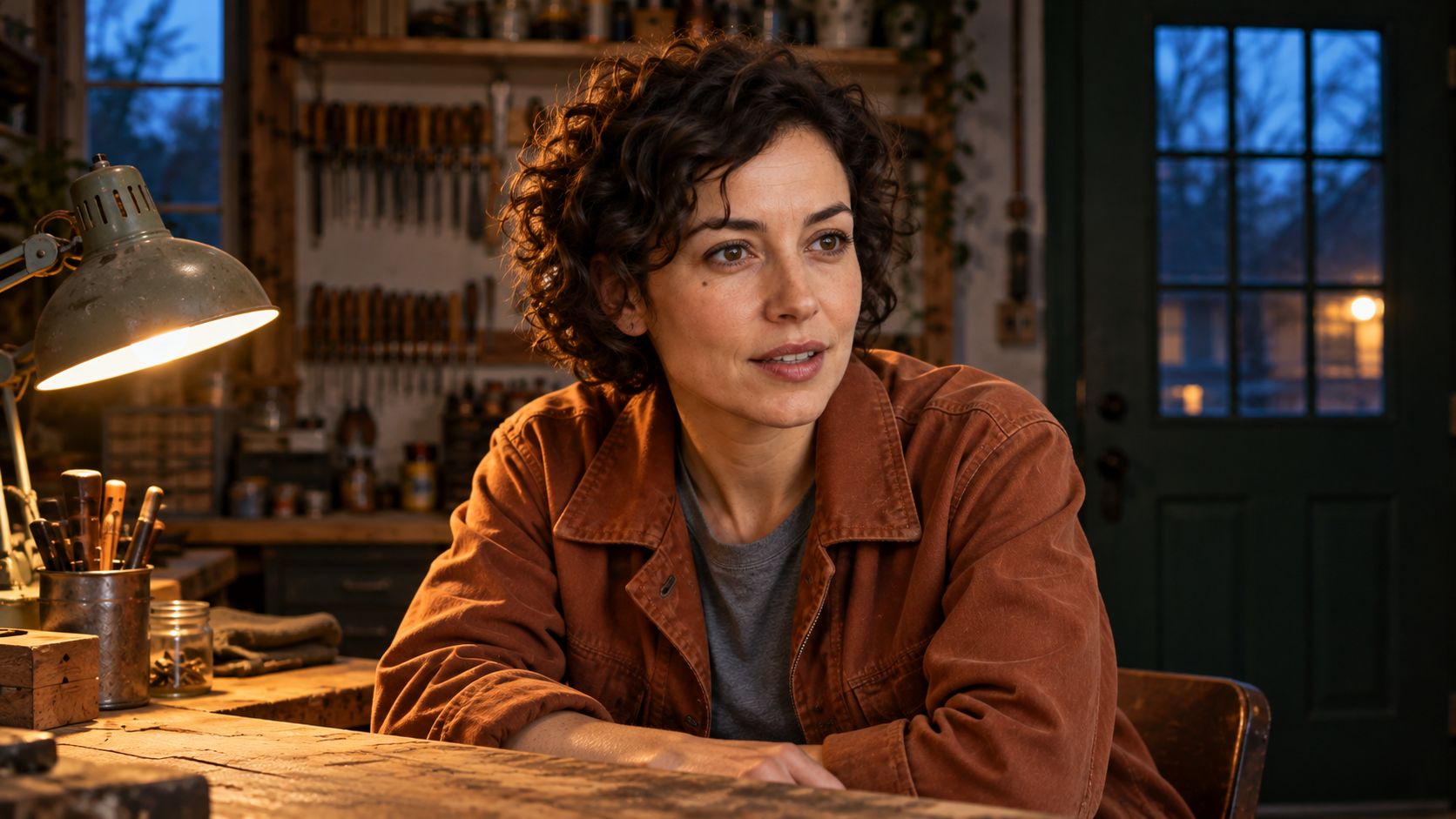
系列角色既要有讓人認得的臉,也要有讓人認得的聲音。本教學使用 Vidu Q4 Preview,在 Arcloop 透過人物圖、場景圖和錄音規劃一段 12 秒短劇。你會準備素材、撰寫對白提示詞,再用同一錄音製作另一段新台詞。
場景設在打烊後的修理店。女主角望向門口,認出訪客,戒備的表情逐漸放鬆。兩句短台詞帶出情緒轉變,簡單的環境方便觀察表演。以下是待執行的製作流程,不是已完成的聲音測試。
聲音參考負責什麼
Vidu Q4 支援聲音參考,也支援視覺參考。錄音提供音色示例,影片提示詞提供新台詞與場景要求。**音色相似、台詞準確、嘴型對應、表演自然是四個獨立檢查項目。**一項做得好,不代表其他項也正確。
這套方法適合連續劇中的同一角色、對鏡頭外談話的反應,或簡短口播。先只用一個說話角色,方便判斷模型執行了哪些要求。
如何在 Arcloop 用 Vidu Q4 製作對白場景
步驟 1:先寫清楚情緒與台詞
先決定人物情緒如何轉變,再安排運鏡。本例從不確定走向安心。她保持坐姿,望向門口,不做大幅手勢。
| 時間 | 畫面與動作 | 台詞與聲音 |
|---|---|---|
| 0 至 3 秒 | 聽見有人進來,抬眼看門口。 | 輕微門鈴與環境底聲。 |
| 3 至 6 秒 | 認出對方,戒備稍緩。 | You came back. |
| 6 至 8 秒 | 停頓,輕輕吸氣。 | 保留環境底聲。 |
| 8 至 11 秒 | 肩膀放鬆,仍看著訪客。 | I kept the light on. |
| 11 至 12 秒 | 停留在她的反應上。 | 讓最後一句自然落下。 |
這些時間是節奏目標,不是精確到影格的控制。影片完成後再檢查停頓是否自然。台詞與可複製的提示詞保留英文。
步驟 2:準備人物、修理店與聲音參考
人物圖要清楚,臉部大小應方便核對。中性表情有助於檢查轉頭後臉、頭髮與外套是否改變。
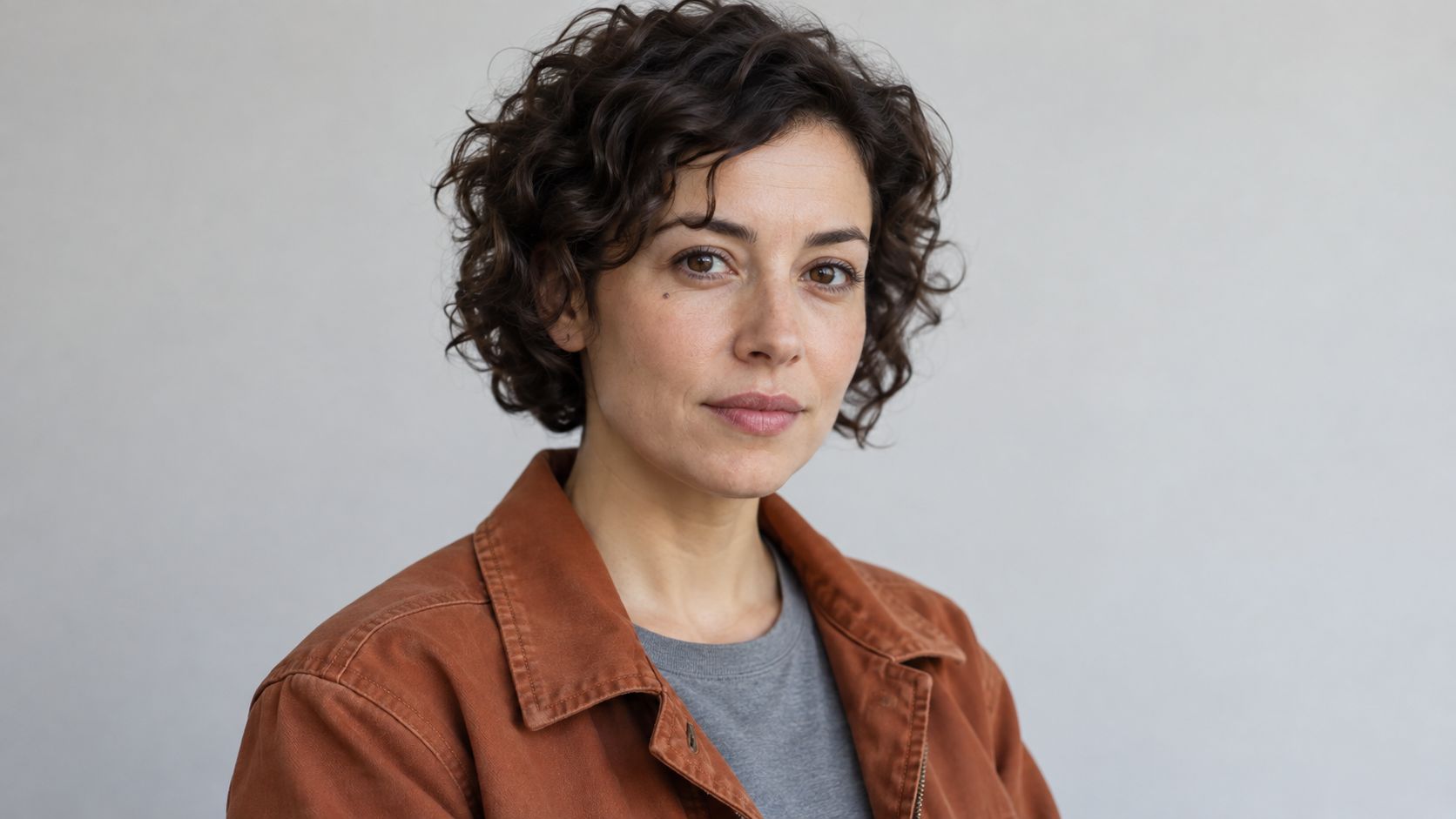
人物圖由 Arcloop 外部的內建圖像生成工具製作,用於約束臉、髮型與服裝。
人物圖片提示詞
Create one photorealistic casting reference photograph of an original adult woman in her early thirties. Short dark curls, brown eyes, a narrow oval face, a small natural freckle below her left eye, rust colored canvas work jacket over a plain gray cotton shirt. Chest up framing, body turned slightly to the right, both eyes visible, relaxed mouth, neutral attentive expression. Soft daylight on a plain pale gray background. Natural skin texture, realistic hair and fabric, no beauty filter. One person, no text, no logos, no collage, no illustration or animation.
場景圖負責工作台、門與光線。保持無人,避免引入第二張臉。
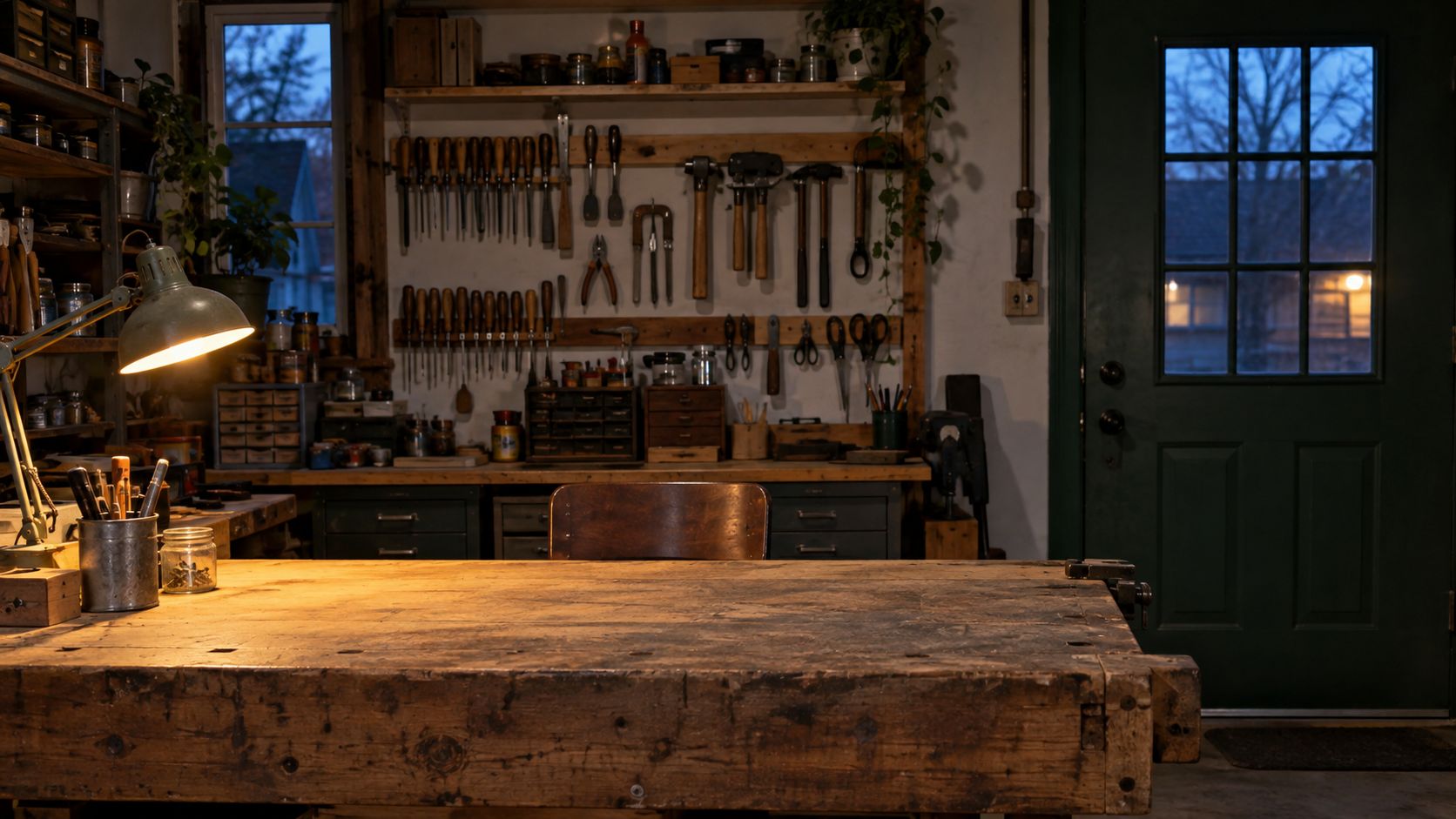
場景圖由同一外部工具製作。空座位留給女主角,門口提供明確的視線方向。
修理店圖片提示詞
Create one photorealistic location photograph of a small independent repair shop after closing. A worn wooden workbench in the foreground, a dark green entrance door in the right background, neatly hung hand tools on the rear wall, one warm desk lamp on the left, cool evening light through a narrow window. Leave a clear seated position behind the workbench with an unobstructed view toward the door. Eye level medium wide composition, realistic scale and practical lighting. No people, no readable text, no brand marks, no illustration or animation.
聲音使用自行錄製或已獲授權的合成聲音。選擇單人自然說話、沒有音樂的乾淨錄音,不用混合多種誇張語氣的片段。
依照 Vidu 參考生影片介面,準備 3 至 12 秒的 MP3。本例建議自然朗讀 5 至 8 秒,並檢查匯出長度。Arcloop 上傳介面可能有額外限制,送出前核對。
建議錄音台詞
I left a seat for you. Take your time.
錄音台詞與最終對白不同,方便檢查模型能否把相同聲音用於新內容,而非僅重複錄音。後續版本繼續使用同一錄音。
步驟 3:附上素材並填寫完整提示詞
開啟 Arcloop,在影片請求附上兩張圖與錄音,分別清楚命名。方括號內容是佔位符,請換成任務中的實際素材名稱或引用標記。
完整影片提示詞
Create one 12 second photorealistic drama scene in a real repair shop after closing.

Use [CHARACTER IMAGE] for the woman's identity, short dark curls, face, freckle, rust colored jacket, and gray shirt. Use [SHOP IMAGE] for the workbench, dark green doorway, tool wall, and practical lighting. Use [VOICE AUDIO] as the voice reference for this woman speaking the new dialogue below. The recording is a voice example, not a request to repeat its words.

One adult woman is seated behind the workbench. An unseen visitor has just arrived at the doorway to camera right. Keep her gaze toward that doorway, slightly past the camera. Begin in a medium close view at her eye level. Make one slow, subtle camera push toward her face throughout the scene. Keep her face and mouth unobstructed.

0 to 3 seconds: A soft door chime sounds. She raises her eyes toward the doorway, attentive but guarded. Her hands remain still below the frame.

3 to 6 seconds: Recognition softens her expression. She says the following line once, in natural conversational English:
You came back.

6 to 8 seconds: She pauses. A small breath and a slight release in her jaw show relief. Leave the pause quiet.

8 to 11 seconds: Her shoulders ease. Still looking toward the visitor, she says the following line once:
I kept the light on.

11 to 12 seconds: Hold on her quiet reaction as the last word settles.

Use warm light from the desk lamp and soft cool evening light from the window. Natural skin texture, restrained facial movement, realistic breathing, gentle focus falloff. Keep the character, clothes, shop layout, and lighting consistent. Generate the spoken dialogue, soft chime, and quiet room tone. No music, narration, subtitles, additional speakers, extra dialogue, sudden cuts, illustration, or animation.
提示詞分別指定聲音、圖片與對白的任務。改編時替換角色、場景與台詞,再調整停頓,使其適合目標表演。
步驟 4:生成場景,再換兩句新台詞
選擇 Vidu Q4 Preview 與 reference to video。本例規劃使用 12 秒、720p、16:9,並開啟生成音訊。開始前確認兩張圖與錄音都屬於目前任務。
Arcloop 模型說明要求圖片輸入,參考生影片最多支援三段音訊參考。核對目前介面的點數估算。提示詞的時間段不是精準時間開關,實際台詞、時序與嘴型都要檢查。
第二次請求維持圖片、錄音、長度與音訊設定不變,只把兩句對白換成下面的內容。
Line at 3 to 6 seconds:
I almost locked the door.

Line at 8 to 11 seconds:
Come in. It's cold out.
比較兩支影片的口音與聲音質感,同時允許自然的重音差異。這只檢查本次場景,不能推論模型整體成功率。
若要觀察錄音的作用,可另外生成不附聲音參考的原對白版本。刪除提示詞的聲音參考句,仍開啟生成音訊,並另外計算這次嘗試的預算。
步驟 5:檢查台詞、聲音、嘴型與反應
先戴耳機聽,再看畫面。檢查台詞是否完整、有沒有多說內容、停頓是否保留。將聲音與錄音比較,聽子音、音色質感與口音;只有音高相近還不夠。
以正常速度看嘴型,檢查是否先出聲音才動嘴、說完嘴還在動,或停頓時表情突然誇張。對照人物圖檢查開頭與結尾的臉和外套。
台詞太趕就縮短句子或增加時間。聲音不清先換掉有雜音的錄音。表演僵硬就把情緒要求簡化為一個可見變化。每次只改一項,再比較下一版。
常見問題
需要寫程式或另外使用對嘴工具嗎?
本流程使用 Arcloop 的圖片與音訊附件、文字提示詞及影片設定,讓 Vidu Q4 Preview 同時生成畫面與聲音。先檢查影片嘴型,再決定是否需要額外編輯。
可以只上傳錄音嗎?
不可以。目前 Arcloop 的串接要求圖片。人物圖說明誰在說話,場景圖說明所在環境,錄音只是補充聲音參考。
一段錄音能保證每集聲音完全相同嗎?
不能。重複使用同一錄音、人物圖與說話角色分配後,仍需逐支比較。不同台詞與情緒要求會改變表達方式。
比較需要多少點數?
兩段不同對白需要兩次生成,可選的無聲音參考版增加第三次。圖片與錄音準備也應計入成本。模型、參數與重試影響總量,每次確認前查看 Arcloop 估算。