Introdução: quando cada OC tem um figurino diferente, mas a mesma função
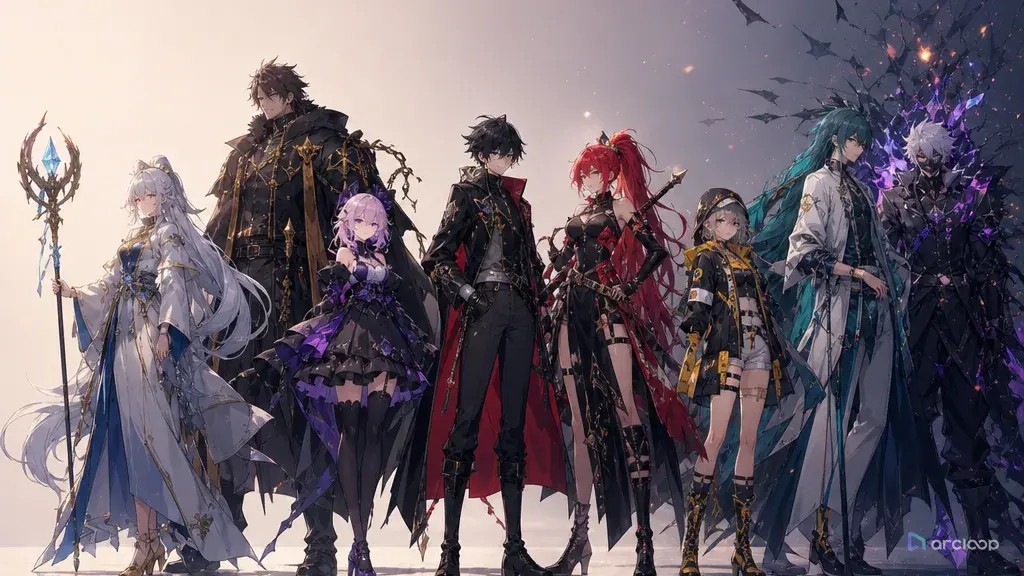
O elenco parece ótimo numa fila. Um personagem tem blazer escolar, outro tem óculos de mecânico, outro tem um casaco cerimonial, outro tem um moletom, e o último tem uma espada. Aí você tenta escrever a primeira cena. Todo mundo fica parado esperando o protagonista fazer alguma coisa. Os personagens secundários ou repetem a mesma reação ou viram decoração visual ao fundo. Os designs são diferentes, mas as funções na história não.
Esse é o verdadeiro problema de um planejamento de elenco fraco. Um elenco não é uma coleção de perfis. É um conjunto de pressões ao redor da história. Alguém revela informações. Alguém bloqueia o herói. Alguém espelha o medo do herói. Alguém ajuda com um custo. Alguém complica a solução. Se essas funções estão faltando, até as character assets mais bonitas não criam cenas.
Este guia combina planejamento de elenco com função de personagem secundário para shorts de anime com IA, pilotos de episódio, trailers e clips de história para redes sociais. Ele explica como definir a função de cada personagem na história, converter isso numa descrição de character asset, montar a primeira cena do ensemble e verificar se cada personagem secundário merece o espaço que ocupa no Shot. Comece em campos de perfil de personagem e depois construa o elenco dentro de ArcLoop Worlds.
Princípios fundamentais para planejamento de elenco e papéis de apoio
O primeiro princípio é: papel antes de figurino. Uma jaqueta vermelha, cabelo prateado ou uma arma enorme podem tornar um personagem memorável, mas não explicam o que ele faz na história. Escreva a função primeiro: protagonista, foil, rival, mentor, testemunha, bloqueador, auxiliar, espelho, guardião de segredo ou complicador.
O segundo princípio é: contraste com propósito. Não torne os personagens diferentes ao acaso. Contraste temperamento, estilo de decisão, poder social, acesso à informação, ritmo físico e risco emocional. Um arquivista cauteloso e um mensageiro impulsivo geram cenas porque as escolhas deles colidem.
O terceiro princípio é: uma âncora visual por personagem. Cada membro do elenco precisa de um marcador de design que sobreviva a Shots pequenos: formato do cabelo, bloco de cor, prop, emblema, postura ou acessório. Cenas de ensemble desmoronam quando todos têm o mesmo nível de detalhe e nenhuma prioridade de silhueta.
O quarto princípio é: pressão de relacionamento. Um mapa de elenco deve dizer o que cada pessoa quer do protagonista, não só se são amigos. "Protege o segredo dela", "precisa da chave dele", "tem inveja da liberdade dela" e "testa a lealdade dele" são mais úteis do que "amigo" ou "companheiro de equipe".
O quinto princípio é: função de personagem secundário. Personagens de apoio devem revelar, bloquear, espelhar, auxiliar ou complicar. Se um personagem não faz nenhuma dessas coisas na cena atual, ele provavelmente pertence a outro Shot, não ao prompt.
O sexto princípio é: agrupamento revisável. Um Shot gerado é mais fácil de avaliar quando só inclui os personagens que a cena realmente precisa: dupla de protagonistas, dupla de rivais, vínculo com mentor, pressão cômica, grupo de facção ou convidado do episódio. Não use @ com o elenco inteiro num Shot de pôster antes que os agrupamentos menores funcionem sozinhos.
Estrutura passo a passo para planejamento de elenco
Comece com a promessa do projeto. Escreva uma frase que explique o motor da história: "Uma escola de mensageiros numa cidade de colinas onde cada entrega remove uma memória do remetente" ou "Um clube de reparação de mecha à beira-mar que esconde uma máquina de guerra aposentada." Isso impede que o elenco se torne genérico.
Escolha a pressão do protagonista. Nomeie o que o protagonista quer, o que teme e qual decisão ele evita. O resto do elenco deve pressionar esses três pontos.
Esboce uma tabela de elenco simples antes de criar qualquer design. Use cinco colunas: nome do personagem, função na história, âncora visual, pressão de relacionamento e ação na primeira cena. Essa é a forma mais simples de integrar a função de personagem secundário ao planejamento de elenco.
Crie character assets em ordem de importância para a história. O protagonista primeiro, depois o personagem que bloqueia ou espelha o protagonista, depois o auxiliar ou mentor, depois os papéis cômicos ou de facção. Use OC Character Sheet Front Turnaround quando uma âncora de identidade em corpo inteiro for importante.
Planeje a primeira cena do ensemble antes de polir todos os designs. Pergunte o que cada personagem faz num momento concreto. Um bom elenco deve gerar blocking: quem fica perto da porta, quem se recusa a sentar, quem esconde a pista, quem fica entre duas pessoas, quem observa em silêncio.
Escreva prompts de Shot a partir dessa tabela de elenco. Para cada cena, inclua apenas os personagens com funções ativas. Se cinco membros do elenco aparecem, declare suas funções para que o prompt não os transforme em decoração de fundo.
Revise o resultado pela função. Não pergunte apenas se os rostos ficaram consistentes. Pergunte se o personagem secundário revelou, bloqueou, espelhou, auxiliou ou complicou o herói no Shot visível.
Uma character asset por membro do elenco, uma função cada
O trabalho de elenco se mantém útil quando não sai do projeto: crie uma character asset para cada membro nomeado do elenco em My Assets e escreva a função na história diretamente no campo de descrição dessa asset. Isso evita o erro mais comum — o elenco é planejado num documento separado e depois reduzido a fragmentos vagos de prompt na hora de escrever os Shots.
Comece em campos de perfil de personagem para a identidade, e use o campo de descrição de cada character asset para registrar a função na história. Em ArcLoop Worlds, use @ apenas com os personagens cuja função se aplica àquele Shot. O ponto é simples: nenhum personagem secundário entra numa cena gerada sem um motivo que você consiga apontar.
Para um short com elenco numeroso, prepare três coisas antes do vídeo final: uma tabela de elenco, character assets individuais e uma nota de blocking da primeira cena. A tabela controla as funções na história. As assets controlam a identidade. A nota de blocking controla onde as pessoas ficam e o que fazem. Se um rascunho falhar, corrija a peça correspondente em vez de reescrever toda a descrição do elenco.
Essa abordagem também protege a continuidade entre episódios. Um mentor pode auxiliar no episódio um e bloquear o herói no episódio dois — mas faça essa mudança de forma intencional: atualize a função escrita na descrição da character asset para que a mudança seja algo que você consegue ver, não algo que escorregou por acidente.
Exemplo de prompt 1: tabela de elenco para um short de mensageiro de memórias
Draft five original character descriptions I can turn into character assets for a 2D anime short called "The Last Undelivered Morning." Story engine: a hill-town courier school where each delivered letter removes one memory from the sender. Main cast, no copied titles, no protected logos, no named-artist imitation.

Output a clean planning board with five original characters. 1. Lead: Nelle, a stubborn courier trainee with cropped copper hair, green delivery sash, and a dented brass mail tube; function: wants to deliver every letter but fears learning why her mother stopped writing. 2. Foil: Bastian, a precise route keeper with silver side-part hair and blue ledger gloves; function: blocks reckless choices and forces rules into the scene. 3. Mirror: Asha, a quiet stamp carver with black braids and a red ink-stone necklace; function: shows what Nelle becomes if she hides pain through work. 4. Assistant: Mirok, a rooftop bell ringer with orange scarf and patched knee pads; function: helps movement through town but complicates timing with bad guesses. 5. Secret keeper: Vell, a retired courier with clouded glasses and a folded yellow rain cape; function: reveals family history only when cornered.

Board requirements: include character anchors, story function, relationship pressure, and first scene action. Keep portraits readable and visually distinct. No extra cast, no fake UI text, no copied symbols, no photorealism.
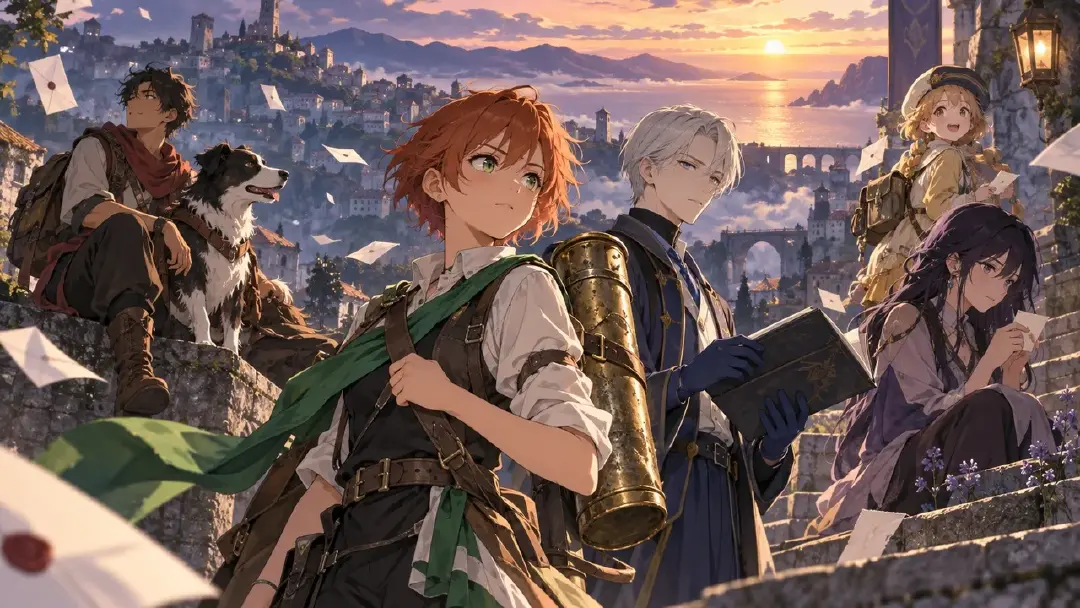
Esse prompt cria uma tabela de elenco, não uma fila de beleza. Cada personagem tem uma âncora de design e uma função que pode gerar cenas.
Exemplo de prompt 2: prompt de cena do ensemble com funções de apoio
Use the approved "Last Undelivered Morning" cast table to create a 7-second 2D anime ensemble scene inside a narrow hill-town sorting room before sunrise. Characters: Nelle stands at the center table holding the dented brass mail tube; Bastian blocks the exit on screen left with the blue ledger gloves visible; Asha sits near the stamp press on screen right, watching Nelle without speaking; Mirok leans through the high window with his orange scarf caught on the latch; Vell remains half-hidden behind hanging mailbags in the background.

Scene function: Nelle decides whether to deliver a forbidden yellow envelope. Supporting roles must be visible: Bastian blocks, Asha mirrors Nelle's fear, Mirok assists with escape, Vell withholds the reveal. Camera: medium-wide locked frame, table centered, all hands visible, no random crowd. Motion: envelope trembles once, stamp press clicks, orange scarf flutters, Vell's glasses catch a thin line of light. Style: clean 2D anime morning blue shadows with warm paper tones. Preserve each character's anchor and position. No extra characters, no unreadable poster layout, no text overlays, no costume swaps.
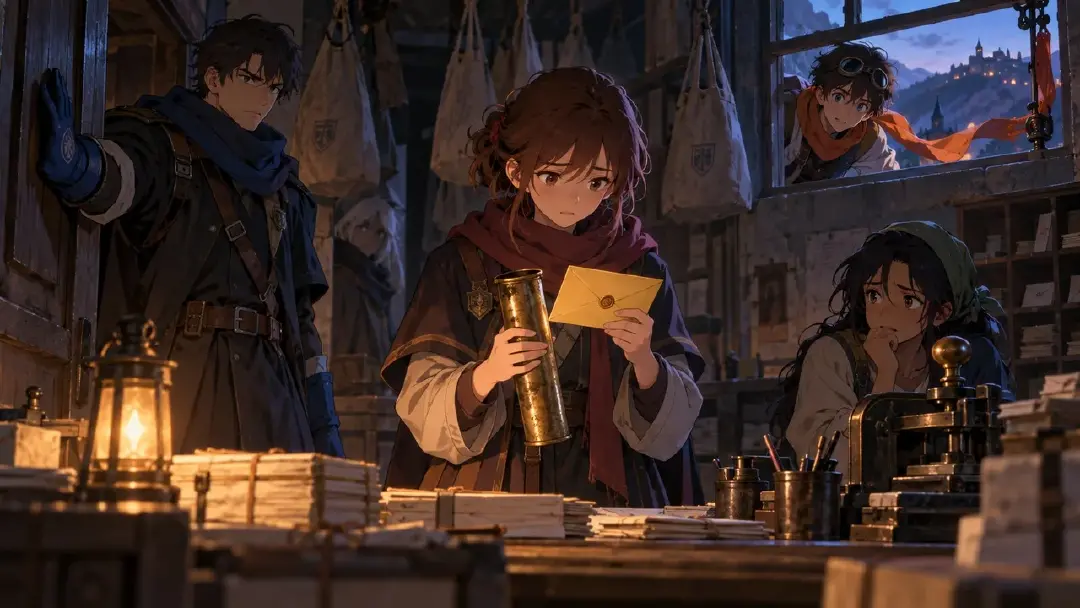
O prompt nomeia por que cada personagem secundário está presente. Isso impede que o ensemble vire uma foto de grupo decorativa.
Exemplo de prompt 3: rodada de revisão controlada do elenco
Revise the selected sorting-room take using the approved cast table. Keep the scene, duration, camera, palette, and character positions. Do not redesign the cast.

Approved anchors: Nelle's cropped copper hair, green delivery sash, and brass mail tube; Bastian's silver side-part hair and blue ledger gloves; Asha's black braids and red ink-stone necklace; Mirok's orange scarf and patched knee pads; Vell's clouded glasses and folded yellow rain cape.

Weak layer to repair: supporting character function is unclear. Strengthen the visual story jobs without adding dialogue or text. Bastian should clearly block the exit, Asha should mirror Nelle's hesitation, Mirok should offer an escape route from the window, and Vell should visibly hold back information in the background. Keep Nelle's decision at the table as the center of the shot.

Reject if the output becomes a cast poster, adds extra people, changes the envelope color, hides hands, swaps screen positions, or makes every character perform the same reaction.
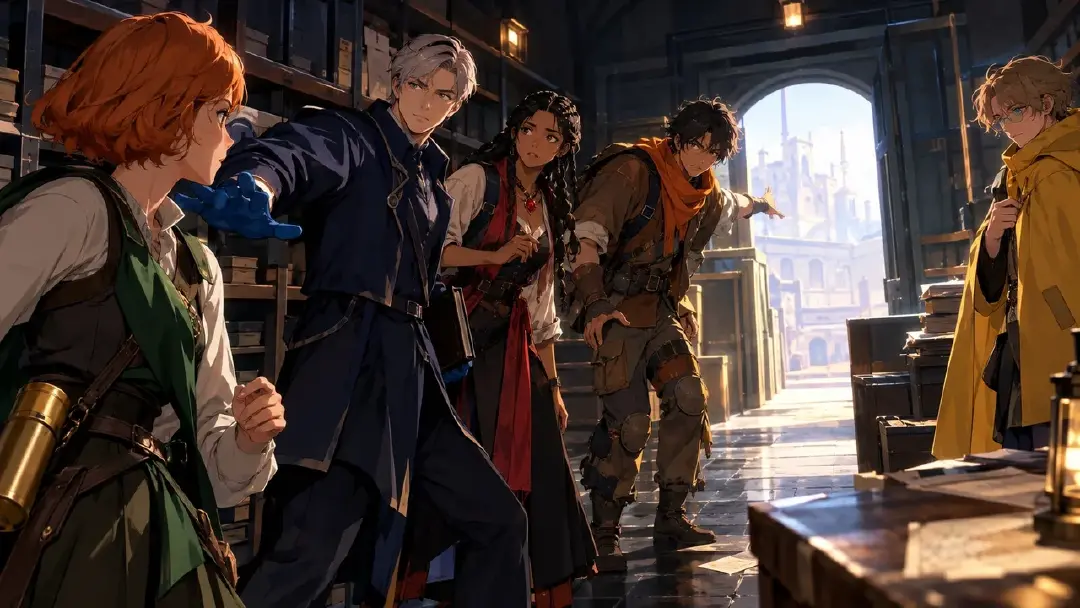
Esse prompt de revisão mantém o que funcionou e corrige a camada de papéis. Isso é mais barato e mais claro do que reconstruir o elenco inteiro.
Erros comuns no planejamento de elenco
O maior erro é criar todo mundo como protagonista. Se cada personagem tem o figurino mais detalhado, a arma mais poderosa e o arco emocional mais intenso, ninguém tem contraste. Deixe alguns personagens serem precisos porque sua função é estreita.
Outro erro é escrever relacionamentos como rótulos. "Melhor amigo", "mentor" e "rival" são pontos de partida, não instruções de cena. Adicione o que a pessoa faz: cobre, testa, atrasa, mente, revela, financia, trai, protege ou envergonha.
Criadores também colocam personagens demais num único Shot gerado. Se um personagem secundário não tem função visível na cena, remova-o daquele prompt. Guarde-o para o Shot onde a função dele importa.
Um quarto erro é deixar papéis de apoio permanentes de forma plana. Um mentor pode auxiliar numa cena e bloquear em outra — atualize a função na descrição da character asset do personagem de forma intencional quando a história mudar, em vez de deixar a mudança acontecer pelo que o modelo resolve gerar.
Por fim, não polir character assets antes de a tabela de elenco funcionar. Um personagem secundário lindo sem função vira decoração cara. Decida a função primeiro, depois refine o design.
Perguntas frequentes
Quantos personagens deve ter o elenco de um anime short com IA?
Para um piloto curto ou clip para redes sociais, três a cinco personagens nomeados costuma ser suficiente. Um protagonista, um bloqueador ou rival, um espelho ou auxiliar e um personagem de revelação podem criar mais drama do que um elenco grande com papéis indefinidos.
O que é função de personagem secundário?
É o trabalho que um personagem de apoio realiza na cena: revelar, bloquear, espelhar, auxiliar ou complicar o herói. Um personagem secundário pode ter um design rico, mas é a função que o torna útil na tela.
Como evitar que todos os personagens soem ou ajam igual?
Dê a cada membro do elenco um estilo de decisão diferente. Um segue regras, outro improvisa, outro evita conflito, outro retém informação e outro age antes de pensar. Escreva essa característica na descrição da character asset para que seja o que é referenciado com @, não algo que você precisa lembrar de redigitar em cada Shot.
Devo fazer um mapa de relacionamentos antes das character assets?
Faça uma tabela de elenco preliminar primeiro, depois as character assets e depois um mapa de relacionamentos mais elaborado. Se você criar as assets primeiro, pode se apegar a personagens que não ajudam a história.
Como transformar uma ideia de elenco em descrições prontas para Shot?
Rascunhe os papéis do elenco e as funções na história primeiro, depois converta cada um numa character asset com nome, descrição e imagens de referência. A partir daí, cada Shot no Storyboard do episódio apenas referencia a asset que precisa com @, mantendo o elenco conectado do planejamento até a tomada final.