Pour maîtriser les coûts de génération tout en obtenant le rendu d'un plan-séquence, vous pouvez tester l'extension vidéo avec MiniMax H3 en utilisant un seul personnage dans un même décor. Définissez d'abord le cadrage initial du personnage et de la scène, générez un premier segment vidéo, puis extrayez sa dernière image pour l'utiliser comme première image du segment suivant. Cette première image transmet l'apparence du personnage, ses vêtements et l'environnement actuel à la séquence suivante, ce qui aide à maintenir une cohérence globale d'un bout à l'autre.
Une génération unique avec H3 dure au maximum 15 secondes ; les contenus plus longs doivent être générés par segments avant d'être assemblés. Lors d'une continuation à partir de la dernière image, il est préférable de limiter le nombre de personnages, de conserver des mouvements et un cadrage continus, d'éviter de faire entrer plusieurs personnages successivement à l'écran et de limiter les changements fréquents d'angle ou de valeur de plan. Plus l'image subit de variations, plus les personnages et le décor risquent de dériver, ce qui multiplie les vérifications et les retouches.
Prolonger le même plan à partir de la dernière image
Observons d'abord cet exemple en prise de vue réelle d'environ 13,2 secondes : un jeune homme tenant un carnet marche jusqu'à la porte d'une salle de classe, s'arrête, puis lève la main pour l'ouvrir. Pendant la lecture, essayez de repérer s'il y a un raccord visible entre le moment où il s'arrête devant la porte et celui où il tend la main pour l'ouvrir.
Dans l'ensemble, le mouvement est fluide et, au premier coup d'œil, il est difficile de deviner que la séquence résulte de l'assemblage de deux clips. Revenons sur la première moitié pour voir comment elle a été conçue.
Le premier segment a été généré en texte-vers-vidéo et dure environ 6,58 secondes. Le jeune homme marche jusqu'à la porte de la salle de classe et s'arrête, sans encore toucher la poignée.
Prompt réel du premier segment :
Photorealistic live-action cinema, natural human movement, 16:9. A young adult East Asian man with short black hair wears a charcoal zip-up hoodie over a light gray T-shirt and dark trousers. He holds a small black notebook in his LEFT hand throughout. His empty RIGHT hand remains relaxed beside his body. A closed wooden classroom door with a brass lever handle is on screen right. Over six seconds he takes two unhurried steps from screen left toward the door, then stops within reach of the handle. He does not touch or open the door yet. Hold his final standing pose briefly. Fixed medium-wide three-quarter side view from his right side, both hands and the handle clearly visible, warm afternoon sunlight from screen left. One uninterrupted shot, no cuts, no camera movement. Audio: natural footsteps, subtle clothing rustle and quiet empty-school ambience. No speech, music, titles or subtitles.
Pour qu'il poursuive son action et ouvre la porte, nous avons extrait par programme la toute dernière image de cette vidéo afin de l'utiliser comme première image du clip suivant. L'image ci-dessous correspond exactement au point de jonction entre les deux vidéos.
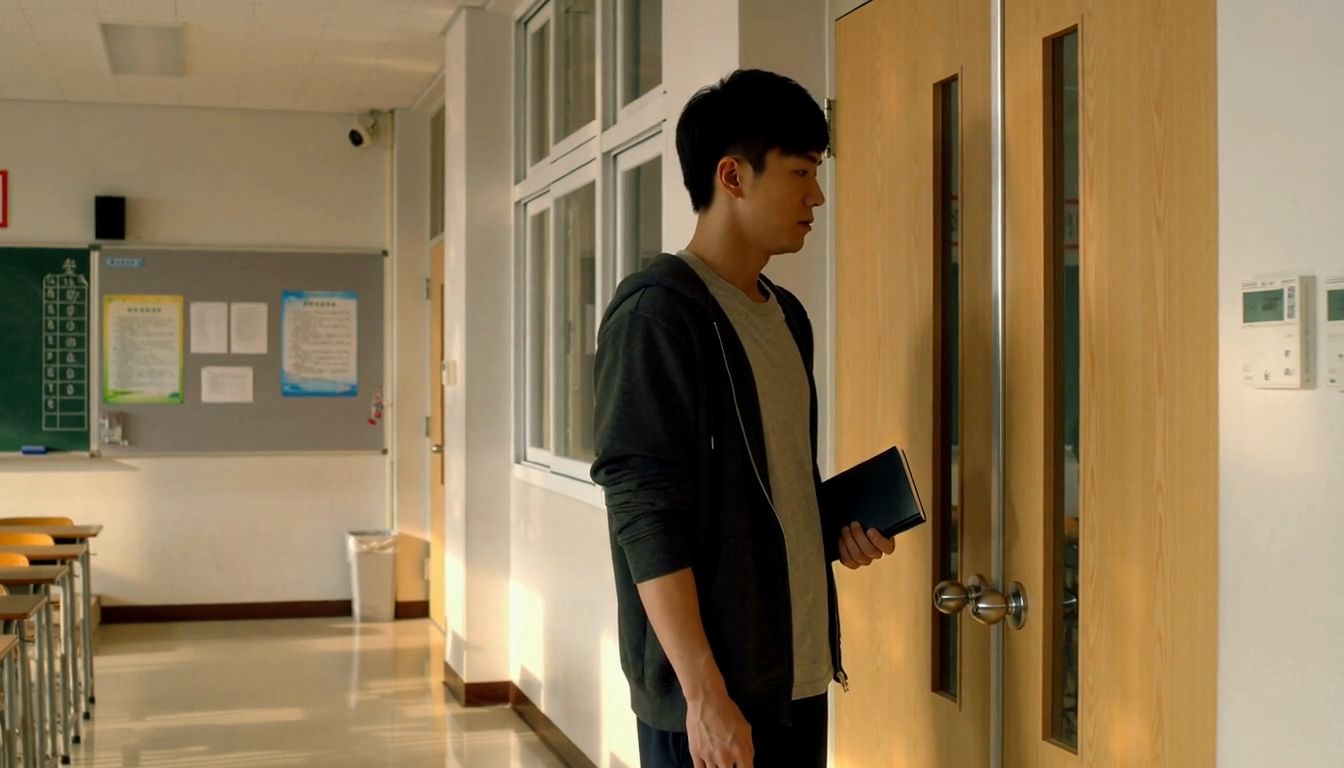
Le prompt suivant décrit uniquement la suite de l'action : le jeune homme lève la main droite, saisit la poignée et pousse la porte. Le prompt initial mentionnait une poignée à levier en laiton, mais la vidéo a généré des boutons de porte ronds et argentés ; pour la suite, nous avons donc décrit les boutons réellement présents à l'image, tout en conservant les vêtements du personnage, le carnet dans sa main gauche et la lumière du couloir.
Prompt réel pour la continuation à partir de la dernière image :
Photorealistic live-action continuation from the supplied first-frame image. Preserve the same adult man, face, charcoal hoodie, gray T-shirt, wooden double door, round silver doorknobs, and warm afternoon light. Over six seconds he raises his empty RIGHT hand, reaches for the round silver knob closest to him on the left door leaf, turns it and gently pushes that door leaf inward into the classroom. The other door leaf stays closed. His LEFT hand keeps holding the same small black notebook beside his torso. He stays beside the doorway. Keep the camera fixed with the same framing and perspective. One uninterrupted shot, no cuts. Audio: subtle sleeve rustle, one soft latch click, a brief natural hinge creak and quiet school ambience. No speech, music, titles or subtitles.
La seconde moitié dure également environ 6,58 secondes. En mettant les deux segments bout à bout, on obtient la vidéo présentée au début. Dans cet exemple, la reprise se fait au moment où le personnage est immobile, ce qui facilite l'enchaînement des mouvements. Une fois l'assemblage terminé, relisez la vidéo complète pour vérifier que la jonction n'introduit pas de pause superflue.
Il est recommandé d'automatiser l'extraction d'image par programme : lisez la séquence d'images de la vidéo source, exportez-la en PNG aux dimensions d'origine et vérifiez que la taille de sortie correspond exactement à l'image décodée. Cela évite le redimensionnement, le recadrage et la compression supplémentaire liés à une capture d'écran manuelle. Dans cet exemple, l'image exportée conserve une définition de 1344 × 768, avec des pixels identiques à l'image décodée de la vidéo source. L'extraction ne corrige toutefois pas les déformations visuelles : si la fin du clip présente du flou de mouvement ou une distorsion des membres, extrayez par programme une image nette légèrement antérieure, puis coupez la fin du clip d'origine après cette image lors du montage pour éviter de répéter le mouvement.
Pour cet exemple, nous avons testé séparément la génération à partir de la première image et la génération par référence. Avec la génération à partir de la première image, il n'est pas possible d'ajouter simultanément des images de référence supplémentaires pour le personnage ou la scène ; pour fournir des références complémentaires, il faut passer par la génération par référence. Une image de référence transmet des informations sur le personnage, la tenue, le décor et la composition, mais elle ne fige pas la première image de la vidéo.
Quelle est la qualité du raccord avec la génération par référence ?
Pour comparer le rendu de la génération par référence, nous avons utilisé cette même dernière image comme référence visuelle dans H3, en conservant les mêmes consignes d'ouverture de porte, la même résolution et la même durée. Ici, la première image n'est pas verrouillée et aucune autre image de référence n'est ajoutée. Chaque mode a été généré une fois afin de comparer directement la continuité visuelle.
Résultat de l'assemblage direct entre le premier segment et la version générée par référence :
La version générée par référence dure elle aussi environ 6,58 secondes. Le personnage, le sweat à capuche et le décor devant la porte sont globalement préservés, mais la posture initiale, la position des épaules et des bras ainsi que le cadrage ne s'alignent pas parfaitement avec la fin du segment précédent. Lorsqu'on les assemble directement, un saut d'image net apparaît.
Masquer un saut de raccord grâce à un plan de coupe
Lorsque l'assemblage direct d'une génération par référence sur un axe de caméra proche provoque un faux raccord, on peut insérer un gros plan au moment opportun pour assurer la transition. Ici, nous utilisons un minimum de coupes pour traiter la jonction, tout en restant concentrés sur la même action d'ouverture de porte. Nous avons extrait par programme une image située à environ 2,5 secondes dans la vidéo d'ouverture de porte, au moment où la main droite tient déjà le bouton rond argenté. Nous avons fourni cette image entière à la génération par référence de H3 pour servir de modèle au décor, à la manche et à la main, en demandant directement un gros plan serré sur la poignée. Cette étape n'a nécessité ni la création d'une nouvelle image de storyboard, ni l'utilisation de l'image comme première frame verrouillée.
Prompt réel du gros plan sur la poignée :
Photorealistic live-action close-up insert. Use <Picture 1> as the reference for the SAME right hand already gripping the SAME round silver doorknob, the charcoal hoodie sleeve, wooden door and afternoon sunlight. Reframe to a TIGHT CLOSE-UP from the same corridor side. Show ONLY the hand-covered knob on the IMAGE-LEFT door leaf, to the LEFT of the vertical center seam. The other knob on the image-right door leaf must remain completely outside the frame. Start already close on his RIGHT hand gripping this knob exactly as in the reference. Over four seconds, the fingers tighten naturally and the wrist makes one small turn to release the latch. Keep the wooden door closed; hold the turned knob at the end, ready for the next opening shot. Show one anatomically natural right hand and one knob only. Locked camera, no zoom, no cuts, no face or full body. Audio: faint sleeve rustle, a quiet metallic turn and one latch click over quiet school ambience. No speech, music or text.
Ce clip en gros plan dure environ 4,46 secondes à l'origine. Au montage, nous conservons environ 3,75 secondes du premier segment, nous enchaînons avec environ 2,5 secondes du gros plan sur la poignée, puis nous revenons à la vidéo d'ouverture de porte générée par référence en coupant le passage redondant où le personnage tend la main et tourne le bouton, pour reprendre directement à l'instant où la porte s'entrouvre. Les trois clips font uniquement l'objet de coupes franches et d'un ajustement de durée, sans interpolation d'images, ni variation de vitesse, ni fondu enchaîné, pour une durée totale d'environ 9,83 secondes.
Après l'insertion du plan rapproché, les deux coupes lient le mouvement d'ouverture et créent une transition naturelle entre les deux plans moyens. Lorsqu'on traite un raccord de cette manière, il faut surtout vérifier la correspondance des détails : s'agit-il bien de la même main, la poignée est-elle du même côté, la couleur de la manche et la lumière du couloir restent-elles stables, et le mouvement du bras tendu n'est-il pas joué deux fois au retour sur le plan moyen ? Multiplier les nouveaux angles de caméra rend la cohérence globale plus difficile à tenir ; on se limite donc ici au seul gros plan nécessaire pour faire avancer l'action.
Une vidéo longue de 30 s
Ce même principe de continuation par la dernière image permet également de produire des séquences narratives plus longues. Le court récit d'horreur nocturne en prise de vue réelle Personne derrière la porte a été généré en trois segments : un homme entend frapper, va ouvrir la porte et constate qu'il n'y a personne dehors ; lorsqu'il se retourne, une femme se tient déjà à l'intérieur de la pièce. Le premier segment est généré en texte-vers-vidéo, et les deux suivants sont produits en extrayant par programme la dernière image du segment précédent pour en faire la première image du suivant, à raison d'environ 10 secondes par segment.
Le premier segment s'arrête lorsque la main droite saisit la poignée ; le deuxième commence à l'ouverture de la porte et s'achève au moment où l'homme s'apprête à se retourner ; le troisième complète la rotation et dévoile la femme dans la pièce. Rédiger le prompt en rappelant d'abord l'état du personnage à la fin du plan précédent avant de décrire l'action suivante permet de fixer un point de départ plus clair lors de la continuation.
La vidéo ci-dessous présente la version montée de 26 secondes, générée en 768p avec MiniMax H3. Les trois clips bruts ont d'abord été assemblés pour former une séquence de 30 secondes, puis les 4 premières secondes superflues ont été coupées. En raccourcissant le début, les coups frappés à la porte d'origine ont également été supprimés ; lors de la postproduction, cet extrait sonore a donc été isolé à partir du clip original puis réintégré au début du montage final, afin de préserver la logique narrative où l'homme entend d'abord frapper avant de se lever pour ouvrir.
Cet exemple enchaîne les reprises de dernière à première image en conservant les vêtements du protagoniste masculin ainsi que les rideaux, le canapé et la lampe du salon. Dans le dernier segment, la femme est introduite uniquement par description textuelle, sans image de référence dédiée. Comme elle n'apparaît qu'à la toute fin, sa cohérence visuelle sur des plans ultérieurs n'a pas été testée ici. La bande-son du montage final ayant également fait l'objet d'un traitement séparé, elle ne doit pas être considérée comme le résultat brut d'une génération unique par le modèle.
Cohérence des personnages, du décor et de l'audio
Lorsqu'un personnage ou un objet sorti du champ réapparaît à l'écran, la seule dernière image du segment précédent peut s'avérer insuffisante. Dans une discussion sur Reddit consacrée à l'extension vidéo sur H3, un utilisateur cite l'exemple suivant : si un premier segment comporte trois personnages mais que l'image finale n'en montre plus que deux, et qu'aucune référence n'est fournie pour le troisième personnage lors du segment suivant, son apparence risque de changer lorsqu'il reviendra dans le champ. Dans ce cas, vous pouvez ajouter l'image originale du personnage en mode de génération par référence, ou vous appuyer sur ces références pour générer au préalable la prochaine image de storyboard.
Enchaîner plusieurs générations successives peut aussi accumuler progressivement des dérives colorimétriques, des altérations sur les détails du visage et du bruit numérique. Dans les retours d'expérience partagés par la communauté sur Reddit, certains créateurs utilisent des images clés pour contraindre le rendu, tandis que d'autres rappellent que la qualité visuelle finit malgré tout par se dégrader après plusieurs prolongations. Après chaque segment généré, il est préférable de vérifier l'aspect du personnage, ses vêtements et l'éclairage ; si la dernière image est déjà floue ou déformée, revenez à une image antérieure nette et réajustez le segment en cours afin de ne pas propager le défaut au segment suivant.
Tips : La cohérence sonore nécessite une postproduction
La première image transmet essentiellement des informations visuelles ; à elle seule, elle permet difficilement de maintenir une continuité sonore entre plusieurs clips. Même en conservant l'audio natif généré par le modèle, les segments successifs ne s'enchaînent pas toujours naturellement. Des écarts de volume, des changements de bruit de fond, des ruptures de rythme musical ou des variations de timbre vocal peuvent survenir aux points de coupe ; dans des fils d'entraide sur Reddit dédiés à l'extension vidéo, des utilisateurs signalent également que l'audio se dégrade progressivement après plusieurs générations consécutives.
Au montage, appliquer de courts fondus audio aux raccords, faire légèrement se chevaucher les ambiances de deux segments consécutifs ou poser une piste d'ambiance continue en arrière-plan permet d'atténuer une partie des ruptures, mais ne garantit pas une continuité sonore parfaite. En cas de dialogues répétés, de changement marqué de la voix ou de musique impossible à raccorder, il peut rester nécessaire de régénérer le segment, ou de procéder séparément à un doublage et au remplacement des bruits d'ambiance et de la musique.