If you want to keep generation costs under control while creating the look of a continuous single take, start experimenting with MiniMax H3 video extension using a single character in the same scene. First, establish the opening frame for your character and setting, generate the first video segment, and then extract the last frame of that clip to use as the first frame for the next segment. Passing the first frame carries the character's appearance, outfit, and current environment into the next clip, helping keep the visuals largely consistent from one segment to the next.
A single H3 generation maxes out at 15 seconds, so longer videos need to be generated in segments and stitched together. When using last-frame continuation, it is best to limit the number of characters, keep movements and camera motion continuous, avoid having multiple characters enter the frame one after another, and refrain from switching camera angles or shot sizes too often. The more the image changes, the easier it is for characters and environments to drift, which also increases the amount of rework and checking needed.
Extending the Same Shot with the Last Frame
Take a look at this roughly 13.2-second live-action example first: a young man holding a notebook walks up to a classroom door, stops, and raises his hand to open it. As you watch, pay attention to whether there is any obvious seam between walking up to the door and reaching out to open it.
Overall, the motion flows smoothly, and at first glance it is hard to tell that the video was stitched together from two clips. Let's go back to the first half and see how it was made.
The first half was generated using text-to-video and runs about 6.58 seconds. The young man walks up to the classroom door and stops before reaching out to touch the handle.
Actual prompt for the first half:
Photorealistic live-action cinema, natural human movement, 16:9. A young adult East Asian man with short black hair wears a charcoal zip-up hoodie over a light gray T-shirt and dark trousers. He holds a small black notebook in his LEFT hand throughout. His empty RIGHT hand remains relaxed beside his body. A closed wooden classroom door with a brass lever handle is on screen right. Over six seconds he takes two unhurried steps from screen left toward the door, then stops within reach of the handle. He does not touch or open the door yet. Hold his final standing pose briefly. Fixed medium-wide three-quarter side view from his right side, both hands and the handle clearly visible, warm afternoon sunlight from screen left. One uninterrupted shot, no cuts, no camera movement. Audio: natural footsteps, subtle clothing rustle and quiet empty-school ambience. No speech, music, titles or subtitles.
To have him continue opening the door, we programmatically extracted the final frame of this clip to serve as the first frame of the next segment. The image below shows the exact frame where the two clips hand off.
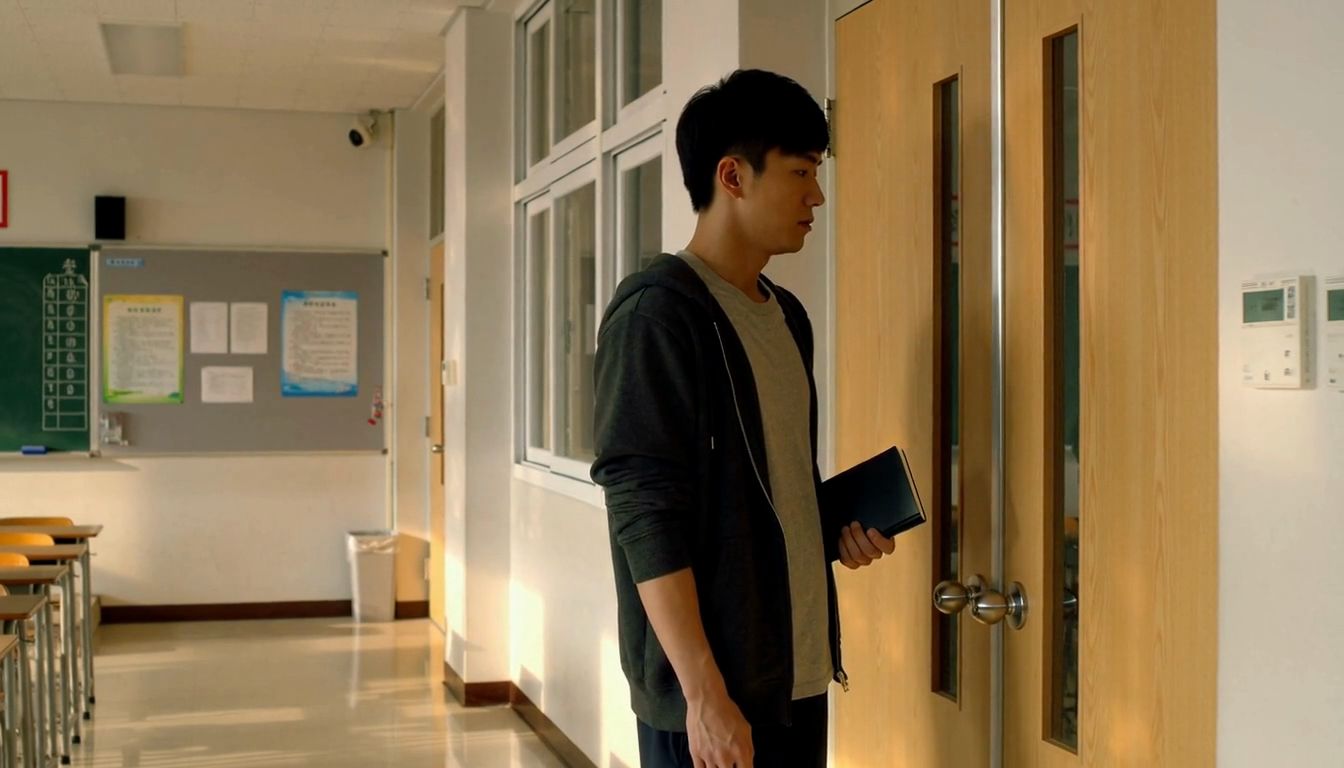
The next prompt only describes what happens going forward: the young man raises his right hand, grips the doorknob, and pushes the door open. Although the prompt for the first half originally asked for a brass lever handle, the generated video actually produced round silver doorknobs. Because of that, the continuation prompt describes the knobs shown in the frame while preserving the character's outfit, the notebook in his left hand, and the hallway lighting.
Actual prompt for the last-frame continuation:
Photorealistic live-action continuation from the supplied first-frame image. Preserve the same adult man, face, charcoal hoodie, gray T-shirt, wooden double door, round silver doorknobs, and warm afternoon light. Over six seconds he raises his empty RIGHT hand, reaches for the round silver knob closest to him on the left door leaf, turns it and gently pushes that door leaf inward into the classroom. The other door leaf stays closed. His LEFT hand keeps holding the same small black notebook beside his torso. He stays beside the doorway. Keep the camera fixed with the same framing and perspective. One uninterrupted shot, no cuts. Audio: subtle sleeve rustle, one soft latch click, a brief natural hinge creak and quiet school ambience. No speech, music, titles or subtitles.
The second half is also about 6.58 seconds long. Joining the two segments directly gives us the video shown at the start. Because this example continues from a moment where the character has come to a stop, the before-and-after actions connect more easily. After stitching the clips together, play the full sequence through once to check whether the join introduces an extra pause.
It is best to automate frame extraction with a script: read the frame sequence from the source video, export the PNG at the original width and height, and verify that the output dimensions match the decoded frame. This avoids the scaling, cropping, and extra compression introduced by manual screenshots. In this example, the exported image stays at 1344 × 768, matching the pixels of the corresponding decoded frame in the source video. However, frame extraction itself cannot fix visual distortion; if motion blur or limb distortion appears at the very end, you can have your script extract a clear frame from slightly earlier and trim everything after that frame from the original clip when splicing to avoid repeated motion.
In this example, we tested both first-frame generation and reference generation. When using first-frame generation, you cannot attach additional character or scene reference images at the same time; if you need to supply extra references, you can switch to reference generation instead. Reference images provide information about the character, outfit, environment, and composition, but they do not lock the very first frame of the video.
How Well Does Reference Generation Connect?
To compare how reference generation performs, we next used the exact same tail frame as an image reference in H3, keeping the same door-opening action requirements, resolution, and target duration. Here, we did not lock the first frame or add any other reference images. We generated one clip in each mode to directly compare how well the shots connect.
Result of joining the first half directly with the reference-generated clip:
The reference-generated version is also about 6.58 seconds long. The character, hoodie, and hallway setting outside the door are largely preserved, but the opening stance, shoulder and arm positions, and camera composition do not fully line up with the end of the previous clip. When spliced directly together, there is a noticeable jump cut.
Using Shot Transitions to Fix Jump Cuts
When splicing a reference-generated clip directly from a similar camera angle causes a visible jump, you can insert a close-up where needed to bridge the transition. Here, we use just a couple of cuts to hide the seam while keeping the sequence focused on the same door-opening action. We programmatically extracted a frame from around the 2.5-second mark of the door-opening clip where the right hand is already gripping the round silver doorknob, fed the full image into H3 reference generation as a reference for the environment, sleeve, and hand, and prompted directly for a tight close-up of the doorknob. This step did not require generating a separate storyboard still, nor did it set this image as a first frame.
Actual prompt for the doorknob close-up:
Photorealistic live-action close-up insert. Use <Picture 1> as the reference for the SAME right hand already gripping the SAME round silver doorknob, the charcoal hoodie sleeve, wooden door and afternoon sunlight. Reframe to a TIGHT CLOSE-UP from the same corridor side. Show ONLY the hand-covered knob on the IMAGE-LEFT door leaf, to the LEFT of the vertical center seam. The other knob on the image-right door leaf must remain completely outside the frame. Start already close on his RIGHT hand gripping this knob exactly as in the reference. Over four seconds, the fingers tighten naturally and the wrist makes one small turn to release the latch. Keep the wooden door closed; hold the turned knob at the end, ready for the next opening shot. Show one anatomically natural right hand and one knob only. Locked camera, no zoom, no cuts, no face or full body. Audio: faint sleeve rustle, a quiet metallic turn and one latch click over quiet school ambience. No speech, music or text.
The raw close-up clip is about 4.46 seconds long. In the edit, we kept about 3.75 seconds of the first clip, cut to about 2.5 seconds of the doorknob close-up, and then cut back to the earlier reference-generated door-opening clip—trimming out the repeated hand reach and knob turn so it picks up right as the door is pushed open. The three clips only use straight cuts and duration trims without frame interpolation, speed ramping, or cross-dissolves, bringing the combined runtime to about 9.83 seconds.
With the close-up inserted, two cuts tie the door-opening motion together and create a smooth bridge between the two medium shots. When handling a seam this way, the main thing to verify is whether specific details match across cuts: whether it is the same hand, whether the doorknob stays on the same side, whether the sleeve color or hallway lighting shifts noticeably, and whether cutting back to the medium shot replays the reaching motion. Adding new camera angles too frequently makes visual continuity harder to maintain, so here we only kept the close-up needed to move the action forward.
A 30-Second Long Video
The same last-frame continuation workflow can also be used to build longer narrative sequences. The live-action nighttime horror short No One at the Door was generated in three segments: a man hears knocking, walks over to open the door, and finds no one outside; when he turns back around, a woman is already standing inside the room. The first segment was created with text-to-video, and the next two segments were each generated by programmatically extracting the last frame of the preceding clip to use as the first frame of the next, with each segment running about 10 seconds.
The first segment ends with his right hand gripping the doorknob, the second segment begins with opening the door and ends as he prepares to look back, and the third segment completes his turn to reveal the woman inside the room. Each prompt first states the character's position at the end of the previous clip before describing the next action, giving the continuation a clearer starting point.
Below is the 26-second edited version, generated with MiniMax H3 at 768p. The three raw clips were first joined into a 30-second video, and then 4 seconds of extra footage at the very beginning were trimmed off. Trimming the opening footage also cut out the original knocking sound, so in post-production the knocking audio was extracted separately from the original clip and placed back at the start of the final edit, preserving the sequence of hearing the knock first and then getting up to open the door.
This example chains last frames into first frames across multiple segments, carrying over the male lead's clothing as well as the curtains, sofa, and table lamp in the room. In the final segment, the woman is introduced solely through text prompting without supplying a separate character reference image for her. Because she only appears at the very end, this test does not verify whether her appearance would stay consistent across subsequent shots. The audio in the finished video was also edited separately and should not be taken as a single, unedited output generated all at once by the model.
Character, Scene, and Audio Consistency
When off-screen characters or props re-enter the frame, relying solely on the last frame of the previous clip may not be enough. In a Reddit discussion on H3 video extension, one commenter shared an example: the first clip features three characters, but the final frame only shows two of them; if no reference information for the third person is supplied for the next segment, that character's appearance can change when they step back into the shot. In situations like this, you can include the original character reference images using reference generation, or use those references to generate the next storyboard frame first.
Chaining multiple rounds of generation can also gradually accumulate color shifts, changes in facial details, and image noise. In community tips shared on Reddit, some creators use keyframes to constrain the visuals, while others note that visual drift can still happen after several rounds of continuation. After generating each segment, it is best to inspect the character, clothing, and lighting first; if the final frame has already become blurry or distorted, step back to an earlier sharp frame and re-adjust the current segment rather than carrying the flaw into the next clip.
Tips: Audio Consistency Requires Post-Production
A first frame primarily supplies visual information, so relying on it alone rarely keeps audio consistent across multiple video segments. Even when you keep the native audio generated by the model, adjacent clips will not necessarily flow together naturally. At the splice points, you may notice volume shifts, different room ambience, broken musical rhythm, or changes in vocal timbre; in Reddit help threads about video extension, users have also noted that audio tends to degrade and drift after chaining several segments together.
Applying brief audio crossfades at the edit points, slightly overlapping the ambient sound between clips, or laying a single continuous bed of background room tone underneath can soften some of the jarring transitions, though it cannot guarantee full audio continuity. If you run into repeated dialogue, obvious shifts in voice timbre, or background music that fails to line up, you may still need to regenerate the clip, or handle voiceover, ambient sound, and music replacement separately.