Why expression sheets exist
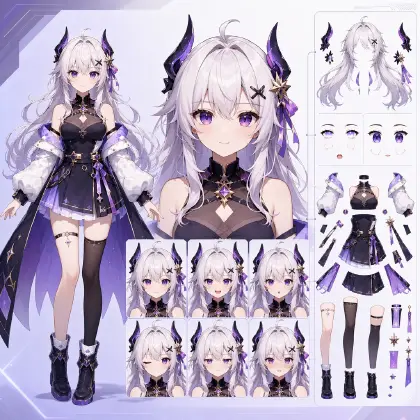
A Live2D rig does not make your character expressive. It plays back the expressions you handed it. If the file contains one neutral face and a smile, that is the entire emotional range of the model — forever, on every stream. The expression sheet is where a VTuber's actual personality gets decided, and it gets decided before rigging starts.
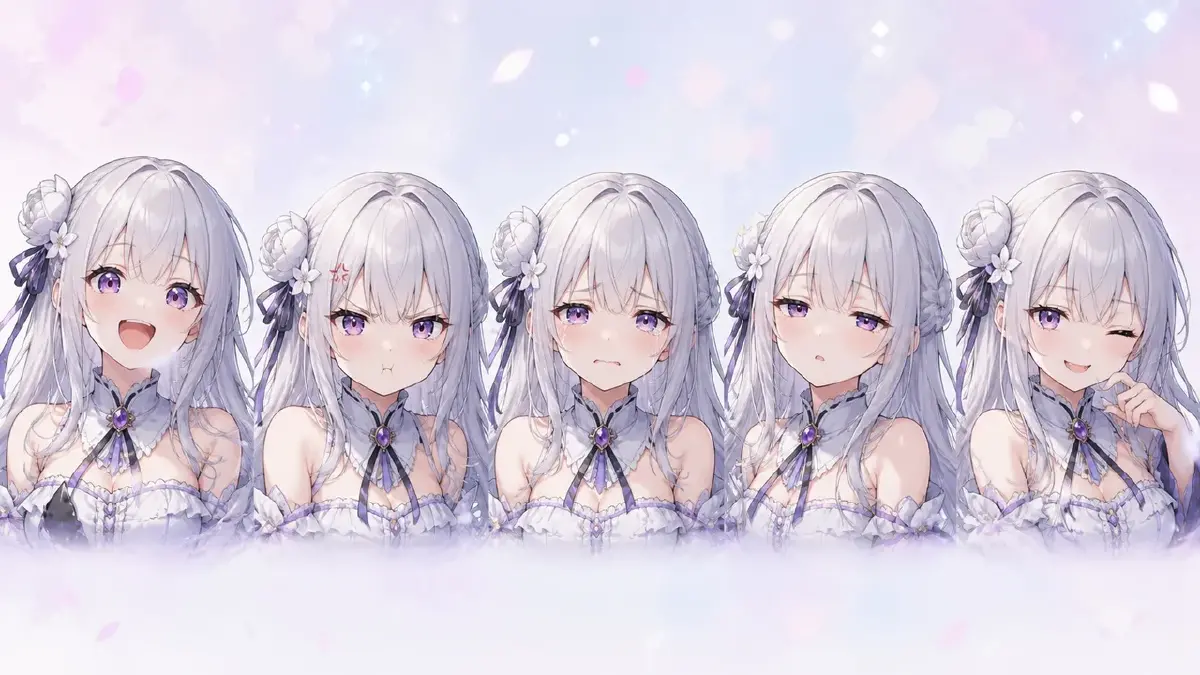
The catch: an expression sheet is ten-plus drawings of the same face, and sameness is the hard part. Hand artists solve it with construction lines and years of practice. If your art is generated, you solve it with identity discipline — or you hand your rigger ten slightly different characters and get a model that shape-shifts when it blinks.
This guide covers which states a rig actually uses, and how to produce them as one consistent sheet.
Which states a rig actually uses
Live2D expressions are built from part states the rigger blends. Design in those terms and every drawing maps to a parameter:
Eyes — the blink chain. Open (the base), half-closed, closed. Add closed-smiling as a fourth if the design uses it. The half state is what makes a blink read as soft instead of mechanical, and it is the one beginners skip.
Mouth — the phoneme set. Lip sync blends between mouth shapes for A / I / U / E / O — wide open, wide flat, small round, half open, round open. Draw the interior once, fully: teeth, tongue, inner shadow. Every phoneme shows some of it.
Brows — the emotion carriers. Neutral, raised, angry-tilt, sad-tilt. Brow states are cheap to draw, cheap to rig, and carry more readable emotion than anything else on the face. Never ship a sheet with only neutral brows.
Face extras. Blush on, tears on, shadow-over-eyes for dread — each as a toggleable overlay in its own state.
Full-face presets. Joy, anger, sorrow, surprise — combinations of the above, plus anything the parts cannot do alone (sparkle eyes, gag faces). Presets are where the character's comedy lives; three or four strong ones beat ten weak ones.
A standard first-model sheet: three eye states, five phoneme mouths, three brow states, blush, one or two presets. Everything beyond that is personality budget — spend it on the states your content will actually trigger.
How to keep ten faces one face
The whole sheet fails if the states do not share an identity. Three rules keep it together:
Lock the master before the sheet. The neutral face is the reference every diff must match. If you are still adjusting the design, you are not ready for diffs — finish the design lock first.
Change one thing per drawing. An expression diff changes the expression. Same angle, same lighting, same hair, same outfit, same framing. The moment a diff also shifts the head angle, the rigger cannot use it as an in-place layer swap.
Reference the character, not a description. In ArcLoop, keep the VTuber as a character asset with the master art bound as its main image. Generate every state by referencing the asset — describing only the delta:
Same framing and lighting as the master portrait of @Mio.
Only change: eyes half-closed, mouth in the "U" phoneme — small,
round, slightly pursed. Hair, outfit, and angle identical.
Because the asset carries the identity, ten requests produce ten states of one face. This is the same mechanism that keeps a cast consistent across an episode — an asset reference is more reliable than re-describing the character every time — applied at the scale of a single face.
Generate the full sheet in one sitting. Style and lighting decisions drift between sessions even with an asset locked, and a sheet generated across a week shows it.
From sheet to PSD
The sheet is a design document; the rig consumes layers. Three handoff rules:
- Every state becomes an in-place diff layer. Aligned to the pixel with the part it replaces, cleanly named (
mouth_A,mouth_I,eye_L_half), grouped by part. The full packaging rules live in the PSD spec. - Draw states, not in-betweens. The rig interpolates between your states; you supply the endpoints and the one middle state per chain (the half-blink) that keeps interpolation honest.
- Annotate intent. One line per preset in your delivery note — "shadow-eyes + flat mouth = dread toggle" — saves a full revision round of the rigger guessing.
Most common failures
- Only happy states. A sheet with five smile variants and no anger, no sorrow, no deadpan gives the model one mood. Streams need range, not repetition.
- Expression plus angle change. The most common unusable diff. One variable per drawing.
- Skipping the half-blink. Open-to-closed with no middle state produces the mechanical shutter-blink that marks a cheap rig.
- Mouth states without a drawn interior. Five phonemes revealing an empty black hole. Draw the interior once, properly, before the phoneme set.
- Subtlety that reads at 4000px and dies at 200px. Viewers see the model small. Test every state at thumbnail size; if the emotion does not survive shrinking, push it further — the same legibility rule that governs subtle acting applies to every diff.
FAQ
How many expressions does a first model need?
The standard sheet above — roughly a dozen states plus one or two presets — covers blink, lip sync, and basic emotional range. Agree on the exact list with your rigger; every state is art cost plus rigging cost.
Do I design expressions before or after material separation?
Design them before, produce final art for them alongside the cut. The states determine which parts need separating — a phoneme set forces a fully built mouth; shadow-eyes forces a separate shadow layer.
Can generated diffs really stay aligned enough for in-place swaps?
Framing stays close when every request pins angle and framing to the master, but expect to nudge alignment by hand in the PSD. The identity consistency is what generation solves; the last few pixels are yours.
What about body poses and hand toggles?
Same rules, bigger parts: each pose variant is an in-place diff of specific layers. Start with the face sheet — it is where all the streaming hours land — and add body toggles in revision rounds.
Decide the personality on paper
The rig will faithfully reproduce exactly the range you design now. List the states, lock the master, generate the sheet in one sitting against the asset, and hand your rigger one character in twelve moods instead of twelve near-strangers. Open your project and start with the blink chain — three drawings, and the model already feels alive.