H3 oder H3 Max? Beginne mit der benötigten Einstellung
Entscheide nach Ausgabegröße und verwendbarem Take. H3 bietet den regulären Ausgabeweg in 2K und 4K; Max bietet 768P und verfeinertes 1080P. In unserem Test mit vier Referenzbildern unten liegen Bildausschnitt und Einstellungswahl nah beieinander, ohne klaren Kameravorteil für Max. Beide haben Reference-to-Video-Endpoints auf fal. Ein Figurenblatt, Bewegungsclip oder eine Stimmreferenz kann daher in beide Tests einfließen.
Max ist fals nachtrainierte H3-Variante, abgestimmt auf Prompttreue, Ästhetik und Durchsatz. Ein Take, der gut aussieht, gut klingt und zu den benachbarten Einstellungen passt, kann in den fertigen Schnitt. Teste für eine fortlaufende Serie zuerst die schwierige Stelle: ein sich drehendes Gesicht, eine Hand, die den Griff wechselt, oder Dialog während einer Kamerabewegung.
Spezifikationen geprüft am 25. Oktober 2026. Die Tabelle trennt fals Endpoints von MiniMax’ veröffentlichten Basismodell-Spezifikationen und lokalen Workflows, die andere Einstellungen anbieten können.
Dauer- und Auflösungsgrenzen auf fal
| Dienst und Modus | Angaben zur Dauer | Wählbare Ausgabe | Wichtige Unterscheidung |
|---|---|---|---|
| H3 Text-to-Video | fal nennt 5–15 Sekunden; Standard 5 Sekunden | 480P, 768P, 2K, 4K | Das Schema bezeichnet 480P und 768P als native Modi; 2K und 4K skalieren eine 768P-Basis hoch |
| H3 Image-to-Video | fals H3-Leitfaden nennt dieselben 5–15 Sekunden; Standard 5 | 480P, 768P, 2K, 4K | Die Ausgabefläche folgt dem bereitgestellten Schlüsselbild |
| H3 Reference-to-Video | fals H3-Leitfaden nennt dieselben 5–15 Sekunden; Standard 5 | 480P, 768P, 2K, 4K | Bilder, Video und Audio teilen sich ein gemeinsames Referenzbudget |
| H3 Max Text-to-Video / Image-to-Video | Allgemeiner Leitfaden: 5–15 Sekunden, Standard 5; Audiohinweis unten beachten | 480P, 768P, 1080P | 1080P nutzt latente Verfeinerung einer nativen 768P-Quelle |
| H3 Max Reference-to-Video | Allgemeiner Leitfaden: bis 15 Sekunden; Schema-Standard 5 | 480P, 768P, 1080P | Referenz- und Schlüsselbildsteuerung unterscheiden sich vom einfachen Image-to-Video-Modus |
| H3 Max Extend | duration bezeichnet neu hinzuzufügendes Material; Standard 5 Sekunden | 480P, 768P, 1080P, 2K | Liefert das gesamte verlängerte Video oder eine Fortsetzung mit Überlappung der Quelle |
Zur Einordnung: MiniMax’ eigene H3-Ankündigung nennt 4–15 Sekunden, eine 768p-Basis und eine separate 2K-Regenerierungsstufe. Damit sind vier Sekunden nicht automatisch bei jedem gehosteten Dienst als Minimum zulässig. Die fal-Tabelle beschreibt auch keine Ausgabegrenzen selbst gehosteter Workflows.
Prüfe vor einem Stapellauf das Dauerfeld des konkreten Endpoints. Max’ Text-to-Video- und Image-to-Video-Schemas akzeptieren Fließkommazahlen und nennen mindestens zwei Sekunden mit target_audio_url; die vollständige Spanne des Leitfadens steht dort nicht. Trenne diese Audiobedingung von der allgemeinen Spanne. Max weist außerdem darauf hin, dass eine zurückgegebene Datei rund 0.7 Sekunden länger als angefordert sein kann.
Die Tabelle enthält dokumentierte Optionen. Das Beispiel unten testet pro Modell eine Referenzanfrage mit 12 Sekunden und 768P; nicht jede aufgeführte Grenze wird getestet. Die in ArcLoop verfügbaren Einstellungen können abweichen.
Wann H3 und wann H3 Max sinnvoll ist
| Was für diese Einstellung zählt | Ausgangspunkt | Vor dem Behalten prüfen |
|---|---|---|
| Eine 2K- oder 4K-Ausgabe aus fals regulären Generierungsendpoints | H3 | Größere Ausgabemaße beheben keine schwache Bewegung, Anatomie oder Kontinuität |
| Mehrere Kamerabewegungen, Kompositionen oder Darstellungen ausprobieren | Beide mit denselben Eingaben vergleichen | Unser Referenzpaar deckt ähnliche Einstellungen ab; verwendbare Takes, Gesamtwartezeit und Kosten vergleichen |
| Ein fertiger Clip, dessen Aktion und Ton bereits funktionieren | Den akzeptablen Take in der erforderlichen Ausgabegröße behalten | Max kann fertiges Material liefern; ein Modellwechsel kann eine gelungene Darstellung verändern |
| Mehrere Figuren-, Bewegungs- oder Tonreferenzen | Beide Reference-to-Video-Modi vergleichen | Identität, Bewegung und Ton gemeinsam testen; keine Text-to-Video-Geschwindigkeitsangaben übertragen |
| Einen vorhandenen Clip verlängern | H3 Max Extend ist eine dokumentierte Option | Überlappung, Rückgabemodus und Übergang zwischen altem und neuem Material prüfen |
| Lokale Ausführung, eigene Nodes oder eine vorhandene LoRA-Pipeline | Die H3-Basis und kompatible lokale Werkzeuge | Tatsächliche Gewichte, Node-Unterstützung, Speicher und Lizenz prüfen; ein gehostetes Max-Ergebnis belegt keine lokale Verfügbarkeit |
Die nützlichsten Reddit-Berichte beschreiben, wo die Modelle in den Arbeitsablauf passen. Ein Max-Nutzer probiert Konzeptvarianten vor einem langsameren Finalisierungsschritt. In einer anderen Diskussion bevorzugt jemand mit Referenzmaterial sein etabliertes Basismodell-LoRA-Setup und berichtet für Max’ Referenzmodus einen kleineren Geschwindigkeitsgewinn als für Text-to-Video. Keiner der Berichte entscheidet den Qualitätsvergleich. Zusammen geben sie Anlass, den tatsächlich benötigten Modus zu testen.
Gib für eine Anime-Szene beiden Modellen dieselbe anspruchsvolle Aktion und dieselben Referenzen. Prüfe Gesichter, Hände, Objektbewegung und Sprache und zähle die Takes, die du behalten würdest. Miss bis zu einer abspielbaren Datei und rechne verworfene Versuche in die Kosten ein. Über eine ganze Episode sagt das mehr aus als der schnellste einzelne Render.
H3 vs H3 Max im Videovergleich: dieselben vier Referenzen
Eine Kurierin bringt eine geschlossene Metallbox in eine Eisenbahnwerkstatt. Der Ingenieur nimmt sie an, antwortet auf ihre Warnung und schaut zu den Fenstern. H3 und H3 Max sollten diese kleine Geschichte in drei Einstellungen erzählen: einer halbnahen Zweieraufnahme, einem Übergabe-Insert und einer engeren Zweieraufnahme für die Antwort.
Die beiden Ergebnisse liegen bei Bildausschnitt und Einstellungswahl nah beieinander. Dieses Paar zeigt keinen klaren Kamera- oder Schnittvorteil für Max. Beide enthalten die drei gewünschten Einstellungstypen; das Tempo unterscheidet sich, und keiner setzt den ersten Schnitt bei vier Sekunden genau um. Vergleiche bei einer solchen Szene den verwendbaren Take und seine Kosten, bevor du für den Modellnamen mehr bezahlst.
Referenzbilder und gemeinsame Einstellungen
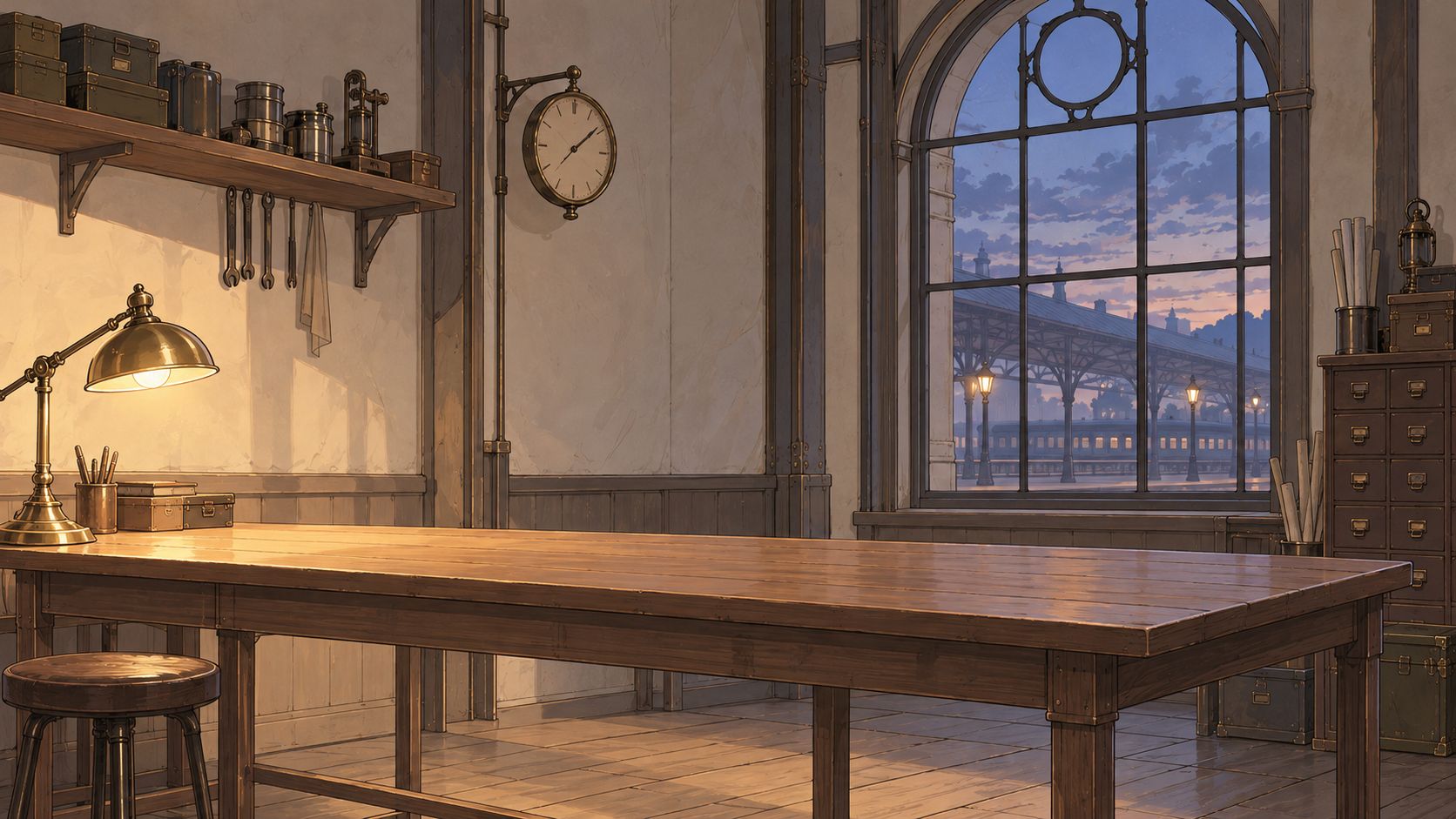
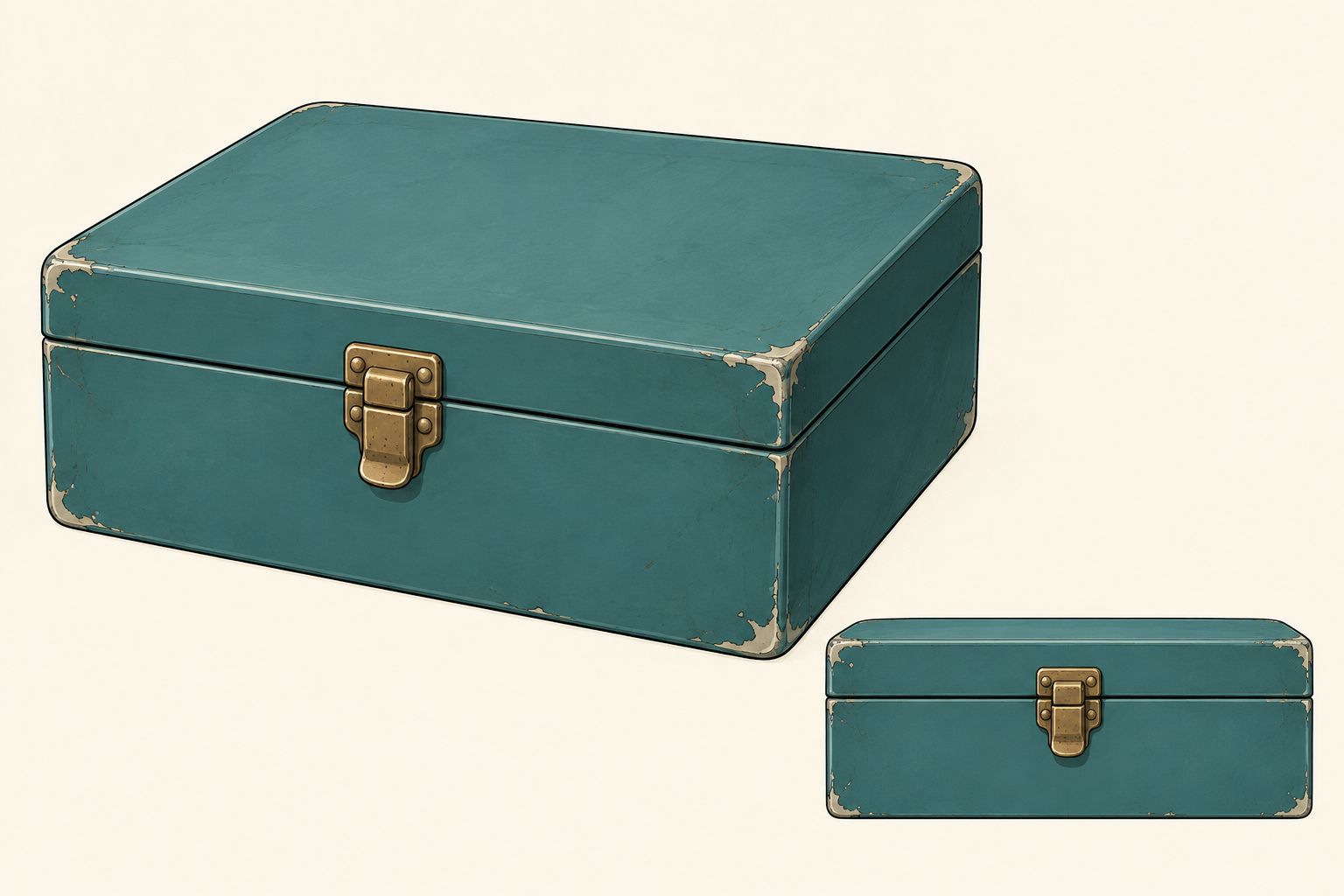
Die Eingaben waren zwei Figurenblätter, eine Werkstattszene und ein Requisitenblatt, in dieser Reihenfolge. Die Szene unten ist die überarbeitete Fassung, neu gezeichnet passend zum koreanischen Webtoon-Stil der Figuren. Beide Videos nutzen denselben Satz. Es wurde weder ein Bewegungsclip noch eine Stimmreferenz übergeben; den Dialog erzeugt das jeweilige Modell.


Beide vollständigen Ergebnisse ansehen
MiniMax H3
H3 Max von fal
Spiele sie getrennt ab, um die jeweils erzeugte Tonspur zu hören. Beide Quelldateien haben 1344×768, 24 fps und 12.25 Sekunden Laufzeit. Diese Anzeigekopien mit 1280×720 behalten alle 294 Frames und den Originalton, mit proportionaler Skalierung und Randauffüllung; es gibt keine Tempoänderung, Frame-Interpolation oder ersetzten Dialoge.
| Aufgezeichnete Messung | MiniMax H3 | H3 Max |
|---|---|---|
| Absenden bis Rückgabe des Ergebnisses | 21.282 s | 19.585 s |
| Absenden bis Abschluss des lokalen Downloads | 29.168 s | 25.305 s |
| Tatsächliche Dateidauer | 12.25 s | 12.25 s |
Das sind einzelne clientseitige Beobachtungen inklusive Anfrage und Statusabfragen. Referenzuploads und Anzeigeexporte liegen außerhalb der Messzeit. Max gab in diesem Paar etwa 1.7 Sekunden früher ein Ergebnis zurück; diese kleine Stichprobe begründet keine Geschwindigkeitsrangliste.
Was dieses Paar über die Einstellungen zeigt
Beide folgen derselben groben Bildstruktur: Mina links, Ivo rechts, eine Nahansicht der Übergabe der Box und dann zurück zu beiden Figuren. Max erreicht die späteren Einstellungswechsel früher, aber die gesamte Kamerabehandlung ist ähnlich. Es gibt hier keinen offensichtlichen Grund, Max allein für abwechslungsreichere Bildausschnitte zu wählen.
Die Schnittanweisungen zeigen auch, wo Nachbearbeitung nötig bleibt. Gefordert waren harte Schnitte bei vier und acht Sekunden, beide bleiben aber länger in der Eröffnungseinstellung. Verstehe diese Zeiten als Richtungsvorgabe für das Modell und passe das akzeptierte Material im Schnitt an, wenn ein Moment exakt sitzen muss. Die automatische Transkription fand beide englischen Zielzeilen in beiden Clips; sie belegt weder Stimmidentität noch präzise Lippensynchronität. Dieser einzelne Paarvergleich entscheidet nicht über Handanatomie, vollständige Bewegungsqualität oder Kontinuität über eine Episode.
Behalte H3 für diese Szene im Vergleich, wenn sein Ergebnis dem Schnitt bereits dient. Wähle Max, wenn sein tatsächlicher Take, seine Ausgabeoptionen oder die Bearbeitungszeit dem Projekt etwas bringen. Prüfe den Preis des konkreten Modus einschließlich Referenzgebühren; eine Text-to-Video-Aktion belegt keine Rechnung für eine Anfrage mit mehreren Referenzen.
Vollständiger englischer Prompt für beide Videos
A 12-second Korean webtoon-style animated scene, 16:9, with three deliberately edited shots. Fine ink lines, soft restrained cel shading, expressive adult faces. A quiet clockwork railway station workshop at blue hour. Natural real-time performance.

REFERENCE ASSIGNMENTS
Image 1 defines Mina, the adult female courier: short black bob, moss-green jacket, rust-red scarf, gold crescent pin. Image 2 defines Ivo, the adult male engineer: brown low ponytail, round brass glasses, navy apron over a cream rolled-sleeve shirt. Each character sheet shows one person at two scales; those insets are not additional people. Preserve each character's face, hairstyle, clothing and accessories across every cut.
Image 3 defines the empty workshop, wooden counter, brass lamp at screen left and blue arched station windows. Maintain the warm light from left and cool window light from right.
Image 4 shows two views of ONE small teal metal box with one centred brass latch. Use exactly one box, with the same proportions, colour and closed lid in all shots. Do not reproduce the reference-sheet layout or duplicate the box.

SHOT 1 — 0.0 TO 4.0 SECONDS — ESTABLISHING MEDIUM TWO-SHOT
Mina stands at screen left on the near side of the counter. Ivo stands at screen right behind the counter. Start with the closed teal box held by Mina above the clear countertop. Gentle, short camera push-in. Mina sets the box on the counter and begins sliding it towards Ivo. Starting around 0.8 seconds, Mina says in English, clearly and with restrained urgency: "Keep it closed until the last train leaves." Ivo is silent and watches the box. Finish the entire line before the next shot.

HARD CUT ON THE MOVING BOX at 4.0 seconds. Match the box's position and movement across the cut. Stay on the same side of the action axis; keep Mina to the left and Ivo to the right.

SHOT 2 — 4.0 TO 8.0 SECONDS — HANDOVER INSERT CLOSE-UP
Tight view of the same closed teal box and both characters' hands, with their distinct sleeve colours visible. Mina's hand enters from the left, Ivo's hands from the right. Ivo takes a secure two-handed grip before Mina releases the box. Mina withdraws her hand; Ivo lifts the box a few centimetres, then sets it on his side of the counter. Show contact and release as one readable action. Only one box. The lid remains closed. Quiet metal-on-wood and cloth sounds, no dialogue during this insert.

HARD CUT at 8.0 seconds to a MEDIUM-CLOSE TWO-SHOT from the same side of the axis. Match Ivo's hands and the box to the end of the insert. Do not reset the handover or return the box to Mina.

SHOT 3 — 8.0 TO 12.0 SECONDS — REPLY AND REACTION
The box rests on the counter in front of Ivo, his hands beside it. Ivo looks at Mina and says in English in a calm lower male voice: "Then we still have time." Mina is silent. After his line, Mina turns her head towards the station windows, her scarf shifting slightly at her chin; Ivo follows her gaze. Hold the final moment with both characters and the closed box visible. A subtle push-in is allowed, no additional cut.

EDITING AND AUDIO RULES
Exactly three shots with clean hard cuts at about 4 and 8 seconds. Use match-on-action continuity at the handover and respect the 180-degree rule. No dissolves, split screens, panels, slow motion, time jumps or added shots. Keep spatial layout, lighting, faces, outfits and the box consistent through the edits. Generate native English dialogue with distinct voices assigned to the correct speaker. Only the assigned speaker talks; no overlapping speech, no narration, no subtitles or on-screen text. Quiet station ambience and restrained handover foley, no music. No extra people, cloned characters, floating hands, opened box or duplicated props.
Referenzlimits: Dateien und Sekunden getrennt zählen
Ein Startbild legt die Anfangskomposition fest; eine Motivreferenz liefert Identität oder Erscheinung. In fals Image-to-Video-Modi folgt die Bildfläche dem Schlüsselbild. Referenzmodi haben eigene Seitenverhältnisregler, daher macht ein breites Figurenbild die Ausgabe nicht automatisch breit.
| Referenzregel | Geltungsbereich |
|---|---|
| Bis zu 9 Bilder, 3 Video- und 3 Audioclips, zusammen höchstens 12 Dateien | MiniMax’ veröffentlichte H3-Ref2VA-Spezifikationen; nicht annehmen, dass jede Max-Einbindung diese Einzelgrenzen übernimmt |
| Referenzvideo: 2–15 Sekunden pro Clip, insgesamt höchstens 15 Sekunden | Beide geprüften fal-Reference-to-Video-Schemas |
| Referenzaudio: 2–15 Sekunden pro Clip, insgesamt höchstens 15 Sekunden | Beide geprüften fal-Reference-to-Video-Schemas |
| Bilder, Referenzvideos und Referenzaudio: zusammen höchstens 12 Dateien | Beide geprüften fal-Reference-to-Video-Schemas |
Neun Bilder plus drei Videos plus drei Audioclips ergeben 15 Dateien. Das überschreitet das Gesamtbudget, obwohl jede Kategorie MiniMax’ Einzelgrenze einhält. Sechs Bilder, drei fünfsekündige Videos und drei fünfsekündige Audioclips ergeben 12 Dateien, mit 15 Sekunden Video und 15 Sekunden Audio. Das erfüllt die genannten Mengen- und Dauerbudgets, garantiert aber weder alle übrigen Dateiprüfungen noch eine gute Einstellung.
Die Regeln für reines Audio müssen geprüft werden: MiniMax’ Ankündigung und fals Leitfäden verlangen ein visuelles Element neben Audio, beide aktuellen fal-Referenzschemas erlauben die Typen jedoch einzeln oder zusammen. Bis dieser Dokumentationswiderspruch für deinen Endpoint geklärt ist, füge ein relevantes Bild hinzu. Diese Überarbeitung testete keine reine Audioanfrage.
Native Auflösung, verfeinerte Ausgabe und Exportgröße
Lies eine Auflösungsangabe zusammen mit ihrem Verarbeitungsschritt. fals H3-Ausgaben in 2K und 4K beginnen bei 768P; Max’ 1080P verwendet latente Verfeinerung aus 768P. Extend hat eine eigene 2K-Option. Die Tabelle hält diese Wege auseinander.
Ein 720p-Download kann einfach ein Export sein. Beide Referenzvideos lieferten Quelldateien mit 1344×768; die Anzeigekopien haben 1280×720. Das ist eine Lieferkonvertierung und kein nativer 720p-Generierungsmodus. Prüfe Breite, Höhe, Bildrate und Dauer der tatsächlichen Datei vor der Kennzeichnung.
Wähle das Ausgabeformat vor dem Schlüsselbild: Querformat für einen horizontalen Player, Hochformat für einen vertikalen Kurzclip. Prüfe den tatsächlichen Zuschnitt und halte Gesichter, Hände und Untertitel im sichtbaren Bereich. Mehr Pixel holen kein Motiv zurück, das außerhalb des Bildes lag.
Einen Clip verlängern, ohne den Übergang zu wiederholen
Max Extend akzeptiert ein Quellvideo von 1.625–60 Sekunden, bis 50 MB und mit einem Seitenverhältnis zwischen 0.4 und 2.5. Das Feld duration fordert zusätzliches Material an. extended liefert Quelle und Fortsetzung zusammen; continuation beginnt mit wiederholten 1.625 Sekunden vom Ende der Quelle.
Bei einer zehnsekündigen Quelle und fünf angeforderten neuen Sekunden sind beispielsweise etwa 15 Sekunden im Gesamtergebnis oder etwa 6.625 Sekunden in der Fortsetzung vor Frame-Rundung zu erwarten. Ungekürztes Anhängen der zweiten Variante würde den Übergang wiederholen. Das ist eine dokumentationsbasierte Berechnung, kein gemessener Verlängerungstest; prüfe die zurückgegebene Datei vor dem Schnitt.
Beschreibe im Prompt die nächste Aktion. Prüfe am Übergang Position, Licht, Bewegung und Ton. Reddits Diskussion über Einzel- und Mehr-Einstellungs-Generierung zeigt einen nützlichen Zielkonflikt: Einzelclips lassen sich leichter austauschen, während Dialog in einer durchgehenden Generierung mehr unmittelbaren Kontext teilt. Stimmen müssen über mehrere Aufrufe hinweg weiterhin geprüft werden.
Häufige Fragen
Ist H3 Max nur für Entwürfe geeignet?
Nein. Ein Clip, der Bild-, Ton- und Lieferanforderungen erfüllt, kann fertiges Material sein. Max’ Name und Geschwindigkeit entscheiden nicht über die Verwendbarkeit eines Takes. Prüfe das tatsächliche Ergebnis, besonders wenn es zu benachbarten Einstellungen passen muss.
Unterstützt H3 Max Referenzen und Fortsetzung?
Ja: fal hat getrennte Reference-to-Video- und Extend-Endpoints. Ihre Regler dürfen nicht vom Text-to-Video-Formular abgeleitet oder mit dem separaten Modell H3 Max Turbo verwechselt werden.
Kann H3 lokal mehr als 15 Sekunden erzeugen?
Ein Reddit-Autor berichtet von einem lokalen 42-Sekunden-Experiment, beschreibt aber auch Verluste bei Qualität und Kontrolle sowie eine wesentlich längere Verarbeitung. Das ist ein Versuch außerhalb der üblichen veröffentlichten Spanne, kein Versprechen, dass ein gehosteter Endpoint 42 Sekunden akzeptiert oder ein lokaler Workflow sie zuverlässig liefert.
Welches Modell soll ich für meine erste Anime-Einstellung wählen?
Beginne mit der benötigten Ausgabegröße und den Eingaben. Unser Referenzpaar gibt keinen klaren Grund, Max allein wegen der Einstellungsgestaltung zu wählen. Vergleiche akzeptable Takes, Kosten und Bearbeitungszeit; nutze H3 für seinen regulären 2K- oder 4K-Ausgabeweg oder einen etablierten Basismodell-Workflow. Baue mit dem KI-Anime-Generator eine kurze Testszene und prüfe Kontinuität und Ton, bevor du daraus eine Sequenz machst.