
Two characters finally trust each other at the end of a season. Then the next opener treats them as strangers again: help needs another explanation, a debt is forgotten, and an earned alliance disappears. The faces still match, but the relationship behaves as though the finale never happened.
This guide shows how to carry changing character relationships across seasons by preserving the finale’s consequences in Story Outline and proving them through the opener’s actions. The examples treat seasons as groups of Episodes within one IP Project; they do not require a separate season-management feature.
Summarize the Finale's Relationships as Changed Permissions
A family tree isn't what you need between seasons. What you need is a short note on what each key relationship allows now that it didn't before — or no longer allows.
After your finale, open the project’s Story Outline and find the paragraphs describing the relevant events. Preserve those events and add a concise description of the resulting permission or obligation near the next Episode’s planned action. Double-click a paragraph to edit it. These are story decisions about what characters will accept, not automatic controls.
Examples of the translation:
-
Before: Saya and Riku reconciled after the warehouse confrontation.
-
After: Saya can ask Riku for backup without rehearsing an explanation. Riku will help, but he still expects her to tell him what danger he is being asked to enter.
-
Before: Commander Varesh betrayed Unit 7.
-
After: No member of Unit 7 owes Varesh a warning. Hana will lie to his face if the mission requires it.
Start with the relationships the next Episodes will use. Do not erase stable relationships from the outline; simply leave them out of this compact change summary unless they affect the opener. For broader relationship planning, use the character relationship guide.
Select Only What the Opener Actually Uses
Not every changed relationship belongs in the first Episode. The opener should begin from the world the finale created, then give those relationships a fresh problem. Trying to restate every change can turn that problem into a recap.
In the project’s Story Outline, put the relevant relationship context beside the paragraphs for the opener. Preserve other consequences with their source events, then add them to the later Episode’s planned action when they become relevant. Do not assume a dormant relationship has returned to its old state.
If Riku and Saya’s trust drives the new season, show it in the first Episode. If Varesh’s betrayal matters later, retain it in Story Outline and bring it into that later scene’s decisions. Forcing every changed relationship into the opener makes it feel like a recap sequence instead of a story moving forward.
How to Design a Repeated Situation That Proves the Change
One useful way to prove a relationship shift is to repeat a situation from the earlier season and let the action come out differently.
In Season 1, when Saya needed backup, she didn't call Riku. In the Season 2 opener, she calls him first. Same situation, different choice — the trust is visible without anyone explaining it.
Keep Riku and Saya as the same character assets in My Assets. If time or events changed their appearance, Bind appropriate new Reference images under those existing assets. Identity can remain continuous while clothing changes. Update the next Episode’s relationship context in the project’s Story Outline before generating shots.
Open the Episode and click Generate Shots. Review the resulting shot cards against your planned starting conditions, then edit any description that brings back an obsolete habit. Use @ to select the existing characters; their references support identity, while your shot descriptions specify the behavior this moment needs.
The following scenes are original illustrations of the method, not tested outputs. Create character assets for Saya, Riku, Hana and CommanderVaresh; scene assets for DepotEntrance and Unit7Safehouse; and prop assets for Phone and AccessPass. Bind suitable reference images in My Assets before selecting these assets through
@.
Example 1 — The trust-confirmed call (Season 2 opener, first contact shot)
Medium locked view of @Saya at @DepotEntrance, with the closed service gate visible behind her. @Saya raises @Phone to her ear in one direct movement. Her posture remains purposeful, and her free hand stays still at her side. Keep her face and the receiver clearly visible without showing readable screen text. Cold streetlight and warmer light beyond the gate establish the location. One raising action only; no dialing sequence, exhale, look back, reply, or camera move.

The choice is that Saya calls the person she previously avoided. A raised phone alone cannot identify Riku as the recipient. Include his answering shot or a short spoken name, then compare this contact with the earlier refusal to call him.
Example 2 — The debt made visible (mid-episode, obligation shot)
Locked medium-close view of @Riku at the briefing table in @Unit7Safehouse. @Riku slides @AccessPass across the clear tabletop toward @Saya, whose hands remain still on her side of the table. Keep the entire pass and the space between them visible. Riku’s expression stays reserved; the gesture offers access without suggesting instant friendship. Soft practical lamp light separates the pass from the wood. One sliding action only, with no grasp, release sequence, pocketing, gaze shift, or camera movement.

The access pass carries the debt only if an earlier scene establishes the promise it fulfills. Check that context first. An unexplained object transfer may read as ordinary work, and the slide does not yet show Saya taking possession.
Example 3 — The unearned reconciliation caught and revised (review shot)
Wide locked view of @Hana and @CommanderVaresh in the corridor of @Unit7Safehouse. @Hana turns away from him after their business is already finished. Keep the space between them visible and CommanderVaresh still beside the doorway. Hana’s expression remains controlled rather than openly hostile. Her hands stay at her sides throughout the turn. Cold, even ceiling light preserves the institutional atmosphere. One turn only; no spoken exchange, walking departure, hand gesture, camera move, or reconciliation.
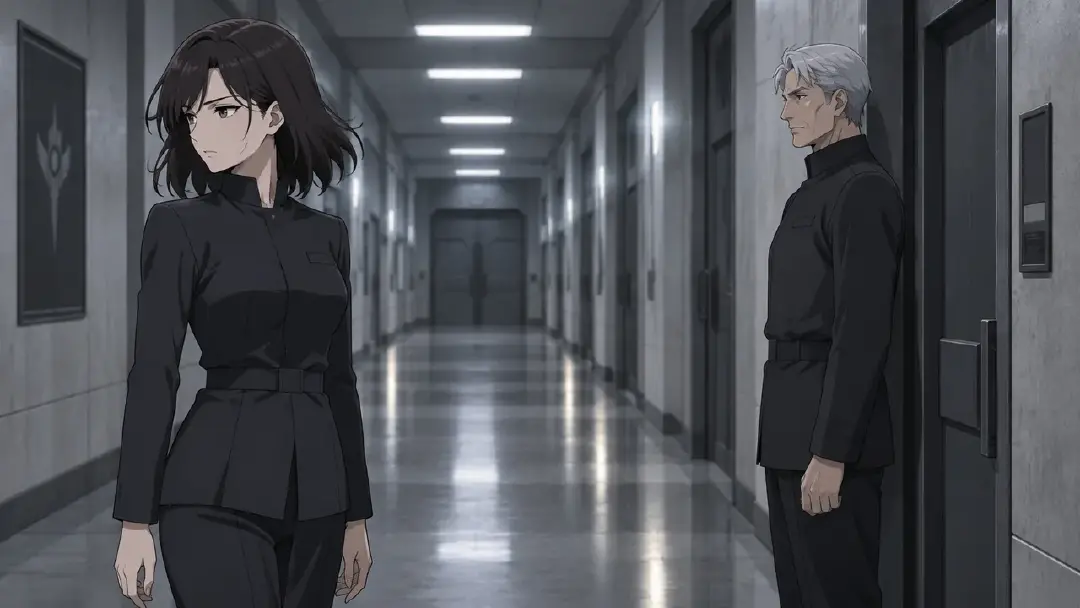
Hana can complete necessary business while withholding personal warmth. This description requests that boundary; it does not guarantee the generated performance. Review the result for whether her departure still fits the unresolved betrayal.
Review the Opener for Four Continuity Failures
Before you move the episode from storyboard to generated video, review each shot card for these four problems:
Unearned reconciliation. Two characters who ended the finale in conflict are casually friendly in the opener. If you did not plan a reconciliation, the output contradicts the intended starting conditions. Go back to the shot card description and add a closed posture, a guarded line, or physical distance.
Unexplained knowledge. A character knows something in Episode 1 that they couldn't know unless they were told between seasons — and you never wrote that scene. If a credible offscreen disclosure occurred, record it in Story Outline and make the needed context understandable on screen. Otherwise remove the premature knowledge from the shot.
Returned habits that contradict the finale. A character who spent Season 1 learning not to lie to their partner is back to lying in the second shot of Season 2. Decide whether the relapse is intentional. If it is, establish the new pressure that causes it; if it is not, revise the outdated behavior in Story Outline and the affected shot description.
Forgotten obligations. A character received help at a cost in the finale, but the next scene grants the benefit without acknowledging what they owe. Show the agreed payment, a refusal to pay or an active dispute. Do not let the obligation disappear between Episodes.
When you find a failure, you usually don't need to regenerate the whole episode. Open the specific shot card, revise the description to make the relationship state visible in this shot, and regenerate that card.
Carry the State, Not the Story
Generate still images first and check which actions carry the changed relationships. Once those images work, request the selected videos through AI Chat Panel, for example Generate videos for Shots 1, 2, and 3. Arrange the selected clips in Edit and watch the opener after the finale. The asset setup supports visual continuity; the scene choices still need review.
Start by adding the changed conditions to the project’s Story Outline before clicking Generate Shots in the new Episode. Keep dormant relationships out of the opener until their episode arrives. Design at least one repeated situation where the action is different from Season 1. And when you review the outputs, read for the four failures before you generate video.
For changes spread across several Episodes, connect these local consequences with the story arc guide.
Open your existing ArcLoop project, add the opener’s starting conditions to Story Outline, and review its shot cards against the finale.
FAQ
Do I need to create new character assets for Season 2? When both seasons belong to the same IP Project, reuse the same character assets and add any needed appearance references. Update Story Outline and the new shot descriptions for changed behavior. This guide does not assume automatic asset transfer between separate projects.
What if a character's appearance changes between seasons — a new hairstyle or costume? Bind the new reference image to the same character asset as an additional Reference image. The asset stays the same; the bound images expand. These references provide visual context for both looks. Review identity in each result; adding images does not guarantee a match.
How much relationship context should I write in the Story Outline? Start with what changed and what behavior it permits or prevents in the next scene. Add the cause when it is needed to explain a limit. Keep only context that helps you decide how the current encounter should play.
The AI Chat Panel generated a shot where a character is too warm toward someone they distrust. How do I fix it? Open that shot card directly, add a specific posture or action that shows the distance — turned away, short answer, no eye contact — and regenerate just that card. You don't need to redo the whole episode.
Can I keep a relationship ambiguous intentionally? Yes. Specify the boundary: Saya accepts Riku’s help but does not give him the full route. Choose a visible action or line that preserves both cooperation and caution. Review the output; writing “ambiguous” alone does not guarantee a nuanced performance.