Un prompt anime doit décrire le style de dessin et la façon dont la scène bouge. Précisez l'épaisseur du trait, le traitement des ombres et la palette, puis racontez en langage naturel ce qui se passe — quelles parties du corps se déplacent, et comment l'action se termine.
MiniMax H3 accepte des images, des vidéos et de l'audio en plus du texte. Pour un rendu 2D cohérent, choisissez des références qui montrent le style visé et décrivez nettement le trait et les ombres. Si un résultat paraît trop photographique, reprenez à la fois les références et les consignes visuelles.
Ce guide indique quel mode utiliser, comment préparer les références, propose quatre exemples de prompts et montre comment diagnostiquer les deux échecs les plus fréquents chez les créateurs d'anime : un style de dessin juste accompagné d'un mouvement raté, et un visage qui dérive d'un plan à l'autre.
Partez d'une scène courte, facile à évaluer : un personnage qui se tourne vers quelqu'un, une main qui saisit une lettre, une réaction discrète après une réplique. Quand le visage, le style de dessin et le mouvement tiennent ensemble, réutilisez les mêmes références et la même direction visuelle pour le plan suivant.
Choisir entre texte-vers-vidéo, image-vers-vidéo et référence-vers-vidéo
Votre matériau de départ décide du mode. Vérifiez les options proposées par votre générateur MiniMax H3 avant de rédiger quoi que ce soit.
| Votre point de départ | Mode envisageable | Ce qu'il faut préparer |
|---|---|---|
| Une idée de scène ou de style visuel inédit | Texte-vers-vidéo | Une description du personnage, du décor, du style de dessin et de l'action |
| Une illustration achevée avec la composition voulue | Image-vers-vidéo | L'image d'ouverture et une description du mouvement de la scène |
| Une transition avec un début et une fin précis | Génération à partir d'une première et d'une dernière image | Deux images de scène achevées, au cadrage compatible |
| Un personnage original dans une scène inédite | Référence-vers-vidéo, aussi appelé Ref2VA | Des références de personnage et une description du nouveau plan |
Ces modes répondent à des problèmes différents, et les confondre est une cause fréquente de rendu anime raté. Une planche de personnage est une référence d'identité : elle dit au modèle qui est le personnage. Une illustration de scène est une référence de composition : elle lui dit à quoi ressemble la première image. Glissez une planche à vues multiples dans l'emplacement de la première image, et la mise en page de la planche a tendance à suivre, cases comprises.
Les noms des modes et les entrées acceptées varient selon le fournisseur, et certaines interfaces proposent des combinaisons supplémentaires. Vérifiez à quoi servira chaque image importée avant de générer.
Décrire séparément le rendu 2D et le mouvement
La mention « anime style » laisse ouvertes quantité de choix visuels. Précisez les détails qui comptent pour votre scène :
- Le trait : des contours sombres et nets, des lignes de crayon fines, ou des traits d'encre bruts.
- Les ombres : des aplats francs, des ombres à deux tons, ou des ombres peintes en douceur.
- La couleur : une palette pastel restreinte, des teintes du soir assourdies, ou des couleurs vives et saturées.
- La lumière : une ombre au bord net en travers du visage, une lumière latérale chaude, ou un intérieur éclairé uniformément.
Une formule comme « animation 2D en cel shading, contours sombres cohérents, aplats de couleur, ombres au bord net » donne plus de prise au modèle qu'une série d'adjectifs élogieux. Des termes tels que « rayons de lumière volumétriques » ou « faible profondeur de champ » peuvent introduire un rendu photographique. Pour des aplats francs, décrivez la direction de la lumière et le bord des ombres.
Décrivez le mouvement en langage naturel : ce que fait le personnage, quelles parties bougent, et comment l'action se termine. Pour un plan unique et continu, cela suffit généralement — H3 déduit le rythme de la description. Des lignes d'action horodatées apportent peu à ce stade et peuvent être suivies de façon irrégulière ; elles servent surtout à ordonner plusieurs temps forts ou à ménager une coupe, lorsque la séquence elle-même porte l'information.
Examinez l'image fixe et le clip comme deux vérifications distinctes. L'image fixe montre le visage, le trait et les ombres. La lecture montre le minutage, les mouvements que vous n'avez pas demandés et la façon dont le dessin évolue d'une image à l'autre. Contrôlez l'image fixe avant de générer la vidéo, puis vérifiez que le style tient pendant le mouvement.
Préparer des références pour la cohérence du personnage
Partez du jeu le plus restreint qui puisse faire l'affaire. Un portrait net et une vue en pied forment un bon point de départ pour un premier essai. Ajoutez une vue de profil ou de dos dès qu'une action révèle des détails que ces deux images ne couvrent pas.
Attribuez à chaque référence un rôle précis :
| Référence | Ce qu'elle doit guider |
|---|---|
| Portrait du personnage | Proportions du visage, coiffure et signes distinctifs |
| Vue en pied ou planche de rotation | Proportions du corps, tenue, chaussures et accessoires |
| Image de style | Trait, ombres et traitement des couleurs |
| Image de décor | Lieu, agencement et objets récurrents |
| Clip de mouvement | Un geste précis ou un comportement de caméra |
Choisissez des images qui s'accordent entre elles. Si une vue montre un col ou une coiffure différents, réglez l'écart avant de générer : des designs contradictoires produisent des détails incohérents. Pour un accessoire asymétrique, précisez la gauche ou la droite du personnage lui-même.
Une grande planche de référence est utile pour relire un design. Son efficacité comme entrée de génération dépend du plan et du flux de travail. Gardez à côté des recadrages propres du visage et de la vue du corps pertinente, et comparez la planche entière à ces recadrages quand de petits détails disparaissent.
La spécification officielle Ref2VA de H3 autorise jusqu'à neuf images, trois clips vidéo et trois clips audio, avec 12 fichiers au maximum, tous types confondus. Le total cumulé doit rester dans cette limite. Vidéo et audio sont chacun limités à 15 secondes cumulées, et chaque clip doit durer entre 2 et 15 secondes. Une référence audio exige également une entrée image ou vidéo. Votre fournisseur peut appliquer des restrictions supplémentaires.
Ajoutez les références une par une et vérifiez si chacune améliore le résultat. Des références redondantes ou contradictoires consomment les emplacements disponibles et peuvent dégrader la cohérence.
Comment le prompt et les références se répartissent le travail
Servez-vous des références pour établir le design du personnage. Maintenez les détails d'apparence écrits en accord avec ces images, et répétez les signes distinctifs lorsqu'ils aident à préciser le plan.
L'exemple texte-vers-vidéo ci-dessous décrit le personnage, faute d'images pour établir son apparence. L'exemple référence-vers-vidéo confie ce rôle aux images importées. Dans les deux cas, vérifiez que le texte s'accorde avec le design voulu.
Quand les références portent l'identité, voici ce qui a sa place dans le prompt : la valeur de plan, l'action, la caméra, la lumière, le son, et de brefs rappels pour un détail qui ne passe pas — une barrette du côté gauche du personnage, une manche qui doit rester retroussée.
Exemples de prompts anime pour MiniMax H3
Les prompts ci-dessous restent en anglais pour être copiés directement. Les prompts A/B de la salle de classe sont les textes originaux soumis lors du test ; les autres sont des exemples illustratifs.
Un prompt anime qui fonctionne couvre six points : le sujet ou la référence, le style de dessin, le cadrage, la séquence d'action, l'éclairage et le son.
Remplacez les libellés de référence ci-dessous par ceux que votre interface emploie. Dans ArcLoop, choisissez une ressource enregistrée via le sélecteur de références @.
Texte-vers-vidéo : une scène anime silencieuse
À utiliser pour trouver un rendu avant de s'engager sur un personnage récurrent. Sans références, c'est la description d'apparence qui fait tout le travail.
A five-second 2D anime scene with flat cel shading, clean dark outlines,
and muted blue and amber colors. Medium shot of a young woman with short
black hair and a teal jacket at a school rooftop railing. She looks toward
the stairs, pauses, and gives a small smile. Static camera. Warm side light
creates a clear shadow across her jacket. Distant traffic and a brief gust
of wind. No dialogue or music.
Si vous voulez réutiliser ce personnage, préparez des images de référence validées avant de construire d'autres scènes, afin de limiter les variations d'un plan à l'autre.
Référence-vers-vidéo : le même personnage dans un nouveau plan
Importez un portrait et une référence en pied, puis attribuez-leur un rôle dans le prompt. Remarquez que la description d'apparence a disparu.
Image 1 defines Rin's face and hairstyle. Image 2 defines her body
proportions and teal school uniform. Keep these details consistent.

Five-second medium shot of Rin standing beside a classroom window.
2D cel animation with the linework and shading shown in Image 1.
She hears someone at the door, turns her head, and pauses with an attentive
expression. Her body stays in place. Static camera, soft afternoon light.
Sound: quiet classroom ambience and one door knock. No music.
Réutilisez les descriptions de référence d'un plan à l'autre. Ajustez l'action, le cadrage et la lumière tout en gardant les détails du personnage cohérents.
Image-vers-vidéo : un simple mouvement de tête
Nous avons utilisé cette illustration de salle de classe originale comme première image d'un plan anime MiniMax H3 de cinq secondes.
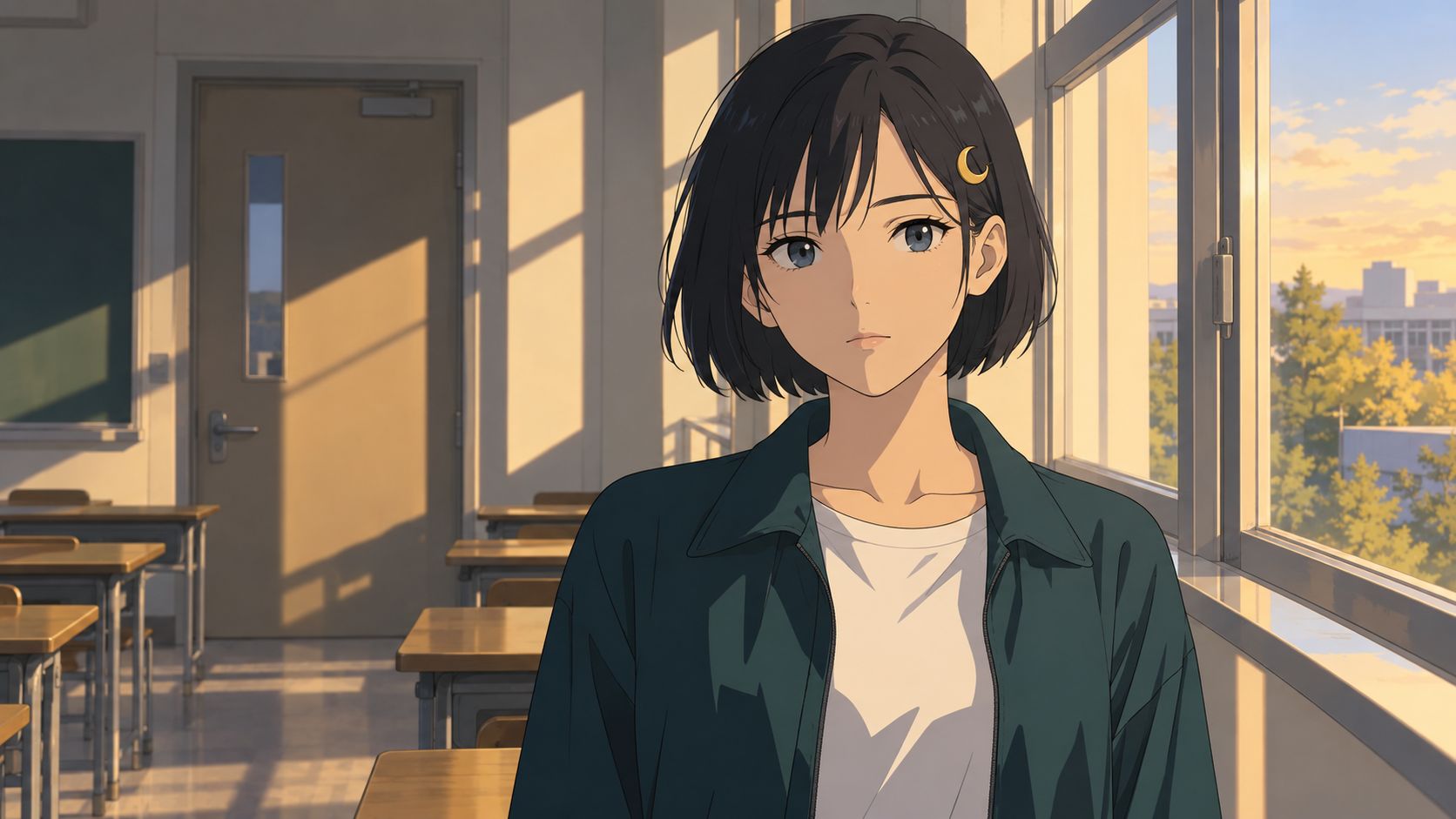
A — prompt en langage naturel :
Animate the supplied classroom illustration as a five-second 2D anime shot.
Preserve the character design, clean dark outlines, flat cel shading,
and afternoon lighting shown in the image.

Rin turns her head toward the doorway and stops with an attentive
expression. Keep her shoulders in place. Allow a small amount of movement
in the loose strands of her hair.

Static medium shot. Quiet classroom ambience. No dialogue or music.
B — le même plan avec des temps forts horodatés. Les consignes de style du début et les consignes de caméra et de son de la fin sont identiques ; seul le paragraphe d'action diffère :
Animate the supplied classroom illustration as a five-second 2D anime shot.
Preserve the character design, clean dark outlines, flat cel shading,
and afternoon lighting shown in the image.

0-2 seconds: Rin holds her starting pose.
2-4 seconds: She turns her head toward the doorway, keeping her shoulders
in place. The loose strands of her hair follow the turn.
4-5 seconds: She holds an attentive expression as her hair settles.

Static medium shot. Quiet classroom ambience. No dialogue or music.
Les deux clips conservent le rendu en cel shading, la lumière chaude de la fenêtre et le mouvement des cheveux pendant la rotation. La description en langage naturel de A produit un plan unique exploitable. B a déjà tourné à l'échantillon de 1,5 seconde, avant la fin du maintien de deux secondes demandé. Un mouvement des épaules est également visible dans B, malgré la consigne de les garder en place.
Pour un plan unique, décrivez le rendu, l'action et la caméra, puis vérifiez le résultat. Les horodatages ne faisaient que redire un ordre que la description simple impliquait déjà, et le modèle ne les a pas suivis de plus près. Là où le minutage porte réellement une information — plusieurs temps forts dans un même clip, ou une coupe entre deux plans —, écrivez la séquence et vérifiez dans le clip renvoyé l'apparition précoce du mouvement et les rotations du corps non voulues. Il s'agit du troisième essai sur trois pour chaque prompt ; le minutage a varié d'un essai à l'autre.
Dialogue : une courte réaction
Use the supplied character portrait for Rin's identity. Five-second
close-up in 2D anime style, with flat shading and consistent dark outlines.
She looks toward the person just off camera, takes a small breath, and says
quietly, "You came back." After the line, she lowers her eyes and pauses.
Static camera. Evening light from the window. Clear dialogue, faint cicadas
outside, no music, and no additional speech.
H3 peut générer l'image et le son ensemble, y compris le dialogue et l'ambiance de la pièce. Écoutez le texte exact et vérifiez le mouvement de la bouche. Pour un dialogue réparti sur plusieurs clips, réutilisez la même référence vocale lorsque l'interface le permet, et comparez la voix entre les générations plutôt que de supposer qu'elle a été conservée.
Garder le même personnage sur plusieurs plans anime
Lancez une courte séquence de test avant d'engager une scène entière :
- Validez les images de référence. Vérifiez le visage, la tenue, une vue de profil et tout accessoire qui apparaîtra à l'image.
- Choisissez trois angles qui échouent différemment. Un plan taille, un profil et un gros plan exposent chacun un problème de cohérence distinct.
- Réutilisez les mêmes références de design et la même description de style. Ne changez que l'action, le cadrage et l'éclairage.
- Relisez les résultats ensemble. Comparez les proportions du visage, la silhouette des cheveux, les vêtements et les couleurs, puis demandez-vous si le mouvement donne l'impression d'une seule interprétation.
- Corrigez la seule chose qui a échoué. Si le profil est faux, améliorez la référence de côté ou simplifiez la rotation — puis régénérez ce plan uniquement.
Dans ArcLoop, conservez les images de personnage validées dans My Assets, sélectionnez-les pour les plans concernés et vérifiez ce qui est attaché à chaque génération avant de lancer. Pour créer un nouveau design de personnage, le générateur d'anime par IA est un point de départ raisonnable.
Des plans courts et séparés vous permettent de régénérer un plan raté sans reconstruire toute la scène. Pour une conversation continue, testez aussi une génération unique plus longue : répartir une conversation sur plusieurs clips peut modifier la voix ou le jeu entre les prises. Retenez la solution qui vous donne des images exploitables avec une charge de vérification tenable. La même discipline qui garde les visages stables d'un plan à l'autre (en anglais) s'applique ici sans changement.
Corriger les problèmes fréquents des vidéos anime MiniMax H3
| Problème | Ce qu'il faut vérifier | Ce qu'il faut essayer ensuite |
|---|---|---|
| L'image ressemble à un rendu 3D | L'ombrage de la référence et les termes d'éclairage photographique présents dans le prompt | Utilisez une référence nettement 2D ; décrivez des aplats de couleur et des bords d'ombre nets plutôt qu'une lumière volumétrique |
| Le dessin est juste, mais le mouvement paraît trop fluide | La quantité d'éléments qui bougent en même temps, et la présence de pauses dans l'action | Immobilisez la caméra, supprimez les mouvements secondaires, ajoutez une courte pause |
| Le visage change pendant une rotation | Si les références montrent cet angle | Ajoutez une vue de profil ou de trois quarts validée ; testez une rotation plus courte |
| Les cases de la planche apparaissent dans la vidéo | Si une planche de personnage a été attribuée comme image d'ouverture | Placez-la en mode référence, ou fabriquez une image de scène distincte pour la première image |
| Plusieurs actions se chevauchent ou restent inachevées | L'ordre et la complexité de l'action | Rédigez une séquence courte avec une fin claire, ou découpez-la en plans |
| Plus de références donnent un résultat moins cohérent | Tenues ou styles contradictoires, rôles de référence flous | Retirez les entrées redondantes ; réintroduisez-les une par une |
Ne changez qu'une variable par comparaison. Gardez la version du modèle, le mode, la durée et le jeu de références fixes, sauf si c'est précisément l'un d'eux que vous testez, et enregistrez le prompt avec le résultat pour savoir plus tard si la révision a réellement aidé.
FAQ
Faut-il un prompt négatif pour l'anime sur MiniMax H3 ?
La prise en charge d'un champ de prompt négatif distinct dépend de l'interface. Partez d'une description positive du rendu : aplats, ombres au bord net, pas de profondeur de champ photographique. Si un défaut précis revient sans cesse, ajoutez une consigne courte qui le vise et comparez avec le résultat précédent.
Demander 12 i/s suffit-il à retrouver le rythme de l'anime traditionnel ?
Une mention de cadence dans le prompt ne fixe pas de manière fiable la cadence d'images du fichier de sortie. La spécification officielle de H3 indique 24 i/s. Décrivez le mouvement voulu en langage naturel et laissez la description porter le rythme, plutôt que d'attendre d'une valeur d'i/s ou d'horodatages seconde par seconde qu'ils le contrôlent. Inspectez ensuite le clip. Si vous avez besoin d'une cadence de livraison précise, réglez-la dans les contrôles de sortie ou au montage.
Quelle durée et quelle résolution choisir pour un test ?
Commencez par un clip de cinq secondes dans une résolution prise en charge par le mode choisi, et laissez ces deux réglages fixes pendant que vous comparez les prompts. Une fois le style et le mouvement corrects, examinez les options de résolution supérieure et relisez le résultat — en particulier le visage, les cheveux et les mains, où les petits écarts se remarquent vite. Le guide des durées et résolutions de H3 détaille ce que permet chaque palier.
Peut-on réutiliser la même graine pour garder un personnage anime cohérent ?
Une graine aide à contrôler les comparaisons tant que tout le reste demeure fixe. Changez le prompt, le cadrage ou les références, et le personnage peut encore évoluer. Réutilisez des références de design validées et vérifiez le personnage sous plusieurs angles avant d'étendre la séquence.
Faut-il une LoRA pour l'anime sur MiniMax H3 ?
Des adaptateurs de style entraînés par la communauté existent pour MiniMax H3, certains visant des rendus précis comme l'animation de croquis en boucle. Si vous en essayez un, vérifiez le modèle de base qu'il attend, le mode de génération qu'il prend en charge et la capacité de votre flux local ou de votre service hébergé à l'exécuter — un adaptateur conçu pour un flux de travail demande souvent une configuration différente dans un autre. Des références claires constituent un bon point de départ et peuvent être mises à jour à mesure que le design évolue.
Vérifier le rendu et le mouvement
Décrivez l'action, la caméra, l'éclairage et le son dans un ordre clair, avec des détails d'apparence qui s'accordent aux références.
Contrôlez le style de dessin sur une image fixe, puis vérifiez le minutage et la cohérence du personnage en mouvement. Corrigez le détail précis qui a échoué et comparez le résultat suivant.