
MiniMax H3 Image is an open-weight image model that generates square 4K images at 4096 × 4096 pixels and accepts up to 16 reference images per request. MiniMax’s regular international API example for a square 4K image on Standard is about $0.069. Extra resolution leaves more room to crop a wide storyboard frame or reuse it in a poster. We tested character sheets, a three-shot café sequence, bilingual poster text, and a hairclip color edit.
What Is MiniMax H3 Image?
H3 Image is a static image model built on H3 by MiniMax, supporting text-to-image generation, reference image generation, and image editing. For example, you can first use a text prompt to generate a wide shot of a café, then use a character sheet, the café interior, and a document envelope as reference images to generate a storyboard frame of a female detective walking through the door. To adjust the color of a hairclip in the frame, you can upload the original image and describe the modification via text. MiniMax released the model weights and offers online services through the MiniMax Open Platform, MiniMax Code, and Hailuo.
| Parameter | MiniMax Official API Specifications |
|---|---|
| Input | Text prompts for text-to-image. Text prompts plus 1 to 16 images for reference generation and editing |
| Output Resolution | Offers 1K, 2K, and 4K pixel-area tiers; custom dimensions up to 20 megapixels |
| Aspect Ratio | 1:3 to 3:1 |
| Output Count and Format | 1 to 10 images per request; supports JPEG, PNG, and WebP |
| Available Versions | Standard and Highspeed versions share identical API parameters and limits |
Three Key Features of H3 Image
1. Native 4K Leaves Room for Secondary Cropping
In the MiniMax API, 4K is a pixel-area tier, with exact width and height determined by the aspect ratio. A square image is 4096 × 4096, with a total pixel count roughly four times that of a square 2K image. A 16:9 landscape image is 5472 × 3072, and a 3:4 portrait image is 3552 × 4736. When planning to crop a character or prop close-up from a wide shot, select the aspect ratio based on final usage first, then verify the actual dimensions of the exported file.
2. Multi-Reference Images Define Characters, Props, and Scenes
Specify the role of each reference image clearly: Image 1 provides the character's face and outfit, Image 2 provides the prop's shape, and Image 3 provides the room layout. When modifying an existing image, upload the original image and use text to explain both the area to change and the details to preserve. Currently, the MiniMax image editing API specifies edit regions via text descriptions and does not yet offer pixel-level masks.
3. How to Choose Between Standard and Highspeed
Both versions use identical API parameters. The per-token unit prices for image input and image output on the Highspeed version are each double those of the Standard version. Check your delivery deadline first, then compare wait times and costs between the two versions using the exact same prompt, aspect ratio, and reference images.
How Much Does MiniMax H3 Image Cost Per Image?
According to MiniMax international API pricing checked on November 12, 2026, the Standard version rates for text input, image input, and image output per million tokens are $2.30, $1.50, and $3.80, respectively; the Highspeed version rates are $2.30, $3.00, and $7.60, respectively. Tokens used for prompt enhancement are also billed under text input.
The table below shows regular pricing examples for the international API. All outputs are square images, and reference images in the editing examples are 1K. Each request is billed based on actual token consumption.
| Task | Output Tier | Standard (USD / image) | Highspeed (USD / image) |
|---|---|---|---|
| Text-to-Image | 1K | 0.02179 | 0.03529 |
| Text-to-Image | 2K | 0.02333 | 0.03622 |
| Text-to-Image | 4K | 0.06879 | 0.13001 |
| Image Editing, 1 Reference Image | 2K | 0.02658 | 0.04576 |
| Image Editing, 1 Reference Image | 4K | 0.07312 | 0.13673 |
| Image Editing, 3 Reference Images | 4K | 0.07914 | 0.15407 |
The international API launch promotion covers both Standard and Highspeed versions: when the final delivered image has at least 16.6 megapixels, the entire request receives a 50% discount. Promotional examples for square 4K text-to-image are $0.03439 / image for Standard and $0.06501 / image for Highspeed. The promotion ends on November 17, 2026, at 16:00 (UTC).
Based on Official Examples, How Much Does One Usable Image Cost?
Suppose you use the Standard version to first generate 20 2K draft images, and then perform 5 4K edits using a single reference image. Estimated at the regular prices in the table above, total generation costs come to approximately $0.83. If you keep 5 final images, the average cost is approximately $0.17 per usable image. When comparing the two versions, evaluate both the single-generation price and the number of attempts required to get a satisfactory result.
Running the model locally requires factoring hardware, compute, and deployment into your budget. MiniMax provides model weights and deployment instructions, and ComfyUI also supports text-to-image and image editing workflows. VRAM and system RAM usage vary depending on model precision, component offloading methods, output dimensions, and the number of reference images. Use of the model weights is governed by the MiniMax Community License.
MiniMax H3 Image Generation Benchmarks
1. Generating 2K and 4K Character Sheets from the Same Prompt
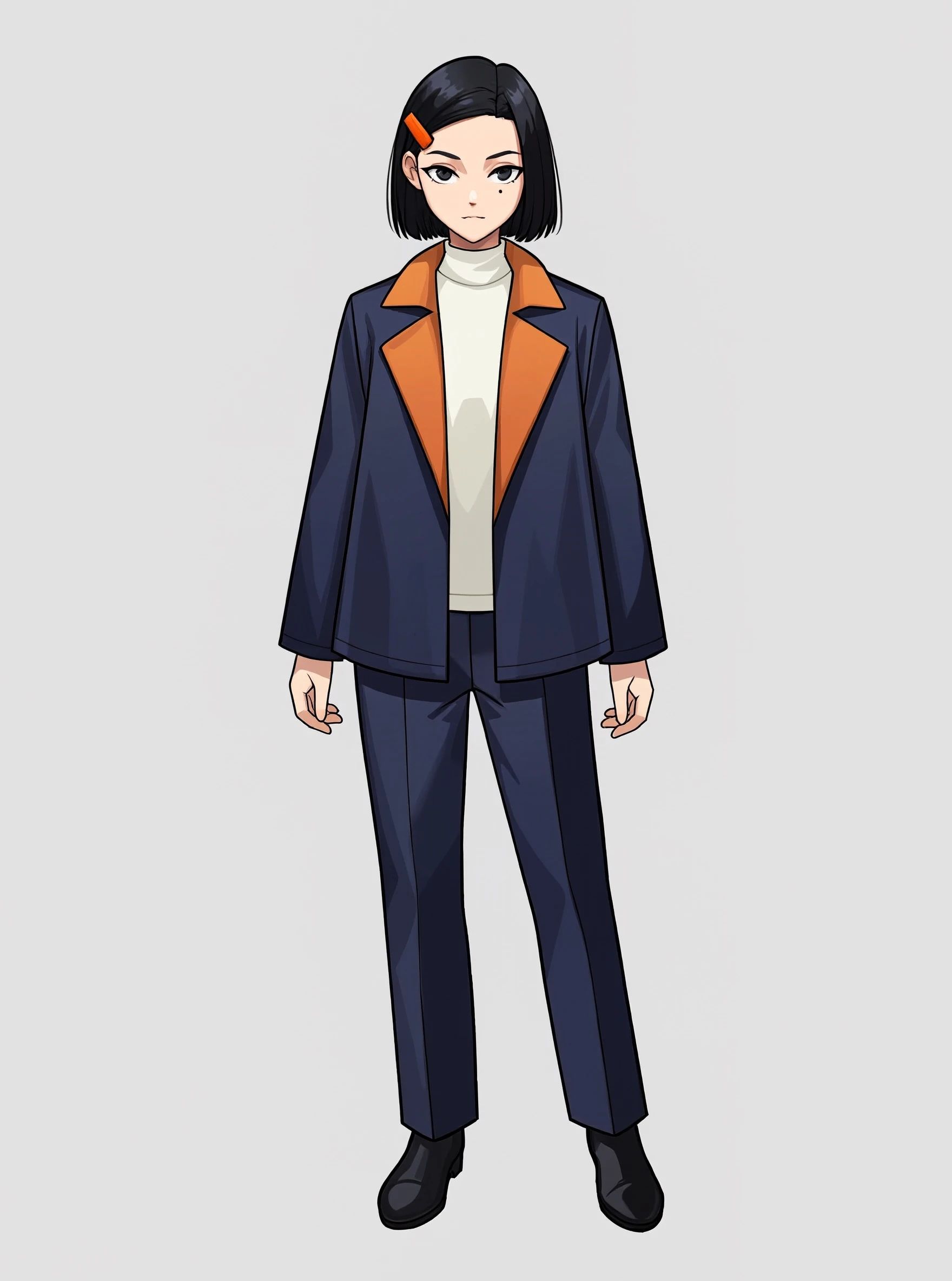
Using the exact same prompt, we generated full-body character sheets of a female detective in a Japanese/Korean manga style at both 2K and 4K tiers. The character design includes several specific details for item-by-item verification: chin-length short black hair, an orange hairclip on the right side, a small mole under the left eye, and a dark navy short trench coat with wide warm-orange lapels.
Prompt
Draw a character sheet of a female detective in a Japanese/Korean manga style, vertical 3:4 aspect ratio, single person full-body front view, framed completely from head to shoes. She is about 22 years old, with a calm, alert expression, looking straight at the camera. Chin-length short black hair with neat ends. She wears a striking rectangular orange hairclip above her right temple, and has a small mole under her left eye.
She wears a dark navy blue short trench coat with wide warm-orange lapels, layered over an off-white turtleneck sweater, paired with dark blue straight-leg pants and black ankle boots. She stands naturally with both arms hanging at her sides, hands empty, with the outlines of her hands and clothing clearly visible.
Use clean manga line art and distinct cel-shaded block shadows. Use dark blue as the primary color, with warm orange accented only on the hairclip and lapels. Use soft, even front lighting so facial features, the hairclip, and clothing details are all clearly visible. The background is solid light gray, and the frame contains only this single character.
2K Tier · 56 Seconds
4K Tier · 1 Minute 07 Seconds
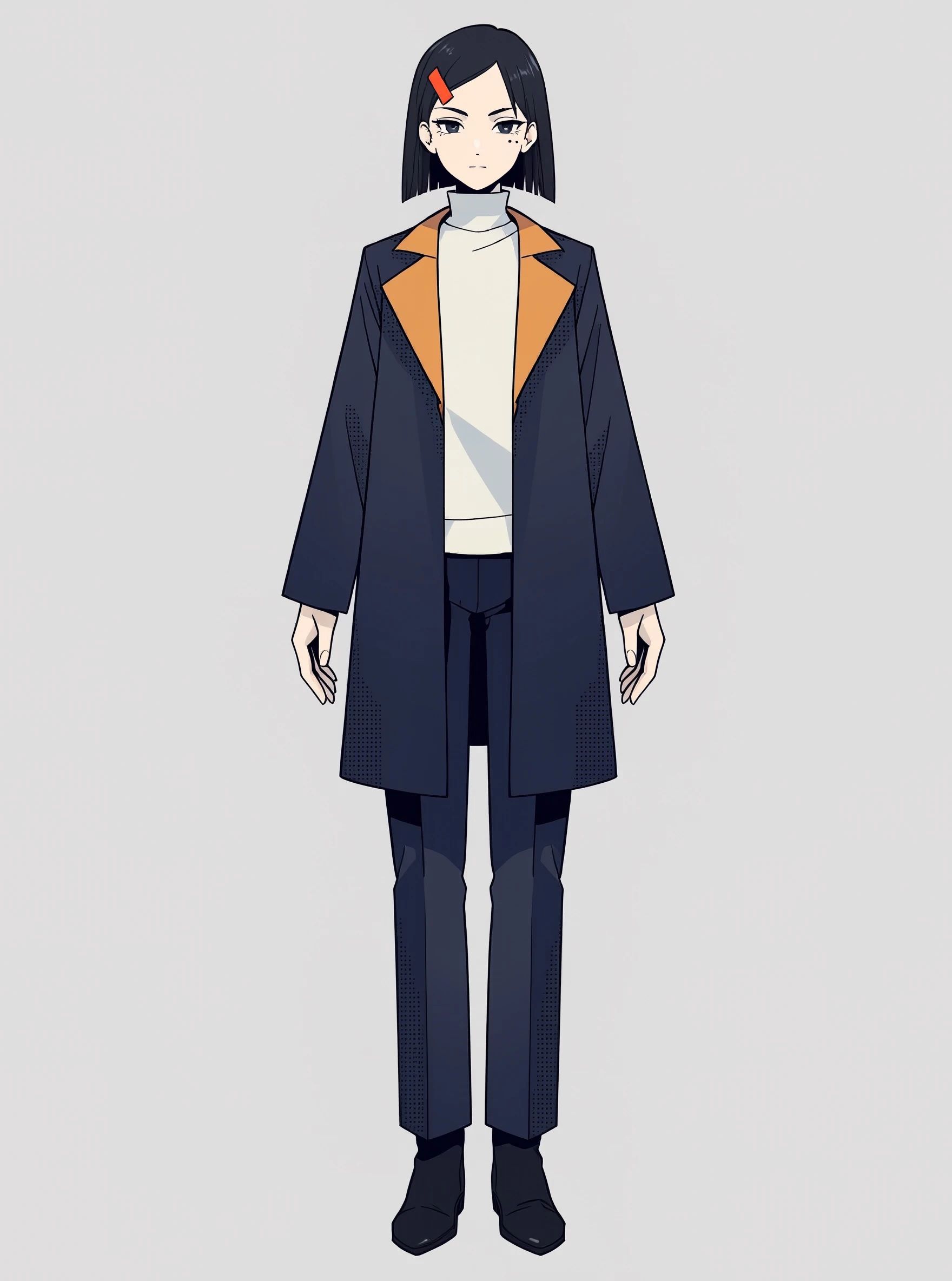
In its release announcement, MiniMax stated a model inference time of under 10 seconds for square 4K images. For these character sheets, we recorded the total generation wait time, timing the 2K and 4K tiers once each at 56 seconds and 67 seconds, respectively. Exact records of the test endpoint, model version, and timer start/stop points were not logged.
Both JPG files currently displayed measure 1760 × 2368 pixels, which matches the official API dimensions for a 3:4 aspect ratio at the 2K tier. The actual delivered dimensions and detail of the 4K tier require verification against the original raw file.
Both images accurately rendered the orange hairclip on the character's right side, the orange lapels on the dark blue coat, and the off-white turtleneck. The first image preserved the chin-length short hair and the single mole under the left eye, and the trench coat is closer to the short style specified in the prompt. The second image features a longer coat hem and adds a second black dot under the left eye. Both storyboard test groups below use the second image as the character reference.
2. Can MiniMax H3 Image Maintain Character, Scene, and Prop Consistency Across a Multi-Shot Storyboard?
Here, we test storyboard consistency across a continuous action sequence: the female detective walks into a café holding a document envelope, sits down by the window, places the envelope on the table, and finally looks down to inspect the seal. Every shot is checked against four criteria: whether the same detective is recognizable, whether her outfit changes, whether the document envelope seal remains consistent, and whether the relative spatial positions of the windows, booths, round table, and bar counter match up.
| Group | Reference Images | Test Sample Images |
|---|---|---|
| Group A | Character only | 1 wide shot, 1 medium shot, 1 close-up, plus 1 deviation sample |
| Group B | Character, Café, Document Envelope | 1 wide shot, 1 medium shot, 1 close-up, plus 1 six-panel storyboard |
Both groups share the second character image from the previous section. While the shared prompt specifies a "single small mole" and "short trench coat," the reference character image has two black dots under the left eye and a longer coat hem. Below, we verify styling continuity against the reference character image. Both groups display individual wide, medium, and close-up shots. Because the file dimensions of the medium and close-up shots differ between groups, the comparison below evaluates the displayed visuals item by item.
Scene and Prop Reference Prompts
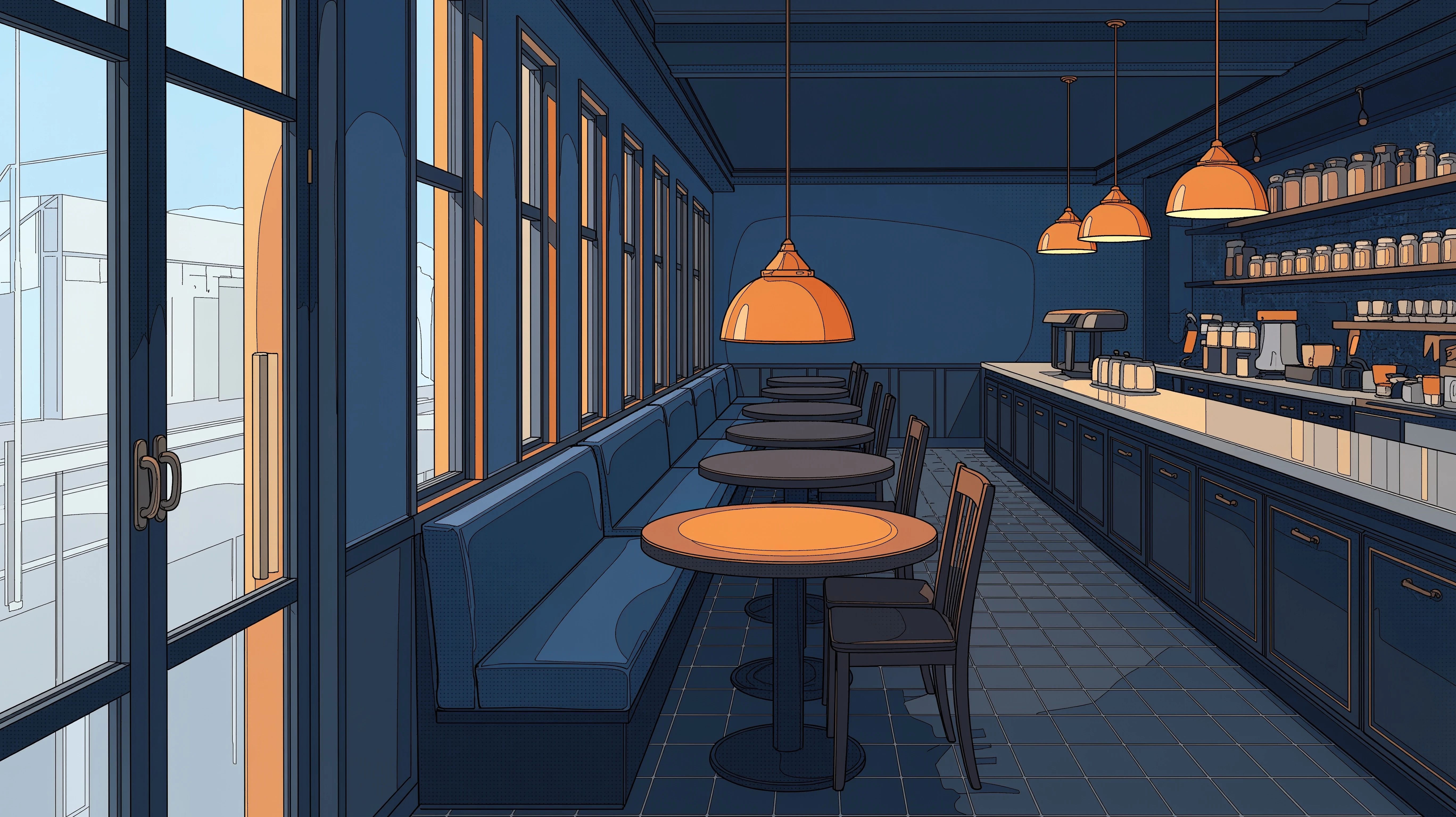
- Café. Draw an interior wide shot of an empty café in a Japanese/Korean manga style, with dark blue as the primary color and warm orange lighting. A glass door is at one end of the shop. Along one side is a continuous row of windows and dark blue booths; across from them is a bar counter, leaving an aisle in the middle. Counting from the entrance, place a dark round table by the second window, with an orange hemispherical pendant lamp hanging above the table. Make the positions of the door, windows, table, and bar counter clearly visible.
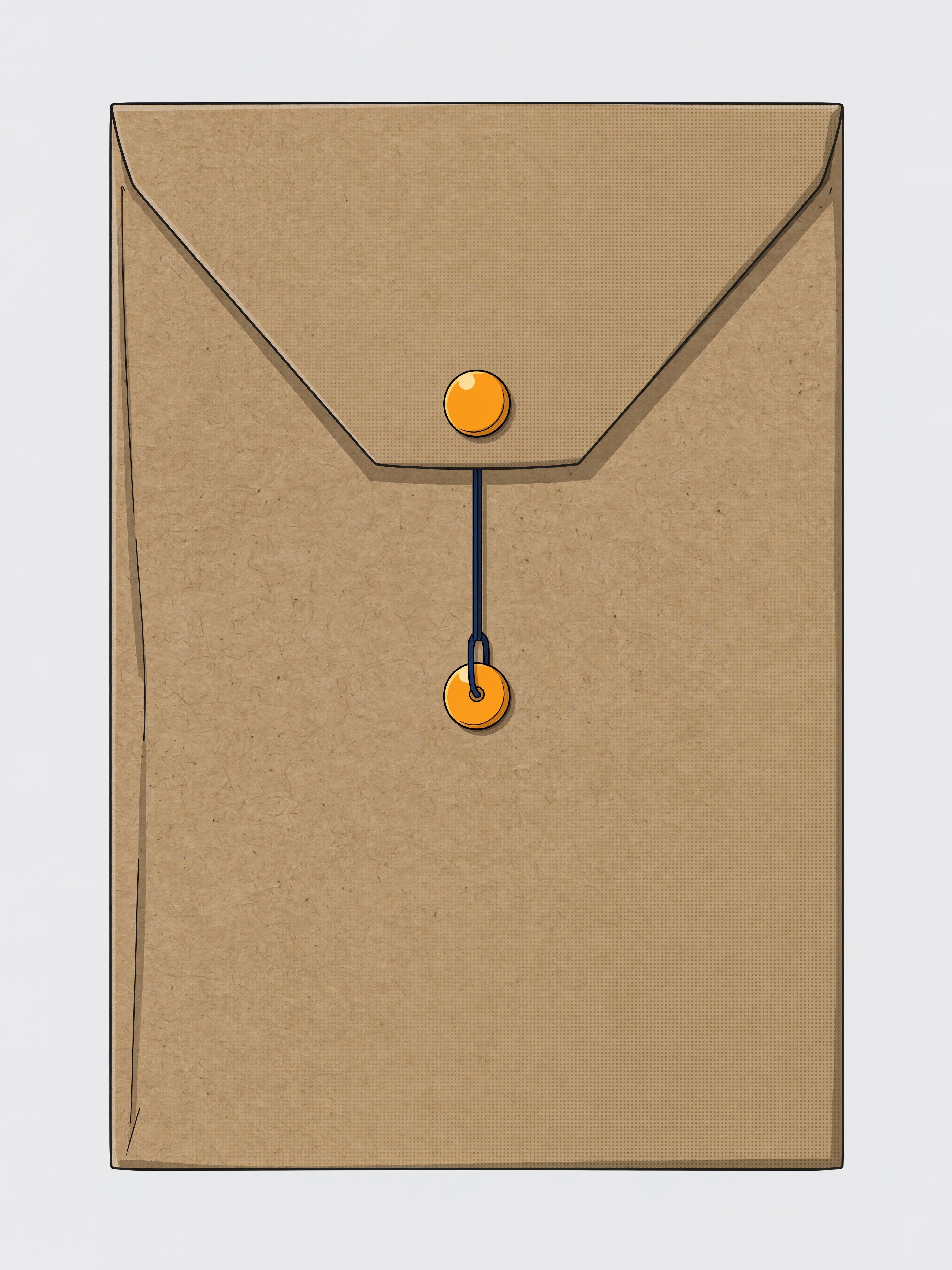
- Document Envelope. On a solid light gray background, draw an A4 vertical brown kraft paper document envelope facing the camera directly, with the flap closed. There is an orange round button clasp on both the upper flap and the lower body of the envelope, with a thin dark blue string wound around both orange clasps. Use clean Japanese/Korean manga line art to fully present the envelope shape and closure.
Café Reference Image
Document Envelope Reference Image
Shared Prompt in the Test Design
Generate a horizontal 16:9 Japanese/Korean manga storyboard frame using dark blue and warm orange as the primary colors. Carry over the face, chin-length black hair, right-side orange hairclip, single small mole under the left eye, dark navy short trench coat with wide warm-orange lapels, and off-white turtleneck from the female detective reference image. The café's glass entrance is at one end of the shop; along one side is a row of windows and dark blue booths, across is the bar counter, and in the middle is an aisle. Counting from the entrance, there is a dark round table by the second window with an orange hemispherical pendant lamp above it. The document envelope is an A4 vertical brown kraft paper envelope, flap closed, with a thin dark blue string wound around upper and lower orange button clasps.
Each shot appends its specific shot description directly after the shared prompt.
| Shot | Shot Description Appended After the Shared Prompt |
|---|---|
| 1 · Wide Shot | Shot from inside the café near the bar counter looking toward the glass door. The female detective is walking into the shop holding the kraft paper document envelope in her right hand; the round table by the second window and the orange pendant lamp appear in the same frame. |
| 2 · Medium Shot | Shot from the aisle side looking toward the window booth. The female detective sits by the second window, using her right hand to lay the document envelope flat on the round table with the button clasps facing up. The framing includes the window frame, booth, and the orange pendant lamp above the table. |
| 3 · Close-Up | Shot from diagonally in front of the round table toward the female detective. The document envelope remains on the same table, with the orange button clasps and thin dark blue string in the foreground. The female detective looks down to inspect the seal; her face and orange lapels are in frame, with the edges of the frame catching the window frame and dark blue booth. |
Storyboard Test Outputs
Group A · Character Reference Only · Wide Shot (5472 × 3072). The detective is near the window, holding the document envelope in her right hand.
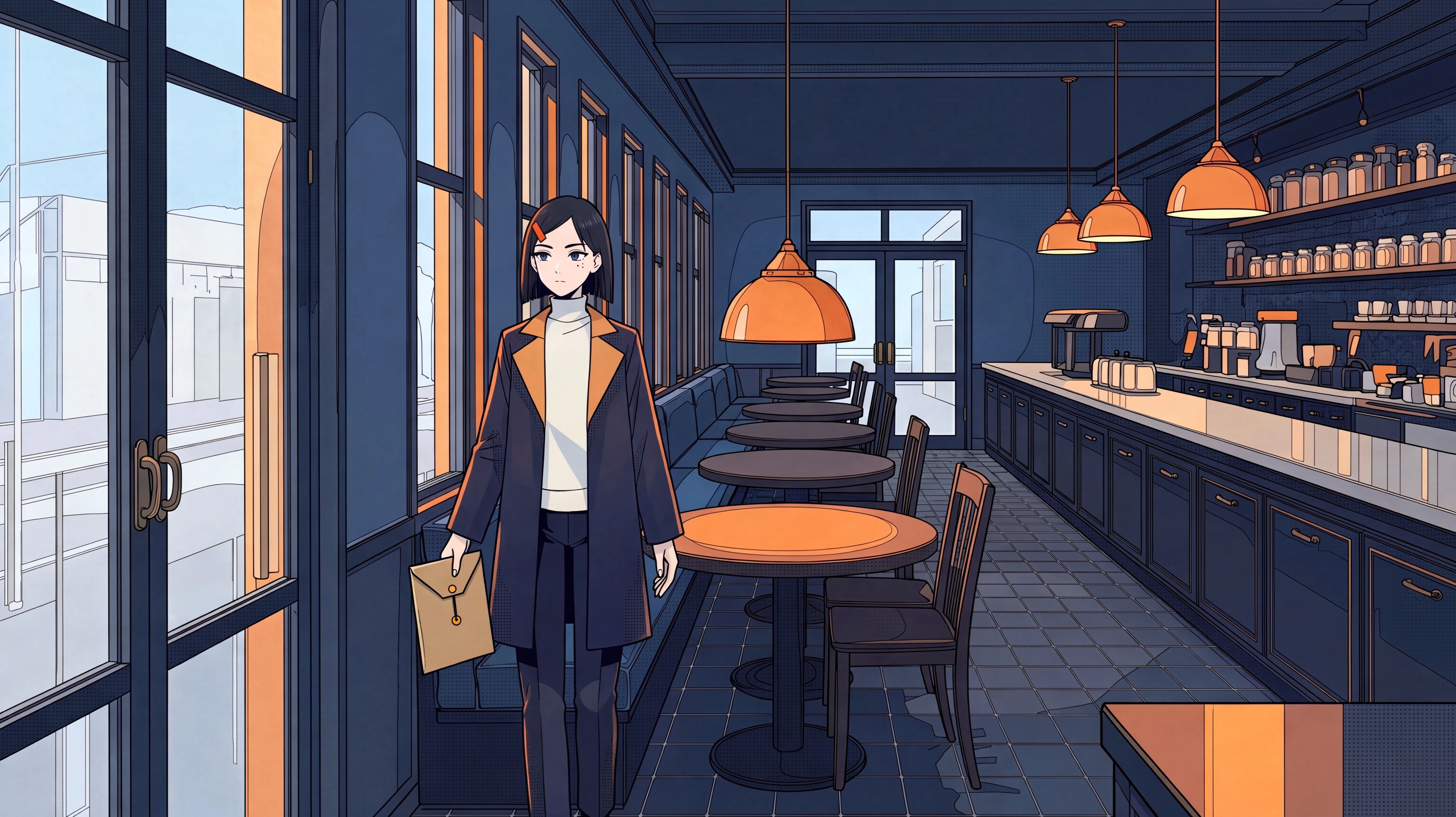
Group B · Character, Café, and Envelope References · Wide Shot (5472 × 3072). The detective walks into the aisle from the direction of the distant glass door.
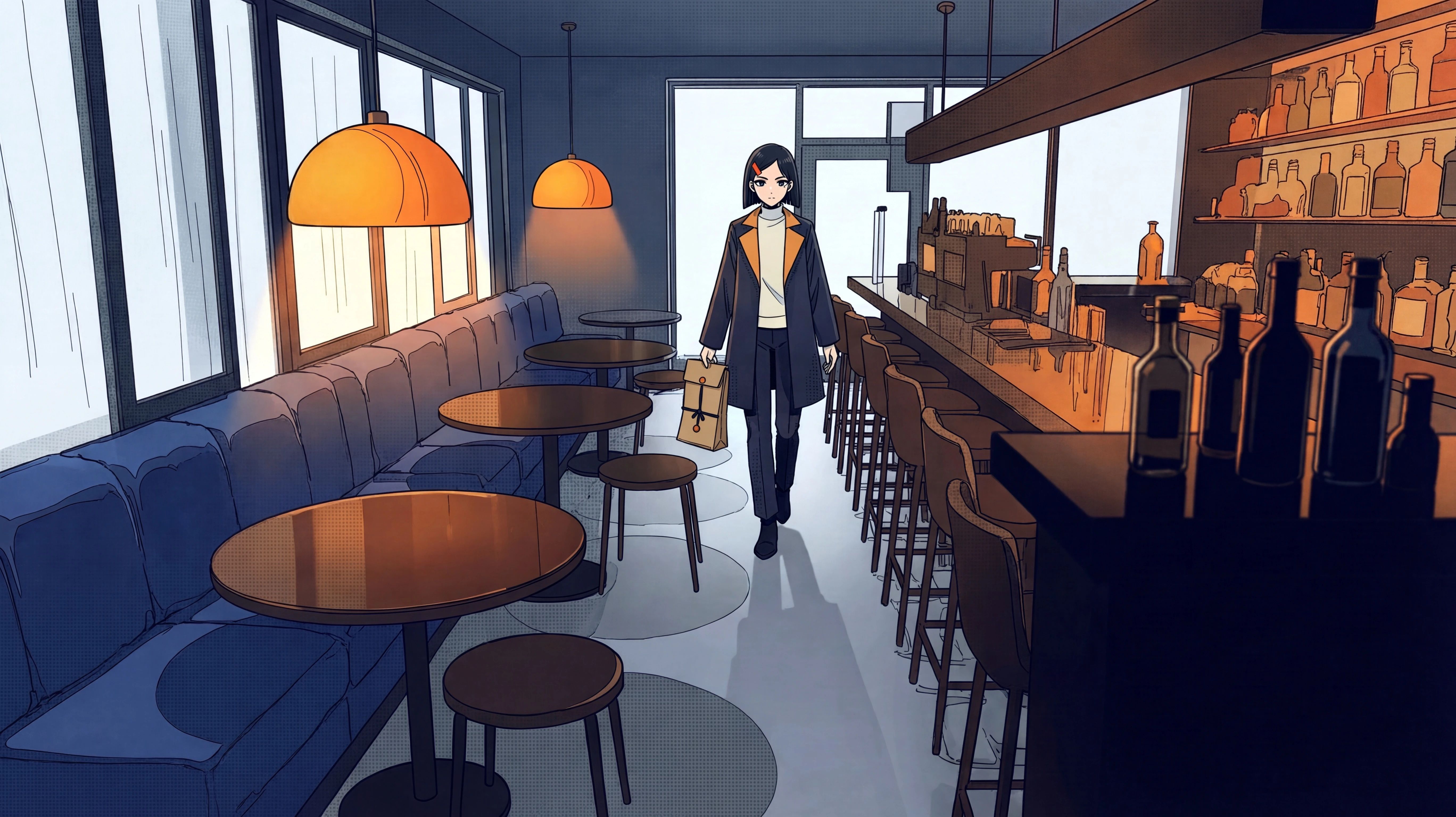
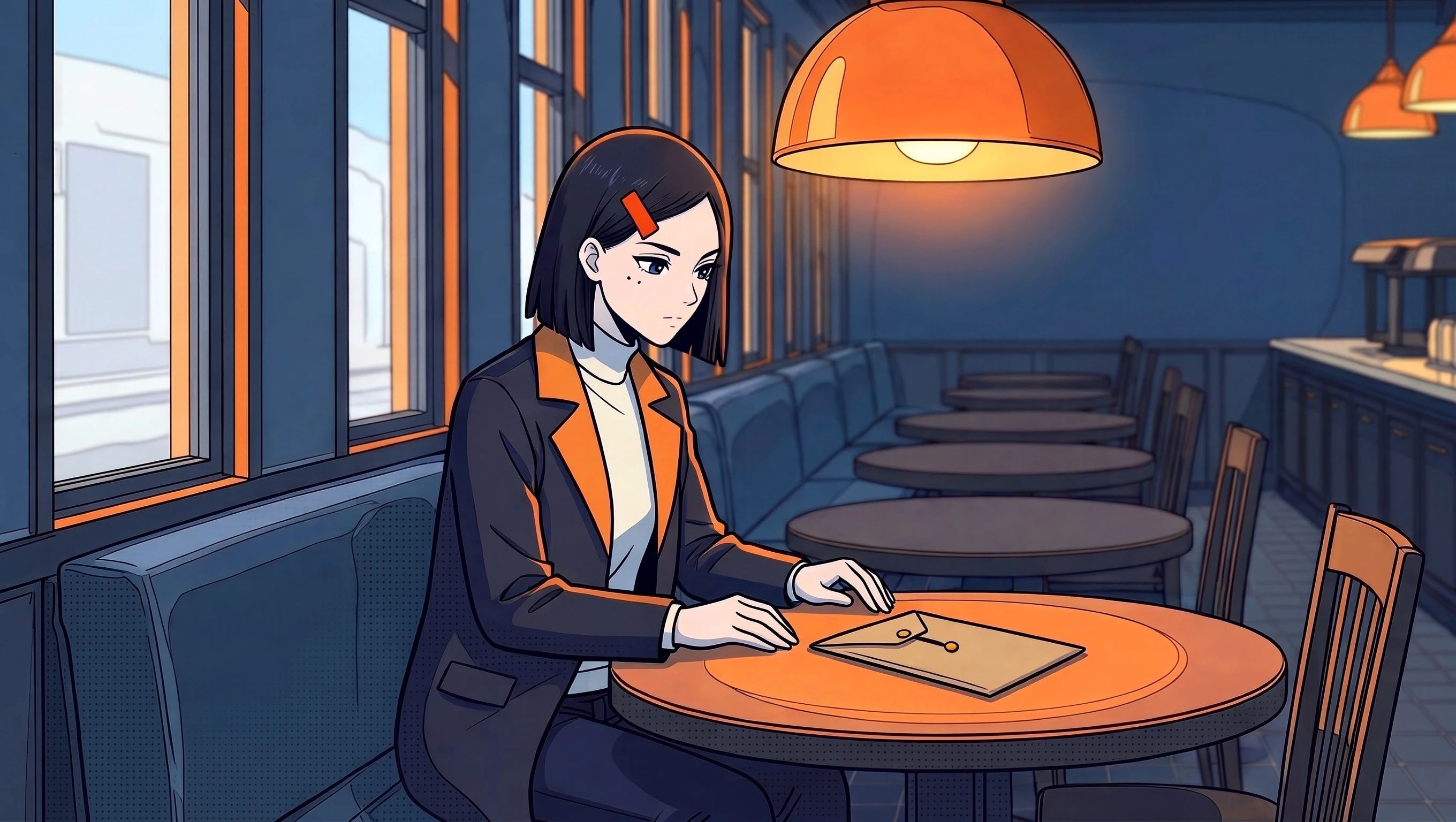
Group A · Character Reference Only · Medium Shot (5472 × 3072). The document envelope lies flat on the round table, with only one orange button clasp clearly visible near her hand.
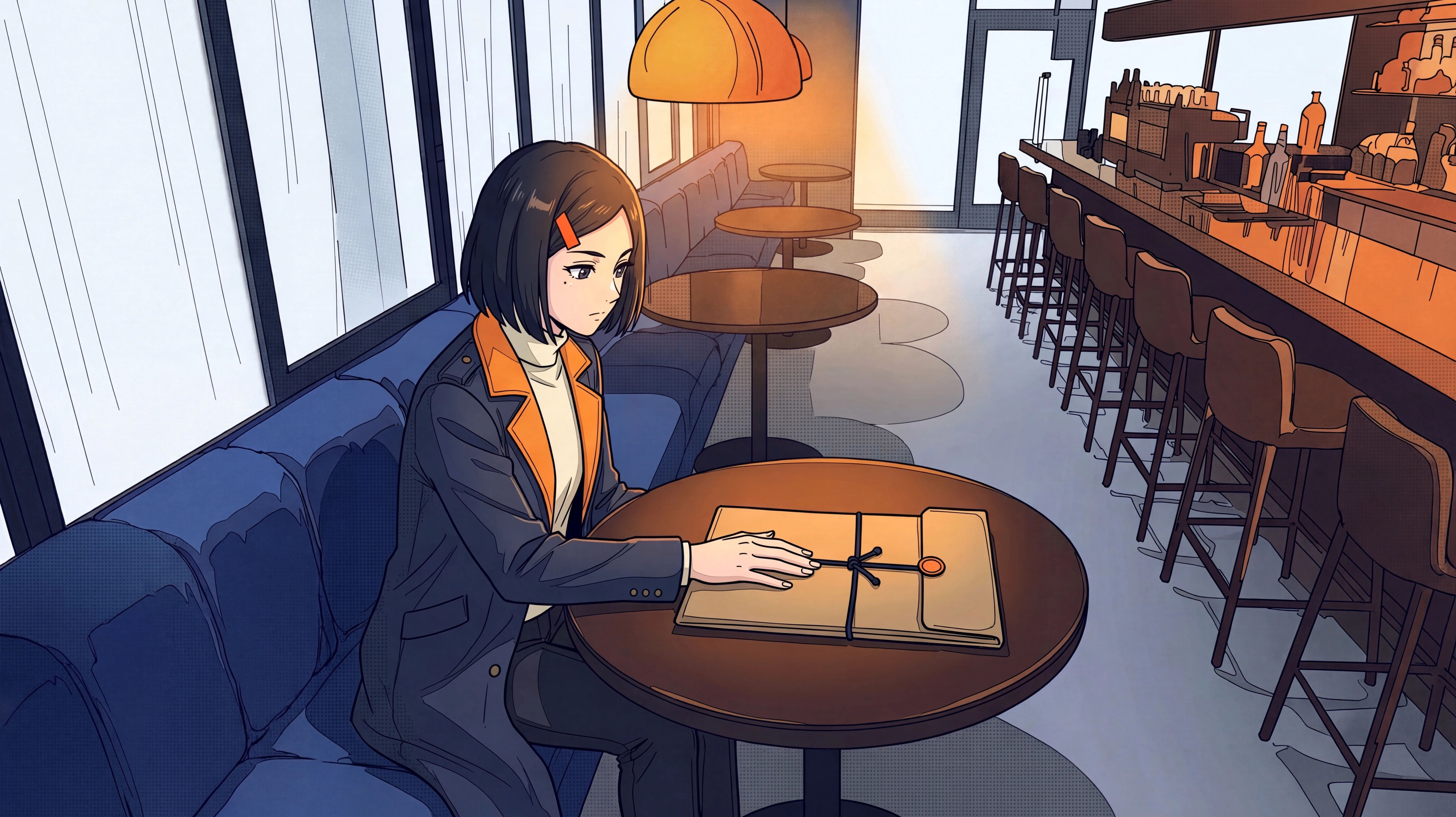
Group B · Character, Café, and Envelope References · Medium Shot (2720 × 1536). The female detective sits in the window booth; the document envelope lies flat on the round table under the orange lamp, with both button clasps and the connecting string visible.
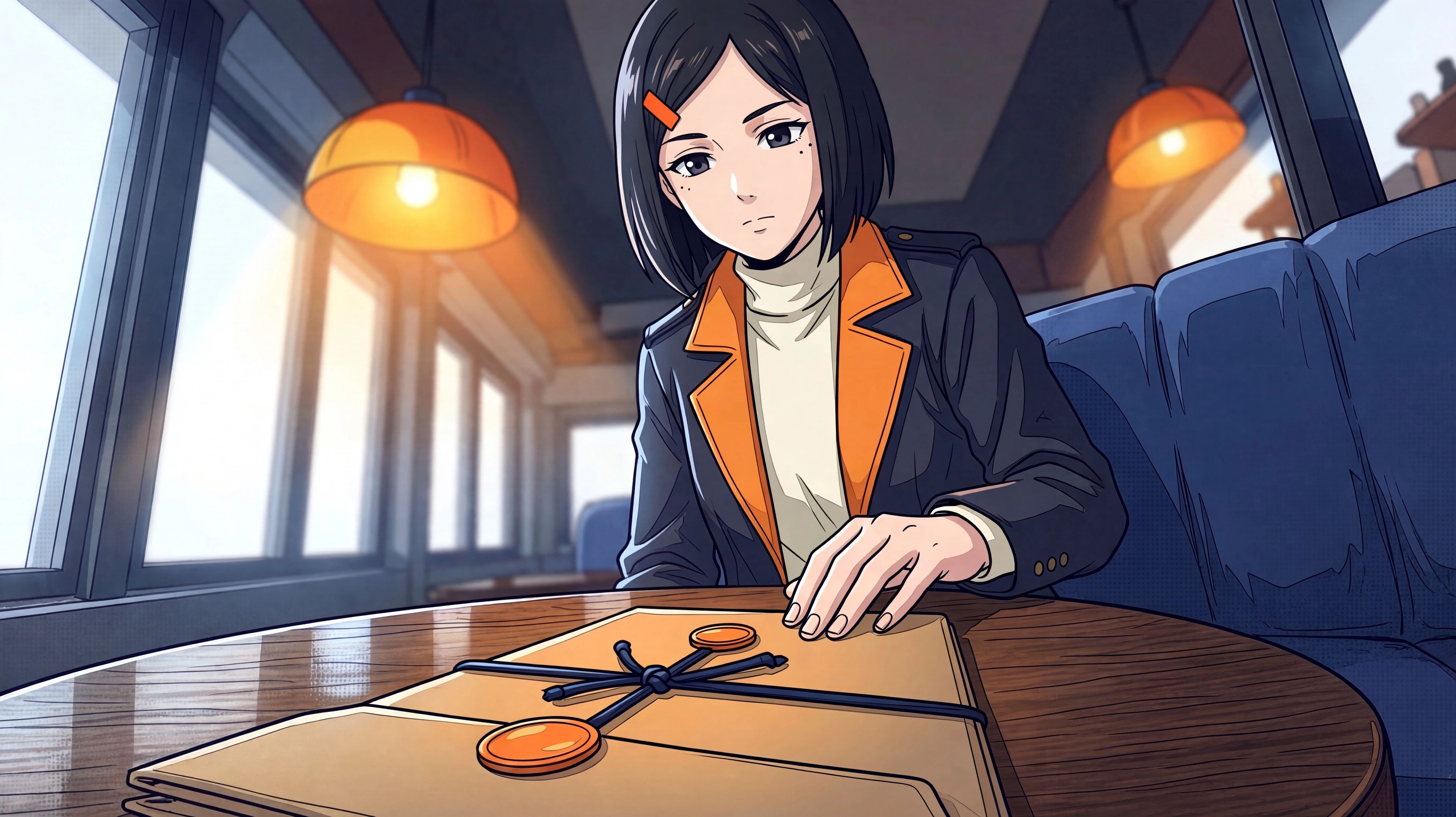
Group A · Character Reference Only · Close-Up (5472 × 3072). Black dots appear under both eyes, and the blue string wraps horizontally around the envelope in a knot.
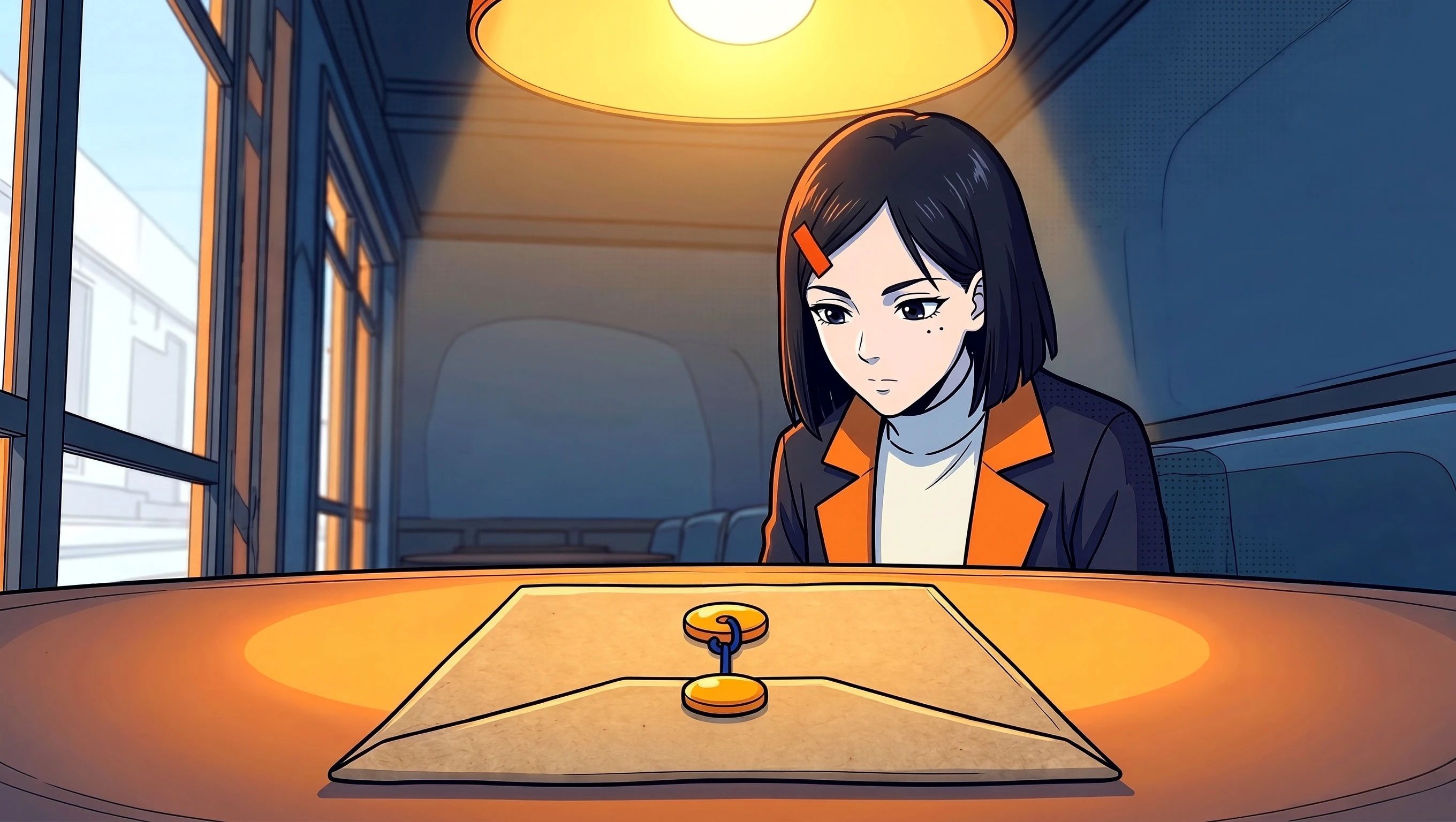
Group B · Character, Café, and Envelope References · Close-Up (2720 × 1536). Retains the two black dots under the left eye, and the document envelope uses a vertical blue string connecting the two orange clasps.
Group A Deviation Sample · The hairclip becomes two clips and switches sides, the original trousers change into lower wear that exposes the thighs, and the document envelope stands upright on the table.
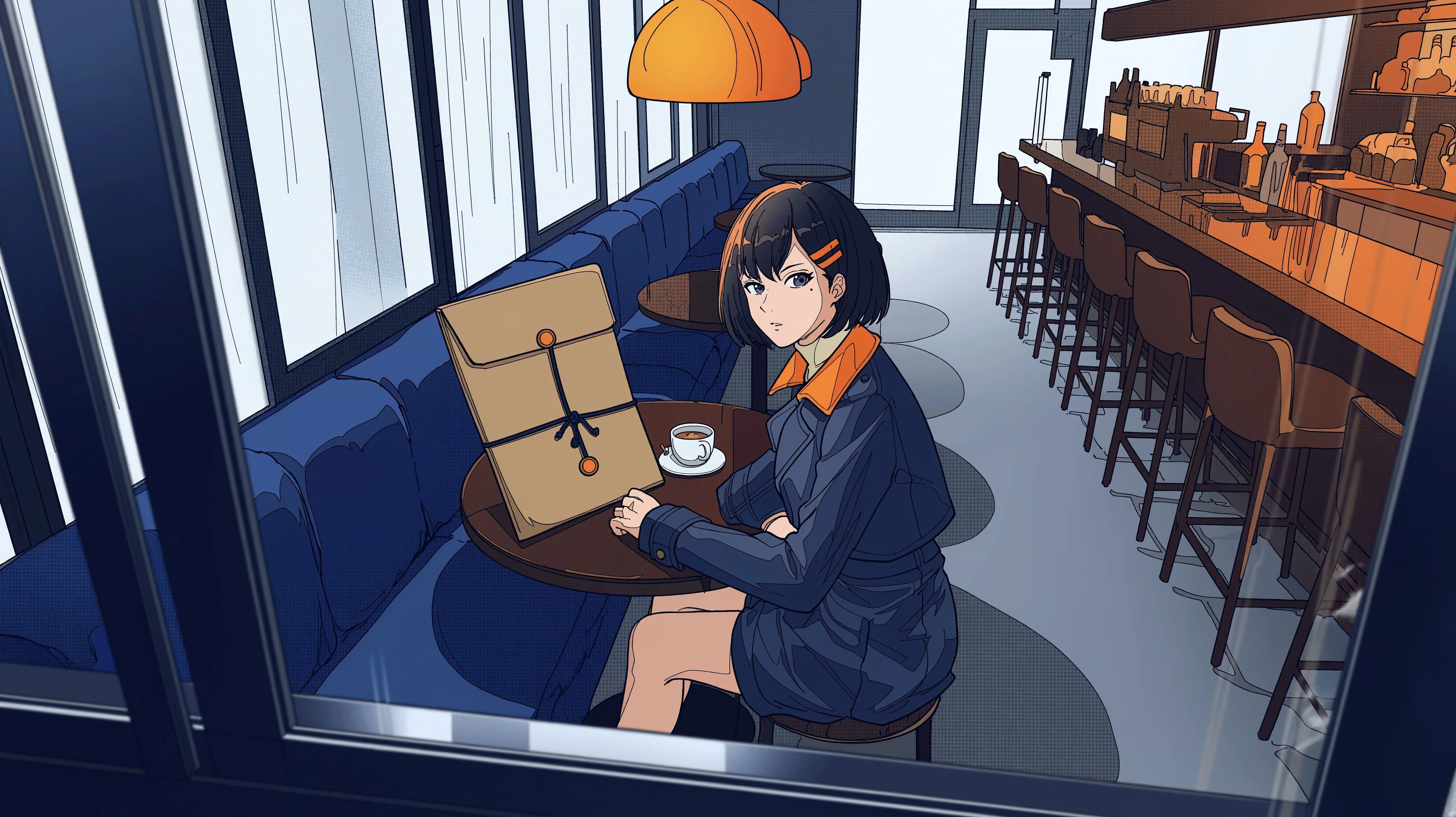
Group B Six-Panel Storyboard · The window round table, orange lamp, and double-clasp document envelope recur across multiple panels; the character entering the door in the top-right panel has empty hands.
| Checklist Item | Differences Between the Two Sample Groups |
|---|---|
| Character Identity | Both groups' wide and close-up shots clearly show the short black hair and single orange hairclip. In Group B's close-up, the two dots under the left eye match the shared character reference more closely. |
| Wardrobe | Both groups retain the dark blue coat, orange lapels, and light-colored turtleneck. Group A's medium and close-up shots add shoulder epaulets and cuff buttons, and one deviation sample changes the lower garment. |
| Props | In both wide shots, the document envelope is held in the right hand, and in the seated shots, it rests on the round table. Group B's medium and close-up shots show the double clasps and connecting string, staying closer to the prop reference. Group B's wide shot still exhibits a horizontal tie string. |
| Spatial Relationships | Both wide shots place the window booths and bar counter on opposite sides of the aisle. Group A places the character near the window, while Group B places the character walking down the middle of the aisle; exact table positions still require verification across matching camera angles. |
If editing these frames into a sequence, prioritize checking details that get magnified in close-ups. For example, if the document envelope in the wide shot has a horizontal string, cutting to a close-up with only a vertical string may lead viewers to think the prop changed.
3. Can It Accurately Typeset Both Chinese and English Text on a Poster?
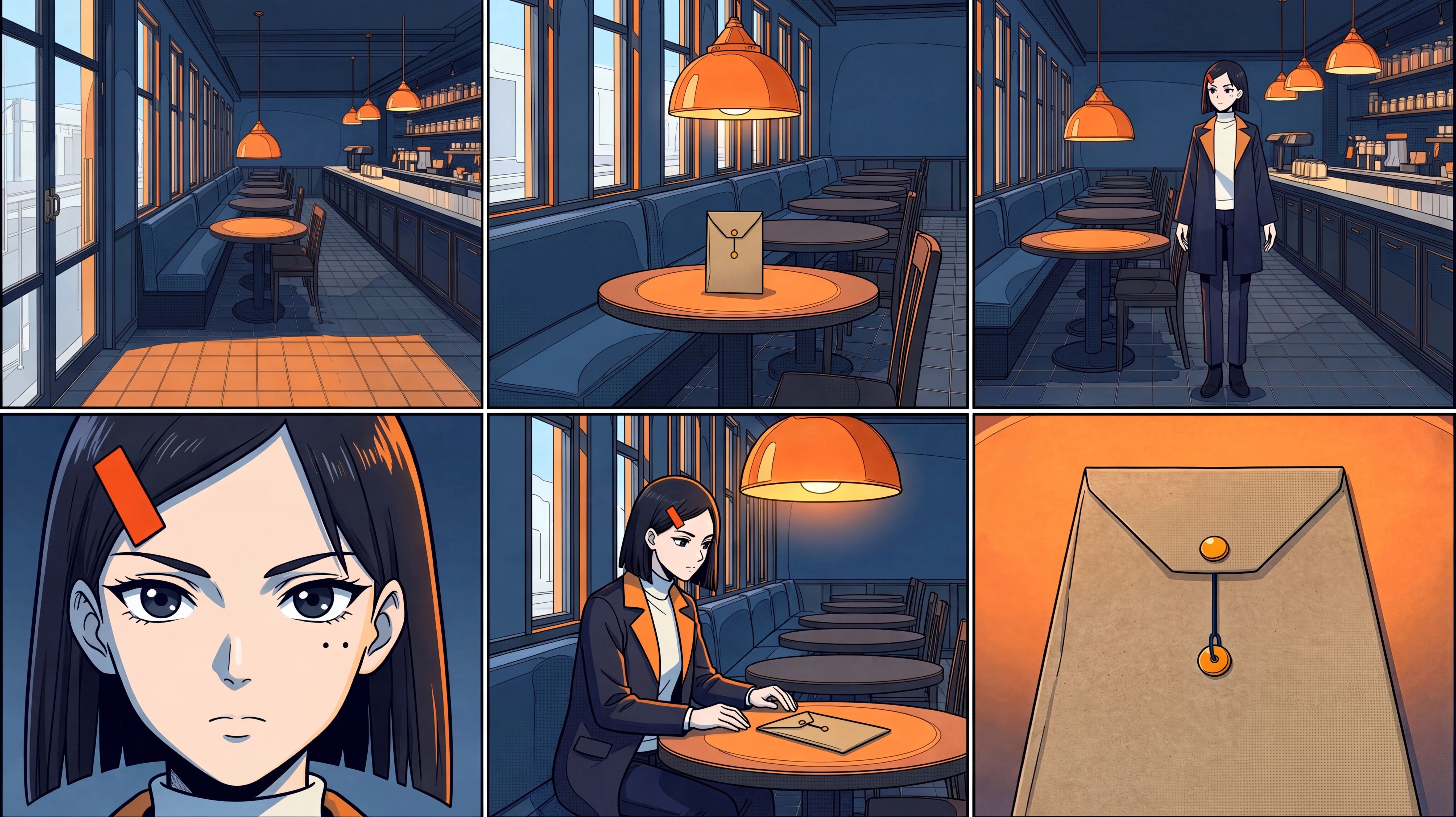
We uploaded the café close-up from Group B—where the female detective inspects the document envelope seal—to convert this storyboard frame into a screening poster for the story The Sealed File (《密封档案》).
Prompt
Convert the uploaded café close-up into a 4:5 vertical screening poster. Carry over the original image's blue-and-orange color scheme, window booth, and warm orange pendant lamp. The female detective remains seated by the window, looking down at the kraft paper document envelope on the round table. Preserve the single orange hairclip on her right side, the two black dots under her left eye, and the wide orange lapels of her dark blue trench coat. Keep her face and the two orange round clasps on the document envelope clearly in frame.
Leave dark blue typesetting areas at the top and bottom of the frame. On the first line at the top, write "THE SEALED FILE" in large condensed type; on the second line, write "密封档案" at roughly half the font size. On the two lines at the bottom, write "11月14日" and "DOORS 8 PM" respectively. Typeset only these four lines of text on the poster; quotation marks are only used to mark the text boundaries.
Results and Observations
Poster Base Image · Group B Close-Up
Final Poster · The Sealed File
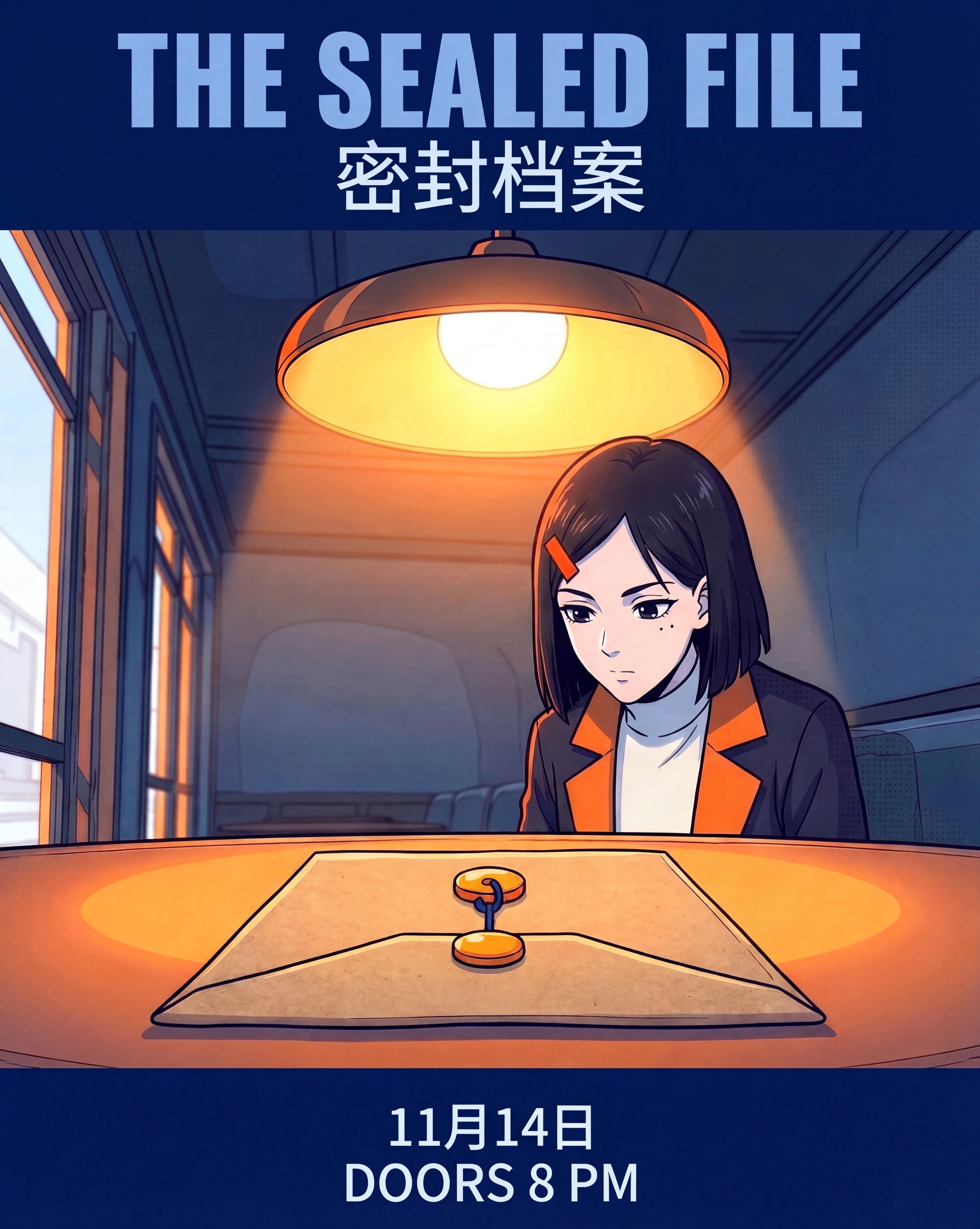
Checking this poster line by line, "THE SEALED FILE", "密封档案", "11月14日", and "DOORS 8 PM" all match the prompt accurately. The English title is the largest, the Chinese title sits on the line below it, and the date and entry time are placed at the bottom. After converting the original horizontal close-up into a vertical format, the detective's orange hairclip, the two black dots under her left eye, the window booth, and the two orange clasps on the document envelope remain clearly recognizable.
4. If You Only Change the Hairclip Color, Do Other Elements Change Too?
We used the second character sheet from Part 1 as the pre-edit baseline. The long trench coat, hairstyle, and double dots under the left eye in this image correspond directly to the silver hairclip sample.
Prompt
Change the orange hairclip on the right side of the female detective in the image to matte silver. Preserve the rectangular outline and position of the hairclip, as well as the character's face, hairstyle, clothing, pose, background, and lighting.
Results and Observations
Before Edit · Orange Hairclip
After Edit · Silver Hairclip
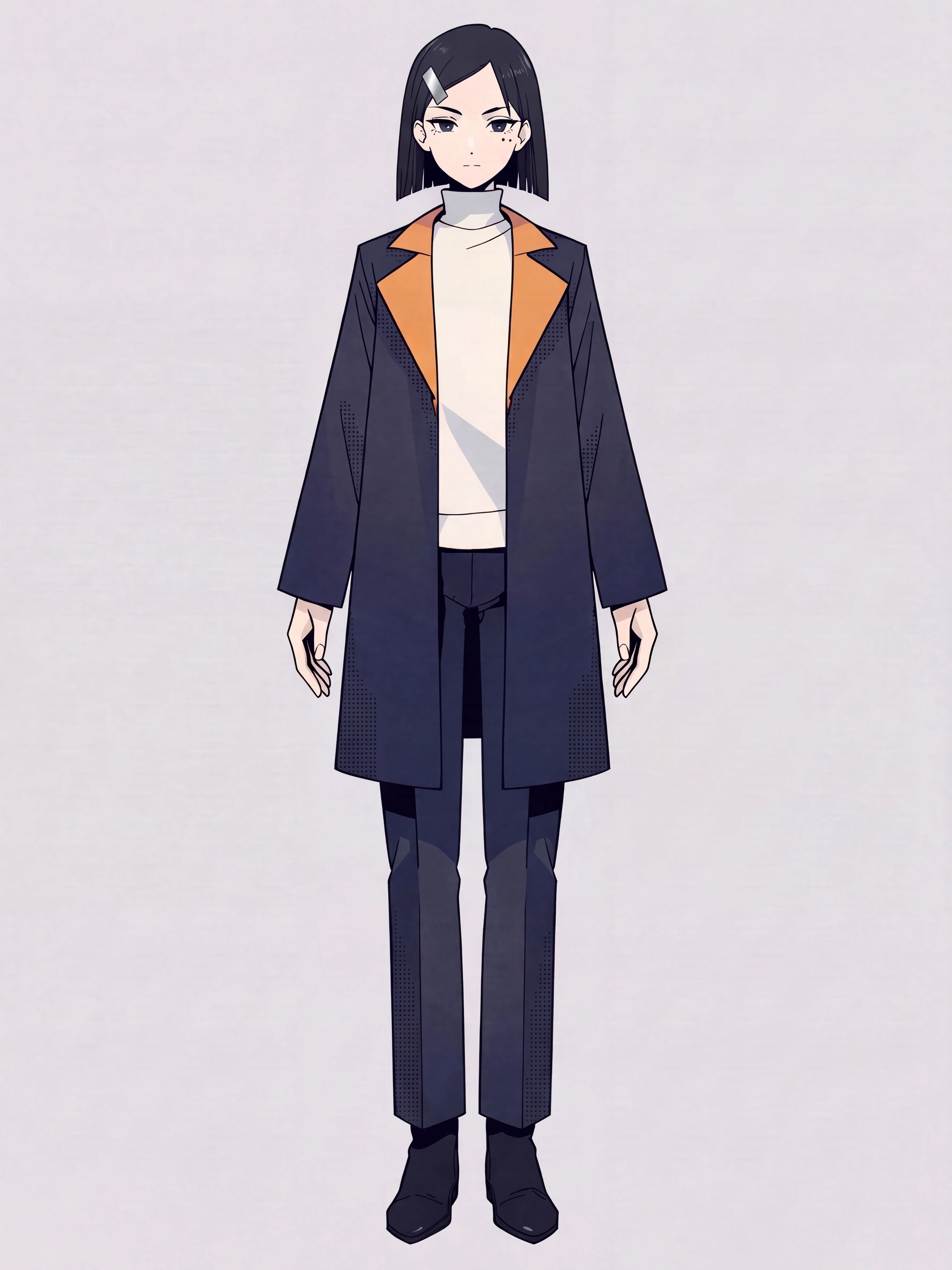
The hairclip on the right side changed from orange to silver, keeping its position and rectangular outline largely intact. The two black dots under the left eye, the orange lapels, and the standing pose were also preserved. However, there is a distinct bright highlight band across the hairclip that weakens the matte finish, and the background shifts slightly toward a pinkish-gray compared to the base image. This sample successfully completed the color swap, with minor deviations in material finish and background tint.