Introduction
An OC prompt that only describes appearance can make an attractive image, but it rarely creates a character that lasts. "Silver hair, red eyes, black coat" is a visual shell. It does not explain how the character behaves, what changes under pressure, what belongs to their world, who matters to them, or why a viewer should remember them after the first image.
OC communities often care about progress, relationships, long-term iteration, inside jokes, personal symbols, and visual mechanisms. A character may have hair that changes shape with stress, a charm that glows near old memories, a mask they never remove in public, or a rival who knows their real name. Those details make the OC feel like someone who belongs to a world.
For ArcLoop content, the respectful framing is simple: your character, your world, AI is your tool. The workflow should help you document, test, and extend your own ideas. It should not flatten OC work into "make me a pretty avatar." When a character needs repeatable face acting, bind multiple expression reference images to its character asset — see Character Profile Fields.
Core Principles
The first principle is mechanism before decoration. A mechanism is a rule that can show up visually or emotionally: a pendant warms near danger, hair ribbons loosen when the character lies, or ink marks spread when magic is overused.
The second principle is relationship before pose. A character becomes clearer through how they treat friends, rivals, mentors, enemies, pets, viewers, and places.
The third principle is world pressure. The OC should not float in empty style space. Their clothing, tools, habits, and fears should make sense inside their world.
The fourth principle is reusable anchors. Good OC prompts define traits that can survive across character sheets, storyboards, voice lines, and videos.
The fifth principle is originality through structure. Inspiration is normal, but the final OC should have distinct rules, relationships, visual language, and story use.
Step-by-Step OC Development Method
Start with the base identity. Write the name, role, age range, world, silhouette, outfit, palette, and two fixed visual anchors. Keep it short.
Add a visual mechanism. Choose one rule that can be shown in images or video. It should be easy to animate and easy to recognize.
Add a relationship map. Define at least three relationships: someone the OC trusts, someone they avoid, and something non-human they care about, such as a city, weapon, animal companion, song, or inherited object.
Add a contradiction. A brave courier who is afraid of heights, a cheerful healer who hates being thanked, or a formal prince who loves cheap street snacks becomes easier to write.
Convert the profile into references. Make a character sheet, expression sheet, prop sheet, and one scene test. Do not jump straight into a dramatic final video.
Write prompts from the world rule. Instead of asking for "cool OC art," ask for "show the moment the compass pendant reacts to a forbidden route." Use Hook to Reveal Storyboard when the rule needs to become a short scene.
Why Appearance Alone Breaks Down
Appearance-only prompts are fragile because they force every scene to reinvent meaning. If the character has no rule, prop, relationship, or tension, every new generation becomes a costume test. That may be fun, but it does not build a series.
Mechanics and relationships give prompts a reason to exist. A glowing compass creates a mystery shot. A rival's scarf tied to the OC's bag creates history. A world rule about floating mail routes creates action. A relationship with a broken robot bird creates emotional stakes. These details also help voice prompts because the character has habits, not just a look.
The goal is not to overbuild a lore document. The lazy version is one page: appearance, mechanism, world rule, three relationships, expression range, and first scene. That is enough to guide many prompts.
Example Prompt 1: OC Mechanism Sheet
Create a 2D anime OC concept sheet for an original character named Nami, a mapmaker in a city built on drifting islands. Appearance: short navy hair, warm brown eyes, tan travel coat, red scarf, fingerless gloves, ink-stained satchel, and a cracked glass compass pendant. Visual mechanism: when Nami lies or hides fear, the compass needle spins and emits a faint red glow. Show front view, side view, back view, and three small mechanism thumbnails: calm compass, nervous spin, danger glow. Plain background, clean cel shading, readable outfit, no scene clutter, no text labels, no logo, no copied symbols.
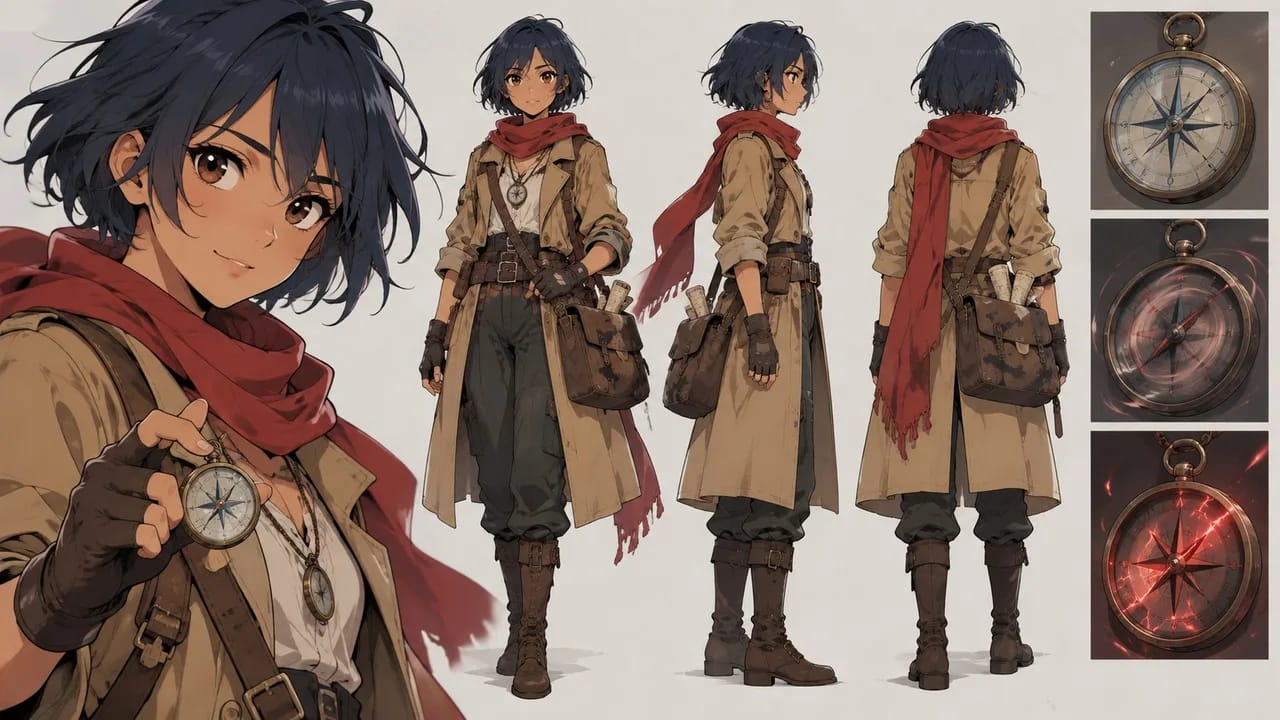
This prompt turns a character trait into a repeatable visual rule.
Example Prompt 2: Relationship Scene
Use Nami's character sheet as identity reference. Create a 7-second 2D anime scene in a floating-island repair dock at sunset. Nami sits beside a small broken delivery drone she secretly cares about, tightening a loose wing screw while pretending not to worry. Main action: the drone chirps weakly, and Nami's compass pendant glows red for one second before she covers it with her scarf. Camera: locked medium close-up from table height. Supporting motion: scarf edge moves in the wind, tiny sparks flicker from the drone wing. Preserve navy hair, tan coat, red scarf, satchel, and pendant. No dialogue text, no extra characters, no logo.

The scene reveals relationship, mechanism, and personality without exposition.
Example Prompt 3: Old Design Remake Prompt
Remake an older OC design into a cleaner current character sheet while preserving creator-owned identity anchors. Keep: navy short hair, red scarf, mapmaker role, cracked compass pendant, and guarded personality. Update: simplify the travel coat silhouette, reduce tiny belt clutter, make the satchel readable, and add clearer expression range. Generate front, side, back, neutral face, embarrassed face, determined face, and worried face on a plain background. Style: polished 2D anime concept art with simple cel shading and practical costume design. The result should feel like the same character matured inside her floating-island world, not a different person. No text, no logo, no unrelated symbols.
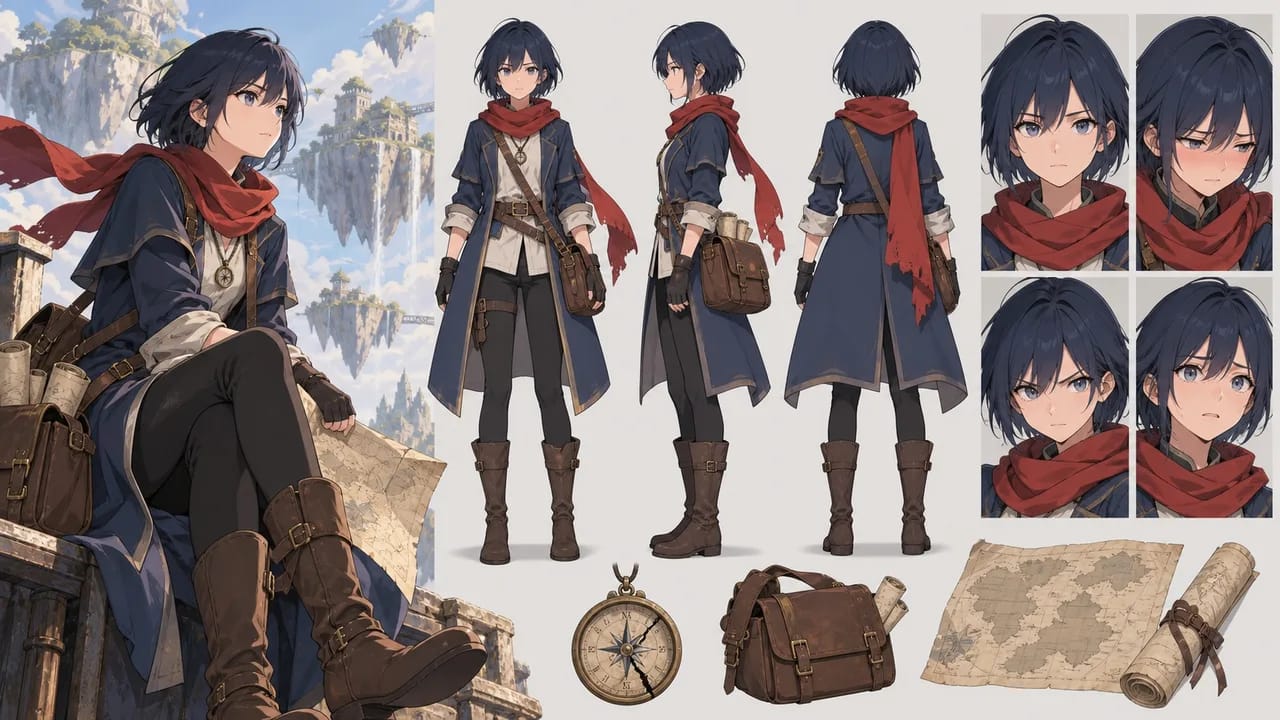
This is useful for long-running OCs whose older details need cleanup without losing history.
Common Mistakes
The biggest mistake is stopping at appearance. A strong design still needs behavior, pressure, and a reason to recur.
Another mistake is writing too much lore before making anything. Keep the first OC brief small enough to test with a sheet and one scene.
Creators also add mechanisms that cannot be seen. If the rule matters visually, make it show through color, movement, prop behavior, expression, or environment response.
A fourth mistake is making every relationship dramatic. Quiet recurring bonds often make better short scenes than constant crisis.
Finally, do not use AI to erase authorship. The useful workflow documents your intent and helps explore it across media.
FAQ
What is an OC visual mechanism?
It is a repeatable rule that can be shown on screen, such as a charm glowing near danger, hair changing shape with emotion, or shadows reacting to a secret.
How many relationships should I define first?
Three are enough: someone trusted, someone avoided, and one important object, place, or companion. Add more after the first scenes work.
How does this help AI prompts?
Mechanics and relationships give each prompt a concrete event. Instead of describing only a look, you can prompt a moment that reveals how the OC works in their world.