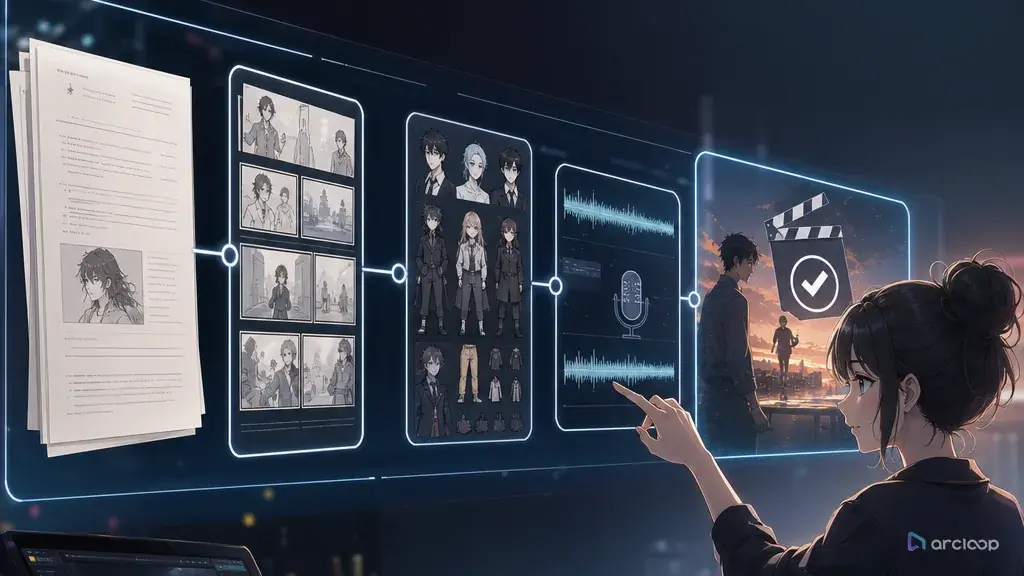
Where It Usually Breaks Down
Most people making their first AI short drama drop the whole script straight into the generator and expect a finished episode to come out the other end. The lead looks fine in scene one, drifts into a different face by scene two, the blocking falls apart once more than one character is on screen, and the lines sound like they're being read off a page. The root cause is always the same: the characters were never built into assets first, the episode was never broken into individual shots, and the voice was never bound to the character. Prompts just get longer and messier, and the only fix left is rerolling generations over and over until something barely usable shows up.
The problem isn't that the script isn't dramatic enough — it's that the script never gets turned into characters, shots, voiceover, and a monetization check before generation starts. The easier path is to open your ArcLoop workspace first, use the AI short drama guide to find a shot structure, and lock the leads down with the character asset library guide — so the opening hook, episode-to-episode continuity, and character IP reuse are all planned for from the start.
How This Actually Works
A script is a piece of narrative text, not a video production spec. It tells you what happens, but it doesn't reliably specify the shot size, character turnaround, key visual, character asset library, blocking, voice, edit pacing, or cover hook for each shot. Feed a script straight into video generation and the system fills in those gaps itself — and the more it has to fill in, the more likely characters are to drift from shot to shot.
It helps to separate the terms for character consistency. A character asset is the minimum identity spec — role, appearance anchors, and a do-not-change list. A character turnaround covers front, side, and back proportions and costume. An extended turnaround adds a three-quarter or key rear angle, useful for turns, glances back, and multi-character shots. A character reference sheet usually lays the key visual, turnaround, expressions, costume, and props out on one page for review. A character asset library is the next level up — a project-wide record that keeps visuals, voice, blocking, and reference rules in one place long-term. The progression is: start with a character asset, add a turnaround or extended turnaround, assemble a reference sheet, then fold it into the character asset library.
A stable script-to-video pipeline splits the script into three layers first. The narrative layer covers character goals, conflict, twists, and each episode's ending. The production layer covers the storyboard, shot list, character asset library, scenes, lighting, and voiceover. The monetization layer covers audience, headline angle, posting frequency, cost ceiling, reusable assets, and the conversion action. Any real AI short drama workflow needs to cover all three layers, because what creators actually care about is whether they can keep producing episodes — not whether they can generate one sample clip.
ArcLoop fits in the middle of the production layer: use the AI short drama guide to find a comparable template, use the storyboard template to break the script into scene-by-scene shots, then build the characters into assets and bind reference images and voice through the character asset library guide. In your ArcLoop workspace, reference that asset in every shot with @CharacterName, so the voice and the face don't change from one episode to the next.
Step-by-Step
Step 1: Pin down the concept. Don't start with something broad like "a wealthy family revenge story." Write an executable concept instead: target audience, main conflict, opening hook, episode length, and monetization goal. For example: "Vertical AI short drama — the lead discovers a rigged contract, the first three seconds show the evidence twist, goal is testing whether the series holds viewers episode to episode."
Step 2: Break the script into scenes. Each scene should carry exactly one action goal: discovery, misunderstanding, confrontation, retaliation, or reveal. The clearer the action goal, the easier the scene is to storyboard. Skip long interior monologues at this stage — video generation can't process them.
Step 3: Build the character asset library. Think of it as a callable identity record for the system: lock down appearance, color palette, signature props, voice, and a do-not-change list up front, so every later shot pulls from that record instead of reinventing the character. At minimum, include the lead's key visual, character turnaround, expression set, costume rules, and do-not-change list. Make the do-not-change list strict — hairstyle, face shape, eyes, jacket silhouette, and key props shouldn't move. That's what saves you from endless rerolling and from the character looking like a different actor in every frame.
Step 4: Break each scene into a shot list. For every shot, write down the shot size, action, line, emotion, duration, blocking, and lighting. Short-form video has a real 15-second rule: if the conflict isn't clear within 15 seconds, viewers drop off; without a second pressure point by the 30-second mark, completion rates fall. Don't force anything past 30 seconds into one long take — break it into 3-to-7-second shots and stitch them together in roughly 15-second beats: opening hook, relationship development, evidence twist, and the moment that pulls viewers into the next episode. Keep the character asset reference and the cut points in every beat.
Step 5: Generate video shot by shot. Don't generate a whole episode in one pass — generate by shot. Each clip should carry exactly one job: a reaction, a turn, handing over evidence, a confrontation. Use the AI short drama guide to save shot structures you can reuse.
Step 6: Handle voiceover and editing. Multi-character voiceover needs a voice profile for each character — noting perceived age, pace, emotional range, and rules for staying consistent across episodes. When editing, prioritize information density over visual polish. Finish with a monetization check: does the title deliver on the concept, does the cover image show the conflict, does the series make it easy to keep watching, and does the budget support the next batch?
Copy-Paste Prompts and Specs
Example 1: Script to Scene-by-Scene Shot List
Break the following short drama script into a scene-by-scene AI short drama shot list. Output fields: scene, shot number, duration, shot size, characters, blocking, action, line, emotion, lighting, character asset reference, cut point. The workflow must follow concept → script → storyboard → video → voiceover → editing. Each shot should carry exactly one action goal, and the first 3 seconds must deliver a hook. Character consistency requirements: establish the character asset first, then reference the character turnaround or extended turnaround, key visual, character reference sheet, and character asset library — no drifting faces across shots. Monetization requirements: flag this episode's selling point, candidate cover frames, and the point that carries viewers into the next episode.

Example 2: Single-Shot Video Generation Spec
Generate a 7-second vertical AI short drama shot. Character: lead Lin Zhixia, using the key visual and character turnaround from her character asset library — keep the face shape, short black hair, cream-colored blazer, and silver earrings unchanged. Setting: outside the meeting room. Blocking: the lead in the right foreground, the supporting male character in the left background, framed from the waist up. Action: the lead stops, turns back, and holds the contract up to the camera. Line delivery: low voice, but firm. Camera: medium shot first, then a slight push-in on the contract. Lighting: cool white office lighting, no flickering. Do not let the character drift across shots, do not change who plays the character frame to frame, do not introduce new characters.

Example 3: Batch Production Review Checklist
Review 12 shots against AI short drama batch production standards. Check: is the character consistent, is the costume consistent, is the blocking coherent, do the lines sound like natural speech, does the voice sound like it's reading off a page instead of talking, is the lighting consistent, do the cut points advance the conflict, is there a hook in the first 3 seconds, is there a reason to watch the next episode at the end. Output: sort into pass, needs a redo, or fixable in editing, and give the minimum fix for each. Monetization add-on: flag whether this episode is better suited to driving traffic, carrying viewers into the next episode, or building toward character IP.

Common Mistakes and Fixes
The first mistake is treating the script as the prompt. The fix is to break it into a shot list first, then generate shot by shot. The script owns the story; the shot list owns production.
The second mistake is a thin character asset library. One pretty image isn't enough — you need a key visual, character turnaround, expression set, and do-not-change list. Otherwise the system reads "the same character" as just "the same style," and every character starts to look interchangeable.
The third mistake is leaving voiceover for last. Short drama conflict runs on dialogue, so emotion and pacing for the voice should be marked at the storyboard stage. This matters even more for multi-character dialogue — voice profiles should be kept alongside the character asset library for the long term.
The fourth mistake is chasing visual polish for its own sake. The goal of an AI short drama isn't a pretty animated clip — it's making the conflict clear enough that viewers want the next episode. When editing, cut the slow shots before you cut the information that sells the twist.
The fifth mistake is skipping a cost line. Rebuilding characters, scenes, and voice from scratch every episode blows the budget. Before monetizing, work out the shot count per episode, expected regeneration count, voiceover passes, and editing hours.
FAQ
Can you skip storyboarding entirely and turn a script straight into an AI short drama?
Not recommended. The real time savings don't come from skipping the storyboard — they come from making the storyboard reusable. Without one, video generation decides blocking and pacing on its own, and it's much harder to fix afterward.
Can AI short drama and AI anime drama use the same workflow?
The underlying workflow is the same: concept → script → storyboard → video → voiceover → editing. The difference is that AI anime drama leans more on character turnarounds, a consistent art style, and the character asset library, while live-action-style AI short drama leans more on performance pacing, vertical composition, and dialogue that sounds real.
When should you start thinking about monetization?
From the concept stage. Monetization isn't something you bolt on with ads at the end — it's a production constraint that shapes the genre, episode length, ending hook, asset reuse rate, and the cost of producing episodes at scale.