A draft is only worth making if it helps you decide what comes next. Does the entrance read? Is the camera too close? Does the pause actually hold anyone's attention? fal's H3 Max Turbo answers questions like these in about a minute, while changing your mind still costs pennies.
In this guide, "MiniMax H3 Turbo" means fal's hosted H3 Max Turbo. It's a drafting tool first: animatics, camera tests, mood samples, pick-up shots. It can also finish a standalone clip when the story is small and nothing has to match the shot before it — short children's animation included. For an episodic anime that needs repeatable character designs, continuity and precise revisions, we wouldn't make it the sole production workflow.
For an overview of the model and its features on ArcLoop, visit the MiniMax H3 Max model page.
Why use H3 Max Turbo? Faster feedback at a lower cost
The price is the headline, but the real benefit is comparison. One idea is a guess. Three are a decision. You can run the static shot, the slow push-in and the tracking move, then pick the one that serves the scene while all three are still fresh in your head.
fal's September 8, 2026 text-to-video benchmark reports 1.54 seconds of inference for a five-second 768p Turbo clip, against 2.46 seconds for H3 Max. That's provider-reported inference time. Queueing, prompt expansion, encoding and delivery all add to the clock, so it isn't the number you'll stare at while waiting — and it isn't an ArcLoop performance measurement.
For budgeting, fal lists these standard rates. No promotions, no temporary discounts, checked on October 25, 2026.
| Resolution | H3 Max Turbo, per output second | H3 Max, per output second |
|---|---|---|
| 480P | $0.025 | $0.05 |
| 768P | $0.04 | $0.08 |
| 1080P | $0.08 | $0.16 |
At the listed 768P rate, a five-second Turbo attempt costs $0.20. The same shot on H3 Max costs $0.40. Twenty attempts on Turbo come to $4 in generation charges, before discounts or any of the surrounding work. Prices move, so check the endpoint before you launch a batch.
Where Turbo fits: drafts, samples and standalone animation clips
Turbo earns its place in two situations: exploring an idea before you spend real time on it, and finishing a small scene that stands on its own. Decide which one you're doing, then judge the output against that purpose and nothing else.
| Use | What to check | What a useful result establishes |
|---|---|---|
| Blocking draft | Entrance, exit and distance between characters | Whether the staging is readable |
| Animatic or camera test | Shot length, push-in, pan and cut point | Whether the sequence has the intended rhythm |
| Look or mood sample | Lighting, colour and movement together | Whether the visual direction suits the story |
| Pitch sample | A short passage assembled from selected shots | Whether a team or client understands the proposal |
| Standalone children's animation | One clear action and a short response | Whether the small scene works without surrounding episodes |
One caveat before you send anything to a client: a convincing pitch sample can still be held together with temporary voices, rough transitions and continuity breaks. Say so in the email. Approving a concept is not the same as approving the pipeline you'd need for every episode.
Simple children's videos can be finished work
A short children's video often doesn't need a running plot or a cast that comes back next week. A clay robot delivering a letter, a small animal greeting a friend, a character discovering something odd under a leaf — each of those can be a complete scene rather than a fragment of one. When the whole point is a readable action and a brief response, Turbo is worth considering for the final clip, not just the draft.
The woodland post-office example in this article is built exactly that way. An orange clay robot sets a letter on the counter; a snail postmaster answers. Eight seconds, two characters, one location, two short lines of generated dialogue. It's a small narrative beat in a single continuous shot, with no need for a chain of matching camera angles.
The formula is dull but reliable: keep the action simple, make the characters easy to tell apart, and keep the dialogue short enough to follow on one listen. Then watch the whole thing for clear speech, stray movement, props that change mid-shot, and an ending that actually lands. If it clears that bar, it's the finished clip. Regenerating it in a bigger model is optional, not a rite of passage.
What separates this from series work is continuity. A children's series with recurring characters, recurring voices and connected events carries the same burden as any other narrative animation. A one-off greeting between a robot and a snail carries almost none.
Why we would not use Turbo alone for a continuing anime series
A clip that looks good answers a different question from a pipeline you can run again next week. In an episodic series, the same character has to survive new angles, new gestures and new lighting. Props stay in the correct hand. And when you ask for one action to change, the approved face, costume and set should come back untouched.
The public fal Turbo endpoints cover text-to-video and image-to-video with first/last-frame controls. As of October 25, 2026, we found no separate H3 Max Turbo reference-to-video endpoint in the public documentation. A first frame gives you a starting composition. It is not a bundle of independent character, scene and voice references, and fal's H3 Max reference-to-video is a different endpoint with different behaviour.
Voice needs its own plan, too. Turbo generates dialogue, but the current public schema has no dedicated voice-reference input, so nothing keeps a character's vocal identity from drifting between shots. Reusing a first frame doesn't lock the voice. And target_audio_url is worth reading twice: it replaces the output soundtrack with audio you supply. It does not listen to that clip and generate new lines in the same voice.
For anything long-running, that means building the voice track deliberately — consistent character recordings or a dedicated voice workflow — then replacing and syncing the dialogue in post. Editing handles timing and transitions; ambience and loudness still have to be matched across the sequence. Don't assume separately generated clips will happen to share a voice.
This is where the input boundary bites. You can pack several established assets into one starting image, but that doesn't buy you stability down a run of shots. It moves the continuity work upstream into image preparation and review — a real cost, even when it works.
So test the workflow before you commit to it. Take three connected shots from one scene — a wide, a reverse, a close-up — then request a small revision. Check identity, geography, costume details, prop positions, dialogue, and how much already-approved material gets quietly rewritten during the retry.
None of this means Turbo can't produce finished work. One creator documented a complete music video made with fal H3 Max Turbo: a starting image per scene, some continuity retries, editing, and a replacement soundtrack. That's a genuinely finished project. It also took exactly the supporting work described above, and one music video is not a repeatable episodic process.
A practical workflow for a short anime sample
- Choose the decision first. Write down what the draft has to settle: an entrance, a pause, a camera move, the tone of a scene. One test cannot approve all four, and trying makes none of them conclusive.
- Prepare the shot image. For image-to-video, put the character, costume and props in the starting composition you actually want. If you're using an end frame, make sure its action and layout can plausibly follow the start.
- Generate a small set of alternatives. Hold the starting image, duration and resolution fixed, and change one instruction at a time. Keep prompt expansion fixed too, or you've added a second moving variable and learned nothing.
- Check the clip in its intended context. For a sample, cut the selected shots together with temporary dialogue or sound. For a standalone clip, watch it with its final audio and ending. A shot that works alone can still refuse to connect to the next one.
- Accept it against the delivery brief. Keep the images, prompts, timing and edit notes. If it meets the brief, ship it. If it's part of a connected sequence, use a workflow that survives the continuity and revision tests — a different model won't automatically reproduce the same performance or the same camera move.
You can start preparing a sample in the AI Anime Generator. Check which models and input controls the current interface exposes before you build a workflow around them.
Two worked examples: a camera test and a clay animation
Both examples were generated on October 25, 2026 with fal H3 Max Turbo, driven from a local script. Each used an ImageGen first frame, image-to-video mode, a 768P request, seed 20261025, and prompt_expansion_mode=disabled. The prompts below are the complete submitted text, not cleaned-up versions. Character names describe what's visible in the frame; they don't attach any additional references.
Case 1: compare a static camera with a small push-in
The question was narrow on purpose: does a small camera move help a quiet entrance? Both versions share the starting image and the action, and differ by a single sentence of camera instruction. One generation each — no re-rolls, no picking the good one.
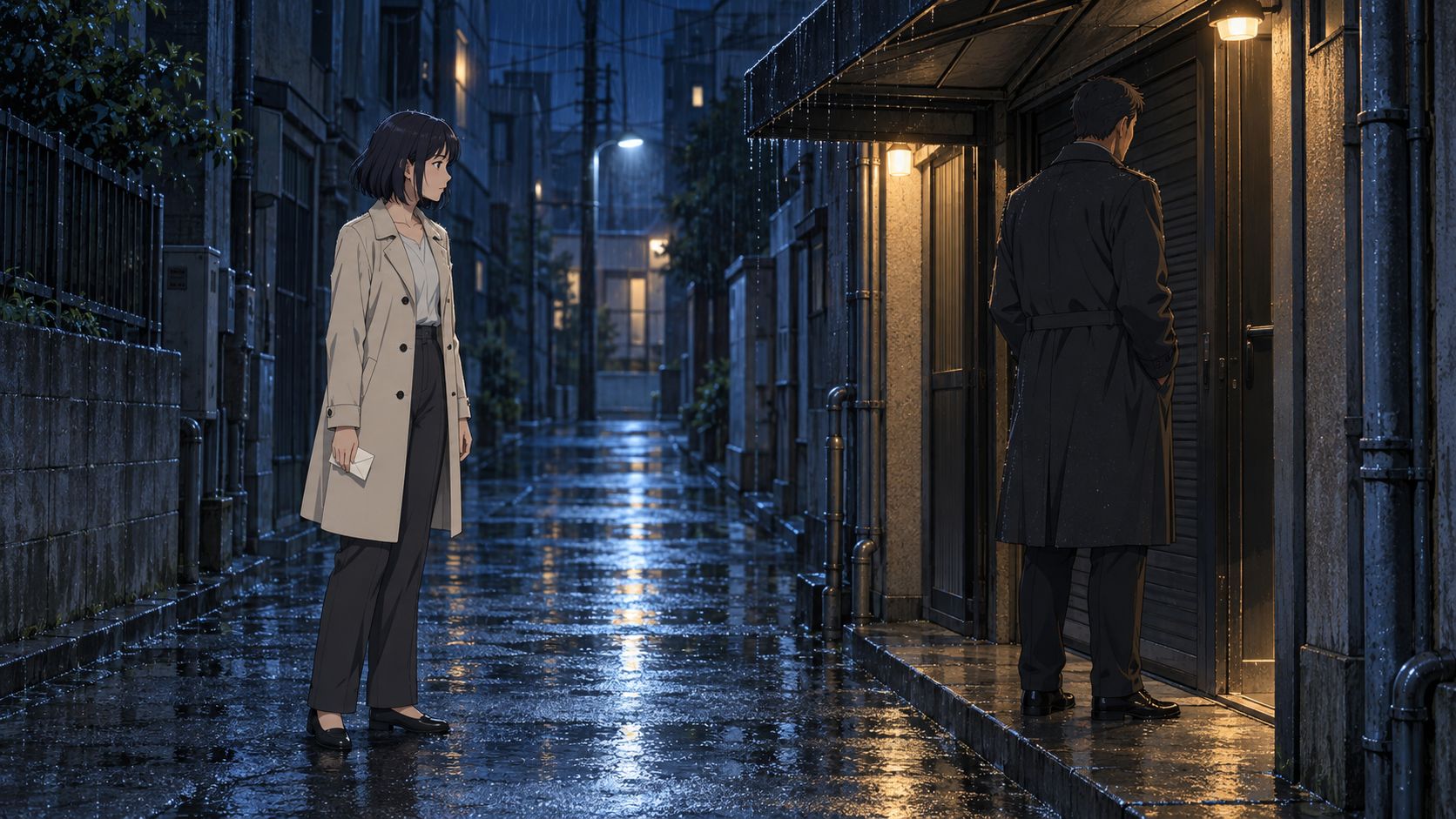
Muted comparison, A on the left, B on the right. Both keep the full shot duration; each side is displayed at 640×360 inside a 1280×720 canvas.
A — complete submitted prompt, static camera:
Animate the supplied first frame into a five-second 2D anime shot.
Rin, the woman in the ivory coat on the left, takes two slow steps to the right toward Sato, then stops before reaching him.
Sato, the man in the dark coat beneath the awning, stays in place with his back turned.
The folded letter stays in Rin's right hand at her side.
Static eye-level camera. Keep both characters fully visible.
Preserve the character designs, clothing, alley layout and blue-and-warm lighting from the starting image.
Gentle rain and distant traffic. No dialogue or music. One continuous shot, no cuts.
B — complete submitted prompt, small forward push:
Animate the supplied first frame into a five-second 2D anime shot.
Rin, the woman in the ivory coat on the left, takes two slow steps to the right toward Sato, then stops before reaching him.
Sato, the man in the dark coat beneath the awning, stays in place with his back turned.
The folded letter stays in Rin's right hand at her side.
Very slow, small forward camera push at eye level. Keep both characters fully visible.
Preserve the character designs, clothing, alley layout and blue-and-warm lighting from the starting image.
Gentle rain and distant traffic. No dialogue or music. One continuous shot, no cuts.
Sampled at roughly half-second intervals, both clips show Rin moving toward Sato and stopping. Sato generally stays by the doorway; the letter stays visible at Rin's side. A has settled by about 2.5 seconds, B by about 3. The push-in is subtle, and the background and framing still deserve a closer look. Treat the labels as the requested instruction, not a measured camera path.
Which is the point: this is a decision a fast draft can settle in an afternoon. Put both versions in the edit and pick the staging that reads more clearly. One run per prompt will not establish reliable camera control or rank the two instructions against each other.
Case 2: an eight-second clay scene with English dialogue
For a different look and a self-contained scene, we built a small woodland post office. An orange clay robot places a letter on the counter; a snail postmaster replies. Compact by design — one location, one main action, one short exchange — which is what makes it a fair test of a standalone children's clip.

Turn the sound on for this one. The eight-second clip plays the model's own generated soundtrack, with no external dubbing and no replacement audio track. It's the English-dialogue revision, arriving after an ambient-only pass and a Mandarin brief; the timing table below covers this English request only, not the whole development path.
Complete submitted prompt, including the dialogue and intended beats:
Animate the supplied first frame into an eight-second handcrafted 3D clay stop-motion film shot WITH CLEAR AUDIBLE ENGLISH DIALOGUE, synchronized character mouths and natural sound effects.

0–1 seconds: hold the starting pose. The little orange postal robot looks toward the snail postmaster, still holding the single cream envelope.

1–4 seconds: the robot gently extends its envelope-holding arm forward and slightly upward, then lays the envelope flat on the counter in front of the snail. Keep the hand and envelope clearly separate. The robot stays in the same spot. While extending the envelope, the robot says in English, in a bright, friendly, youthful and lightly metallic voice: “Your letter. Please sign here.” Its mouth moves with its own spoken words.

4–5 seconds: the robot releases the envelope and slowly withdraws its now-empty hand. The envelope remains resting flat on the counter. A soft paper rustle and a gentle contact sound accompany the delivery.

5–7 seconds: the friendly snail gives one slow blink, then replies in English in a warm, calm, slightly lower mature voice: “Thank you. Have a lovely day.” Its small mouth moves with its own words. The robot listens silently. The snail stays behind the counter and does not grow hands or arms.

7–8 seconds: hold the completed delivery. The robot looks pleased, the snail looks content, and the single envelope stays on the counter.

Audio is essential: both quoted dialogue lines must be clearly audible, complete and not overlap. Use two distinct character voices, no narrator. All spoken words must be in English only. Quiet forest birds and soft outdoor ambience stay underneath the speech. No music. Do not add subtitles or visible text.

Fixed eye-level camera, one continuous shot, no cuts, no zoom.
Preserve the characters, matte clay texture, subtle fingerprints, warm morning lighting and woodland post-office layout from the first frame. Movement is small, deliberate and tactile, with a gentle stop-motion feel.
Frame samples show the envelope being extended, laid flat, and released. Automatic transcription — no script supplied, no language preset — detected English and recovered both lines exactly: “Your letter. Please sign here.” and “Thank you. Have a lovely day.” That confirms the words are present and intelligible in the soundtrack. It does not confirm frame-accurate lip sync, nor that the voices will hold across future clips. The timestamps in the prompt describe the intended sequence; they are not a verified frame-by-frame schedule.
The useful part is the shape: a small scene that needs no sequence of matching angles. For longer dialogue, the voice workflow above still applies. A written description of a voice is not a reusable voice reference, and you'll likely still be editing or re-dubbing between clips.
Measured wait and output settings
| Request | Requested length | Submit to result | Reported inference | Submit to downloaded file |
|---|---|---|---|---|
| Alley A, static camera | 5 seconds | 6.09s | 1.55s | 9.11s |
| Alley B, small push-in | 5 seconds | 5.46s | 1.54s | 7.77s |
| Clay scene, English dialogue | 8 seconds | 7.16s | 2.96s | 10.32s |
Submit-to-result includes network round trips and status polling at roughly one-second intervals; first-frame upload, later transcoding and transcription checks are excluded. The inference column is the provider's returned timings.inference. None of these numbers measures the ArcLoop application path, and all three are single runs — a record of what happened, not a typical-wait promise.
All three source videos came back at 1344×768 and 24 fps. The alley clips hold 124 frames, about 5.17 seconds; the clay clip holds 192 frames, exactly eight seconds. The 720p exports keep the full frame sequence, scaled proportionally with padding to 1280×720 — no speed change, no interpolation, no trimming. We didn't check a supplier invoice, so the standard-price arithmetic earlier in this guide remains an estimate rather than these runs' billed cost.
Keep the draft budget from becoming a retry budget
Decide what counts as a useful result before you press generate, whether you're exploring a scene or finishing a clip. Set a budget, set a retry limit, and write down the reason you'd stop. Then note what each retry was supposed to fix — otherwise you're just buying variations.
Track generation charges separately from image preparation, review, editing and repair. For a draft, count the staging or camera questions you actually resolved. For production, count the shots that passed the full delivery standard. Those are different outcomes; averaging them together tells you nothing.
And if attempts keep moving an approved prop, altering a face or breaking the room, stop the batch. Fix the starting image, simplify the action, or move to a workflow with the controls that shot needs. More versions help while you're still exploring. They get expensive the moment you're trying to protect a decision you already made.
MiniMax H3 Turbo FAQ
Is H3 Max Turbo suitable for finished anime episodes?
For drafts, animatics, samples and finished standalone animations — including simple children's clips with light continuity demands, yes. For connected episodes, don't make it your only production workflow until connected-shot and revision tests pass your own requirements. A good short clip says nothing about series-wide continuity, or about what revisions will cost you.
Does Turbo accept multiple character references?
The public fal Turbo documentation checked on October 25, 2026 describes text-to-video and first/last-frame image-to-video. We found no separate Turbo reference-to-video endpoint. Either build the scene into a first-frame image, or move to a documented reference workflow when separate reference assets are essential.
Do I need a 44 GB GPU, and can I export 1080P?
fal hosts the model, so there's no local GPU to buy. Its Turbo schemas list 480P, 768P and 1080P; the 1080P option refines from a native 768P source. And no — more pixels won't fix continuity, anatomy, or how painful your revisions are.