Why Clips Look Like Sliding Posters
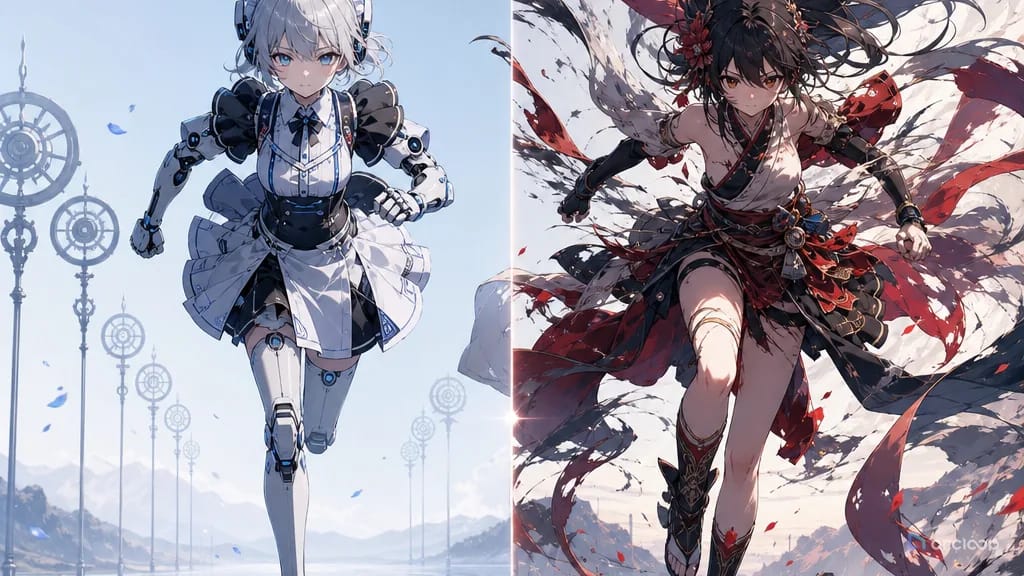
Stiff action often looks like a character sliding between posters. They start in a pose, drift across the screen, and end in another pose without weight, contact, or follow-through. A punch has no shoulder load. A jump has no push-off. A turn has no hips. The clip moves, but the body never performs the action.
The fix is to prompt the mechanics of the beat, not just the result. Anime action can be stylized, exaggerated, and fast, but it still needs a readable chain: anticipation, weight shift, contact, follow-through, and final hold. If the prompt skips those stages, ArcLoop has less information about how the body should travel through time.
Use this guide when AI anime clips feel floaty, robotic, or over-posed. Start with 2D Animation AI Templates, test compact movement with Single Action Dance Clip, and keep action notes inside ArcLoop Worlds so future shots inherit the same physical logic.
Rules for Fixing Stiff Motion
Write the body path before the style. A stylish impact frame does not help if the prompt never says how the foot plants or where the shoulder turns. Start with the physical route through the action.
Use anticipation. Before a leap, the knees bend. Before a swing, the shoulder pulls back. Before a sprint, the torso leans. Anticipation tells the viewer that force is building.
Show contact. Hands grab, feet press, elbows bump, blades meet, wheels scrape, fabric catches. Contact proves that the character is interacting with the world instead of floating over it.
Add follow-through. Hair, coat hems, straps, sleeves, dust, and small props should keep moving after the main body changes direction. Follow-through is often what makes anime action feel alive.
Keep the camera readable. A wild camera can hide weak mechanics, but it also makes good mechanics hard to see. Use locked, side-tracking, or low three-quarter framing until the action itself works.
End on a clear held pose. A final hold gives the viewer proof that the action completed. Without it, the clip may stop in the middle of a blur.
How to Repair a Stiff Action: From Diagnosis to Final Hold
Start by naming the action failure. Do not write "make it better." Write "the jump has no crouch," "the sword swing has no follow-through," "the character slides instead of stepping," or "the landing has no weight."
Preserve what already works. If the face, outfit, and camera are good, keep them. Stiff action repair should not regenerate the character from scratch unless identity is also broken.
Break the motion into three phases. Use anticipation, action/contact, and follow-through/final hold. For short clips, this is enough. More phases can become mushy unless the runtime is longer.
Specify weight transfer. Say which foot plants, where the torso leans, when the knee bends, or how the shoulder leads. Weight cues turn a pose into a physical action.
Add secondary motion that belongs to the same force. If a character spins left, the scarf and jacket trail left after the turn. If they land hard, dust and hair bounce up. Do not add random effects that ignore the motion.
Choose a camera that shows the mechanics. Side view works for running and jumping. Low three-quarter works for impact. Medium shot works for grabbing or dodging. Close-up works only when the action is facial or hand-based.
Review one action layer at a time in ArcLoop. If the landing works but the start is stiff, fix the anticipation. If the body moves but the hands are vague, repair contact. The smallest useful revision is usually the right one.
For action planning, combine this with Duration and Beat Design for AI Video and storyboard multi-shot scenes with Three-Shot Continuity Board.
Fix the Motion Without Rebuilding the Character
Stiff-action repair gets easier once the character is a My Assets entry with a pose reference bound as its Reference image. Regenerate just the shot card that's stiff and check the new take against that same bound reference — you're not restarting the whole scene, and the face and proportions don't drift while you fix the movement.
Use ArcLoop's shot card to state the verb clearly: vaults, blocks, catches, ducks, kicks, slides, plants, reaches. Verbs with contact produce cleaner action than mood words like intense, epic, or dynamic.
When a scene needs big action, build it as separate clips. A full chase, jump, landing, and reaction may need several short shots. ArcLoop can keep screen direction, costume anchors, and prop states consistent while each clip focuses on one physical beat.
For review, watch the draft without judging polish first. Ask whether the action has preparation, contact, transfer of weight, and a readable end pose. If those are missing, final rendering will only make the stiff motion look more expensive.
Example 1: Workshop Wrench Catch
Action repair pass for a 6-second 2D anime workshop shot featuring @Juno Cast, a junior airship mechanic. Setting: cluttered but readable airship repair bay with a hanging tool rack.
Problem to fix: the latest draft made Juno's arm slide upward without a real catch. Keep the same medium shot and outfit. Motion phases: first, she hears a wrench falling and shifts weight onto her left boot; second, she bends her knees and snaps her right hand upward to catch the wrench at chest height; third, her wrist dips from the impact, goggles and shop rag bounce, and she ends in a proud held pose.
Camera: locked medium full-body shot, both boots visible, right hand clear during contact. Style: crisp 2D anime action, clean key poses, small dust motes in warm workshop light. No floating wrench, no hidden hand, no rubber arm, no extra fingers, no camera shake, no outfit redesign, no text.
This prompt fixes the catch by adding weight shift and impact. The wrench has a physical relationship to the hand.

## Example 2: Courtyard Umbrella Dodge

```text
Create a 7-second 2D anime action clip for Roka Sen, an original academy messenger with short violet hair, cream rain cape, navy shorts, knee socks, and brown lace-up shoes. Setting: stone school courtyard during a sudden sun shower, with puddles and open classroom windows.

Action goal: make the dodge feel flexible instead of stiff. Beat 1: Roka plants her right foot in a shallow puddle and lowers her center of gravity. Beat 2: a loose umbrella tumbles in from camera left; she twists her shoulders back and ducks under it, left hand keeping the rain cape from covering her face. Beat 3: the umbrella passes overhead, her cape follows through in an arc, puddle water ripples from the planted foot, and she ends looking back with a quick startled smile.

Camera: side three-quarter full-body shot, locked, no cuts. Keep both feet, both hands, and the umbrella visible. Use clean cel-shaded anime style, light rain sparkle, readable body mechanics. No sliding feet, no cape hiding the pose, no extra limbs, no excessive motion blur, no text or watermark.
The action reads because the foot plant happens before the dodge. The cape follows the same motion instead of becoming random decoration.
Example 3: Market Cart Stop
Generate an 8-second 2D anime scene for Tavi Or, an original night-market noodle runner with black side braid, orange headband, white short-sleeve jacket, blue apron, dark cropped pants, and wooden clogs. Setting: narrow food market lane with paper menus hanging high above the walkway.

Stiff-action repair target: make Tavi stop a rolling cart with believable weight. Timing: seconds 0-2, she runs into frame from left to right, leaning forward with arms pumping. Seconds 2-4, she plants both clogs wide and grabs the cart handle with both hands. Seconds 4-6, the cart pushes her back half a step; knees bend, shoulders tense, apron and braid swing forward. Seconds 6-8, the cart stops, steam sloshes from the noodle pot, and Tavi holds a relieved final pose.

Camera: low side view, full body and cart wheels visible, stable screen direction. Style: energetic 2D anime, warm stall lights, clear contact shadows under clogs and cart. Preserve outfit colors and braid. No sliding through the floor, no hidden hands, no broken wheels, no sudden camera orbit, no extra customers blocking the action.
This example gives the cart resistance. The body reacts to force instead of gliding beside the object.
Where Stiff Action Repair Goes Wrong
The first mistake is asking for "more dynamic" without saying what moves. Dynamic is a result. The prompt needs knees bending, hands grabbing, shoulders turning, feet planting, or fabric trailing.
Another mistake is skipping contact. If the foot never presses into the ground or the hand never clearly touches the object, the action will feel weightless.
Creators often add speed lines too early. Speed lines can support a strong motion, but they cannot replace anticipation and follow-through.
Many prompts use camera shake to create energy. Camera shake often hides the exact body mechanics you need to inspect. Use a readable camera first.
Finally, do not combine too many actions in one repair pass. Fix the jump, grab, landing, turn, or punch separately. One clean action beats five stiff ones.
FAQ
What makes AI anime action look stiff?
It usually lacks one or more physical stages: anticipation, contact, weight shift, follow-through, or final hold. The character changes pose but does not show how force moves through the body.
Should I use pose references for action repair?
Use them when body shape is the main problem. A pose reference can show the start or end position, while the ArcLoop prompt explains how the character moves between them.
How much action fits in a short clip?
One main action fits best. A six-second clip can show a catch, dodge, leap, turn, or landing. A chase with several stunts should be split into separate ArcLoop shots.
How do I keep action readable?
Use a stable camera, visible feet and hands, clear contact points, and a final hold. Then add secondary motion only after the main body path is clear.
How do I repair an action clip without changing the character?
Keep the approved character asset and latest draft visible on Canvas, then ask ArcLoop to preserve identity, outfit, and camera while repairing the specific motion phase that failed.