
Why twist design starts before the reveal
The clip looks exciting until the final shot lands. Your apprentice cartographer opens the copper city map, gasps, and the audience is supposed to understand that her mentor has been protecting the enemy district all along. Instead, the reveal feels like a random rewrite: the mentor's badge changed shape, the map symbol was never visible, and the reaction jumps from confusion to rage.
AI anime stories make this failure easy because a twist is not one prompt. A good turn depends on setup shots, prop continuity, character motive, camera timing, and an audience assumption that can be reversed without breaking the world. If those pieces are scattered, the generator may give you a beautiful reveal frame that cannot connect to the previous clips.
Twist design should begin before you generate anything. Write the false assumption, the hidden truth, and the fair clue as beats in Story Outline, and build the clue itself as a prop or character asset in My Assets so the same @ reference plants it early and reveals it later. Keep Storyboard Continuity beside ArcLoop Worlds so the reveal stays connected to characters and scene beats.
Rules for a fair twist
A twist changes an assumption, not the entire contract with the viewer. If the audience believed the silver compass pointed north, the turn can reveal that it points toward a missing heir. It should not suddenly become a talking sword unless the story prepared that rule.
The clue must be visible before it becomes important. It can be small: a wrong reflection, an old sleeve mark, a repeated phrase, a prop held by the wrong person, a room layout that makes an alibi impossible. What matters is that the clue appears naturally inside an earlier beat. When the reveal comes, the viewer should feel the click: "I saw that, but I read it wrong."
The decoy needs a job. Give the audience a plausible wrong explanation: a character hides a badge because she seems ashamed of her rank, while the real reason is that the badge belongs to another faction.
Protect identity during the reveal. AI may try to "signal secret" by changing face, costume, palette, or age. That breaks trust. The twist should come from evidence, blocking, performance, or information order, not accidental redesign.
Make the reaction prove the twist. Use a pause, a hand stopping above an object, a glance toward the wrong door, or a line that dies before completion. Anime can carry big emotion, but the cleanest turn often begins with stillness.
Keep one twist per short sequence. If a 20-second clip reveals a hidden sibling, a fake death, a changed timeline, and a secret weapon, none of them gets space to register. Pick the one assumption that matters and build every shot around that turn.
How to design a twist: from premise to payoff
Start with a two-line truth table. Line one is what the audience believes before the reveal. Line two is what they understand after it. If you cannot write both lines clearly, the twist is still foggy.
Choose the fair clue. The clue should be visible, specific, and tied to the hidden truth. Avoid vague atmosphere such as "the scene feels suspicious." Better clues include a map corner folded the wrong way, a character knowing a private nickname, a locked door already open from the inside, or a broken charm appearing in two locations.
Choose the decoy reading. Decide how the audience misreads the clue. A folded map could imply sabotage when it is actually a rescue path. The decoy should fit the character's visible behavior.
Assign the twist across shots. A compact anime short can use five beats: normal world, clue in plain sight, pressure that reinforces the wrong reading, hidden truth, and reaction. Use Storyboard Prompt Guide when you need a bridge from beat to shot prompt.
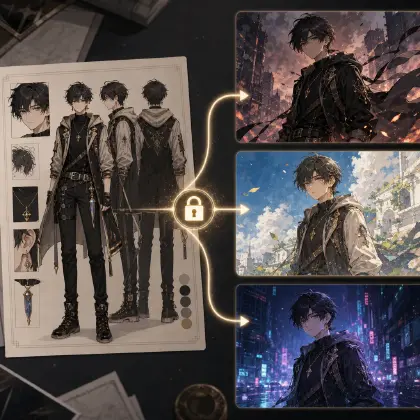
Lock continuity anchors. List character identity, prop shape, prop location, screen direction, lighting logic, and voice emotion for the reveal sequence. The reveal should not ask the model to redesign the world at the same moment it explains the story.
Generate a small batch of variants, not a final. Draft the risky clue and reveal shots, then review fairness before beauty. If the clue is unreadable, fix the shot. If the reveal needs a paragraph of explanation, split the beat.
Approve the twist beat notes after the sequence works. Save the false assumption, hidden truth, clue, decoy, fixed anchors, and reject rules. That card becomes reusable for the next scene, recap, trailer, or sequel hook.
Plan the twist in Story Outline, build the clue as an asset
The twist doesn't have to live in a single oversized prompt. Start in ArcLoop Worlds with the premise, the character assets, and the scene beats in Story Outline. Write the false assumption, hidden truth, and fair clue as their own beat, then reference it — and the clue asset — from every shot that carries setup, misdirection, or reveal.
Use one asset for each job. The character asset protects identity. The storyboard decides information order. The shot card controls framing, action, camera, duration, and dialogue. If the clue is hidden by camera crop, change the shot card; if the motive is unclear, revise the scene beat.
For a short anime sequence, run the review in this order: clue visibility, decoy plausibility, identity continuity, emotional timing, and final polish. Clue visibility comes first because a twist cannot be fair if the audience never had a chance. Final polish comes last because a gorgeous unfair twist is still a broken story beat.
When the sequence is approved, connect it to the larger production path. A twist may affect later costume rules, dialogue tone, prop ownership, or world history. Add those changes to the active world instead of leaving them inside one clip.
Here is how to wire the clue through the actual product workflow.
Open your IP Project at ArcLoop Worlds and go to My Assets. Create a prop asset for your clue object — the blue powder glove, the folded map corner, the cracked monocle — and upload a reference image from Library. Bind that image as the Main image so every shot that references @GlovePowder or @FoldedMap pulls the same visual identity.
In Story Outline, write three beats explicitly: the false assumption the audience holds, the moment the clue appears in plain sight, and the reveal beat. Keep them as their own outline paragraphs so you can link shot descriptions back to them.
When you enter the Episode and click Generate Shots, the storyboard will draft setup and reveal shots separately. Open each shot card and add the clue prop asset using @. In the setup shot, write only what is new in that frame — the angle, the action, the light. Do not re-describe the prop's appearance; the asset carries that. In the reveal shot, reference the same @ asset again so the model draws from the same source.
Generate images first to confirm the clue is visible and the prop looks consistent across both shots. Once the composition is right, use AI Chat Panel to generate video: Generate videos for Shots 3 and 7. Bring both clips into Edit, play them back to back, and check that the clue reads clearly in the setup before you approve the reveal.
Example 1: Observatory key twist setup
Medium close-up of @Nella crouching beside the gear tray in the observatory workshop. She reaches toward a faint blue powder smudged along the tray edge — the same shade as the marks on @Sky Key. The camera holds steady. Cold morning light from the dome window. In the background, slightly out of focus, @Mentor stands with his back turned, adjusting his left glove with one deliberate motion. No dialogue. Ambient hum of clockwork. This is the clue plant shot: the powder is visible but unremarkable.
The card gives clue, decoy, and continuity before final video.
Example 2: Glass Orchard reveal shot
Reveal shot. @Iven kneels at the open floor panel of @Glass Orchard Control Room. He presses one hand into wet dark soil. A tiny rainseed sprout glows faint green beneath the glass floor. Vertical medium shot from behind his shoulder, slow tilt down to the sprout, then rack focus to @Rell's reflection in the glass wall — her expression shifts from accusation to stillness. Show the same muddy cuff visible in the earlier greenhouse shot. Dawn light, cool and soft. No music swell. No dialogue. One action, one reflection, one breath.
The reveal is carried by action and reflection, not a speech.
Example 3: Controlled revision for a twist reaction
Revision to reaction beat only. @Cassel stands on the rooftop at sunset, @Alarm Tower in the upper background. Locked close-up: @Jade Token in lower center, his face in the upper third. Replace the current instant anger with three stages — his hand stops mid-reach on the satchel strap; his eyes track slowly left to the route stamp on the package; a small controlled exhale as the meaning lands. Hold the final frame two beats before cut. No new dialogue, no costume change, no camera movement. The route stamp must be legible.
The revision keeps the approved shot and changes only emotional timing.
Ways twist design goes wrong
The biggest mistake is hiding the clue completely. Make it visible but easy to misread.
Another mistake is using redesign as proof. A sudden scar, new eye color, or changed uniform often reads as generation drift.
Creators also overuse dialogue explanations. A line can confirm the truth, but the turn should be visible in a prop, action, reflection, blocking, or reaction.
A fourth mistake is making every earlier shot suspicious. If every prop glows and every character smirks, the decoy disappears. Keep most of the scene normal so the clue has a natural hiding place.
Another failure is reversing motive without earlier support. If the mentor was protecting the city, earlier shots should support that reading once rewatched.
Finally, do not polish a twist that fails fairness. Better lighting, sharper line art, and longer runtime will not fix a missing setup beat. Fix the logic card first, then render.
FAQ
How early should the clue appear?
Early enough that the audience can register it before the reveal. In a short sequence, the clue often belongs in the first or second shot, then returns in the reveal shot.
Can a twist work in a single 8-second AI anime clip?
Yes, if it is a small visual reversal. Use one false assumption, one clue, and one reaction. A full identity or timeline turn usually needs several shots.
What is the difference between surprise and a twist?
Surprise is anything unexpected. A twist changes the meaning of what the viewer already saw. For story production, the second one is stronger because it rewards continuity.
How do I make sure the twist's clue was actually fair?
Keep the clue as one asset referenced by both the setup and reveal shots. If you can point at the exact earlier shot where @ pulled in the same asset, the clue was visible. If the reveal shot never referenced it, the twist needs another pass before it counts as fair.
Should the FAQ or CTA recommend another planning tool?
No. Keep planning inside ArcLoop: use the world workspace for story logic and premise, character assets in My Assets for identity, and shot descriptions for the renderable beats — that's enough to keep the fair clue traceable without another tool.