
Music and voice acting are the finishing touches of an AI short film. While video models can now generate audio and video simultaneously, they are not dedicated sound generation tools. To take the production value of your film a step further, you need a standalone audio generation model. Using Seed Audio as an example, this guide demonstrates how to generate custom audio clips for your films.
First, listen to a scene audio example from the Seed Audio model page:
This clip blends vocal spatial reverb, expressive emotional delivery, and background music. As you listen, notice the reverb trailing each phrase, the shifts in vocal tone, and the way the music supports the performance. These are the exact details worth refining when designing dedicated sound for key story beats.
Finish your visuals first, select the moments that need reinforcement, generate the audio, place it back under the shot to audition, and finally edit.
Part 01|When to Use Seed Audio
Video models can generate sound alongside visuals, but the emotional delivery of key dialogue, subtle pauses, and the interplay between background audio and characters may not always hit the mark a scene requires. When the visuals already work well, but the dialogue falls slightly flat or the background sound cannot be tuned to what you need, it is worth reinforcing the audio separately.
Video prompts are primarily used to describe visuals, actions, camera movements, and shot breakdowns, leaving limited room for audio direction. Once your visuals are locked, you can hand off moments that require focused performance to an audio generation model like Seed Audio—concentrating your prompt on how lines are delivered, how the background interacts, and how the pacing unfolds.
| What Needs Reinforcement | What You Can Specifically Design |
|---|---|
| Key dialogue and emotion | Whether the same line carries apology, hesitation, or surprise; where the emphasis falls, and how long to pause before and after speaking |
| Balance between vocals and background | Music steps back when a character speaks, then opens up after a pause at the end of a line; footsteps and wind stay in the background |
| Specific sounds in the scene | Offscreen footsteps, knocking, mechanical hums, or a solo instrument with a specific playing style and timbre |
| Emotional turns | Keeping the exact same visuals while using warm, sorrowful, or dangerous sound to change how the audience interprets an encounter |
Lock in the lines and conversational dynamics during video production first, then enhance the audio for selected clips so you can keep using visuals you are already happy with. Keep any original audio that already works; when replacing dialogue, check the duration and lip movements, and make sure the new and old dialogue do not overlap.
These three music cues were generated separately and placed under the same five-second shot for comparison. Below are the three actual prompts used in the final video:
WARMTH: Warm major-key piano and gentle strings give the waiting a sense of answer.
Create a five-second instrumental film-music cue for a quiet reunion at an old European railway station. Begin immediately with gentle, sparse piano in a warm major harmony. Around the middle, a soft sustained string chord opens with a little hope, as a waiting woman notices someone arriving offscreen. End softly and reassuringly. Intimate and restrained, no big climax. Music only: no speech, narration, singing, voices, station ambience, sound effects or percussion. Do not read the instructions aloud.
SORROW: Cello, a descending minor melody, and an unresolved ending cast a sense of regret over the encounter.
Create a five-second instrumental film score that immediately conveys grief and a painful reunion. Start at once with an expressive solo cello playing a clearly descending minor-key melody, supported by dark sustained violas. Let the melody fall and linger as if someone realizes a loved relationship is lost. Strongly sorrowful and emotionally exposed, intimate rather than epic. No cheerful or comforting resolution. Keep the music clearly audible throughout, ending with an unresolved sustained note. Music only. No speech, singing, voices, piano, ambience or sound effects.
DANGER: A repeating low ostinato, bass pulse, dissonant strings, and a cut to silence at the end make the offscreen arrival feel threatening.
Create a five-second instrumental psychological-thriller score with unmistakable immediate danger. From the very first moment, use a tight repeating low-string ostinato and a deep controlled bass pulse. Add close, tense dissonant high strings, building rapidly in density as someone threatening approaches offscreen. Make the tension clear and urgent rather than faint background atmosphere. During the final half-second abruptly cut the music to silence. No jump-scare impact. Music only. No speech, singing, voices, gentle piano, warm harmony, ambience or literal sound effects.
Each segment is preceded by a 0.75-second title card, bringing the full comparison to about 17.25 seconds. As you listen, notice how the exact same upward glance is reinterpreted by the three scores as relief, regret, and alertness.
Part 02|How to Write Seed Audio Prompts
When writing an audio prompt, make three things clear: what is said, how it sounds, and when it happens.
The audio generation API documentation provides a suspenseful dialogue example: a phone vibration opens the scene, birdsong continues in the background, and a marimba paired with electronic tones builds suspense; two men take turns speaking, and finally vehicles and footsteps drive the action forward. It combines characters, music, and sound events within a single prompt.
| Prompt Element | How the Documentation Example Handles It | What to Include for Your Own Clip |
|---|---|---|
| Content: Who says what | Specifies each of the two men's lines and their speaking order | Character names, verbatim dialogue, language, and whether anyone replies |
| Sound: How it is heard | Distinguishes a deep, rich male voice from a raspy, mature one, specifies accents, and defines lead instruments and accompaniment | Timbre, tone of delivery, character distance, environment, and instruments—avoid writing only "cinematic" |
| Pacing: How it unfolds | Opens with a cue sound effect before dialogue begins; questioning and explaining drive tonal shifts, ending with action sounds | Entry timing, speaking pace, pauses between lines, and when background elements enter or fade out |
Taking the station reunion as an example, you can start by defining: one exact line of dialogue + one specific performance style + one clear sonic shift. The offscreen man says only "You waited.", conveying the encounter through a low, restrained sense of intimacy and piano that opens up after the line.
The sequence of sounds in the station example is: gentle breeze and piano → two soft footsteps → the man speaks while music stays very quiet → brief pause → piano opens up.
Put the spoken line in quotation marks and note that the woman does not reply; keep the footsteps quieter than the voice, and exclude station announcements and train noises. Write out these relationships clearly first, then add approximate timing based on the shot duration; always verify timing requests against the generated output, especially the exact placement of music and sound effects.
If a clip calls for a solo marimba, specify the instrument, mallet texture, tempo, note density, and how it ends. Below is an original prompt you can try, which has not yet been generated for audition:
Create an eight-second solo marimba cue for a quiet, suspenseful scene. Use soft mallets and a warm wooden tone. Begin with sparse, slow notes and clear gaps between them. Gradually make the repeating pattern slightly more insistent, then stop before the final beat and leave a short silence. No voices, drums, synthesizers or other instruments.
Here, the pacing follows a "sparse → slightly more insistent → sudden silence" arc. The instrument, playing style, and sonic entries and exits can all be checked item by item, though you still need to audition the result to judge whether the texture and rhythm hold up.
Part 03|Ducking Around Dialogue
Ducking means lowering the background music while a character speaks and bringing it back up after the line ends. For a quiet reunion scene, beyond lowering the volume, you can also thin out the accompaniment to keep the listener's focus on the characters.
When generating vocals and background together in Seed Audio, build this relationship directly into your prompt:
As the man quietly says "You waited.", the piano stays very soft, the wind recedes into the distance, and the footsteps have already stopped. Leave a brief pause after the line, then let the piano gently open up to support the woman's reaction.
Do not simply write "automatic ducking." Specify clearly who needs to be heard, which sounds step back, and when they return, then check whether the model delivered it. In this example, all of these relationships are handled together in a single generation.
If your video already contains dialogue, you can also extract the original audio as a reference, clearly stating the timbre, lines, and pacing you want to keep alongside the vocal delivery or background balance you want to adjust. Once generated, audition it against the picture and replace the original audio track for that segment; see Part 05 for detailed editing steps.
The visuals reuse the five-second station shot generated with Seedance 2 Fast: the woman waits with her head lowered, then looks up toward someone offscreen. The male voice speaks just one line, soft footsteps signal someone approaching, and the piano after the line catches her silent reaction.
This audio clip was generated using the exact prompt below. Requesting eight seconds during generation leaves enough room for the footsteps, pause, and musical swell before and after the line:
Create one complete eight-second cinematic sound scene at a quiet old European railway platform at dusk. Generate dialogue, subtle footsteps, outdoor ambience and piano music together as one coherent scene. At the beginning, a very gentle distant breeze and sparse soft warm piano establish quiet anticipation. Between about 1.0 and 2.1 seconds, exactly two very soft, unhurried shoe footsteps approach offscreen on dry concrete and stop a few feet away. The footsteps are a delicate background detail, much quieter than the speaking voice, never sharp, heavy or dramatic. Around 2.5 seconds, one adult man just offscreen speaks a single short line in natural, clear British English, with quiet surprise and restrained affection: "You waited." Only those two words, only one male speaker. Keep the music very soft around his words so his intimate delivery remains clear. After the line, leave a brief emotional pause with faint breeze. From about 4.8 seconds, let the piano gently open into a warm sustained chord, supporting the woman's silent reaction, then settle quietly at eight seconds. No additional dialogue, no reply, no narration, no singing, no announcements, no loud trains, no impact sounds. Do not speak these directions. Preserve the quiet intimacy of the reunion throughout.
The original generated audio is eight seconds long, and the final clip uses the continuous excerpt from 1.8 to 6.8 seconds placed under the five-second shot. In post-production, only the overall volume was adjusted uniformly with short fades at the head and tail—no separate vocal, footstep, or music tracks were layered in, and no separate-track ducking was applied.
When auditioning, check three things: whether the line is clear, whether the footsteps are light enough, and whether the music waits until after the line to open up. If any item falls short, revise that part of the prompt while continuing to use your locked picture.
Part 04|Multi-Speaker Dialogue
Multi-character prompts need to map out each character, their vocal timbre, line attribution, and speaking order. Start with a short exchange to confirm both voices before adding more lines.
| Character | Voice and Performance | Line in This Exchange |
|---|---|---|
| Alex, offscreen man | Lower, warm adult male voice, natural British English, quietly surprised | "You waited." |
| Maya, onscreen woman | Brighter, softer adult female voice, natural British English, calm and quietly certain | "I said I would." |
Keep character names consistent throughout the prompt and label who speaks line by line. Write vocal timbre and emotional performance separately: the same person might sound surprised first and relieved later, but should still sound like the same character.
After Alex finishes speaking, leave a brief moment for Maya to react before she replies. If you want them to take turns speaking, state explicitly that there is no overlapping dialogue; if the scene calls for an interruption, specify who interrupts whom and on which line. Keep the background music very quiet throughout both characters' lines, letting it open up only after the entire exchange ends.
Below is an original two-speaker prompt example that has not yet been generated for audition. It builds on the station scene by adding the woman's reply and should be paired with visuals that feature the corresponding performance:
Create one complete eight-second sound scene at a quiet railway platform. Two adult characters speak in natural British English.
Alex: a warm, low male voice, a few feet offscreen, quietly surprised. Maya: a softer, brighter female voice, nearby, calm and quietly certain.
Begin with faint wind and sparse piano. Alex says only: "You waited." After he finishes, leave a brief pause for Maya's reaction. Maya then replies only: "I said I would." Keep each voice distinct and consistent. Speak only the quoted dialogue; do not read the character names or instructions. No overlapping dialogue or extra speakers. Keep the piano very quiet during both lines. Let it open gently only after Maya finishes, leaving room for the final reaction.
Listen without watching the picture first to see if you can distinguish the two characters, then check against the shot to verify whether the lines were swapped, whether any extra words were added, whether the pauses work, and whether the lip movements match.
If generating several back-and-forth exchanges at once causes voice bleeding or speaker mix-ups, shorten the generation to a single question-and-answer exchange first, then handle subsequent lines in separate segments. Reuse the exact same character descriptions across segments, and check whether the timbre, ambience, and music connect smoothly when stitched together—text descriptions alone cannot guarantee identical voices across separate generations.
Part 05|Timeline Audio Editing
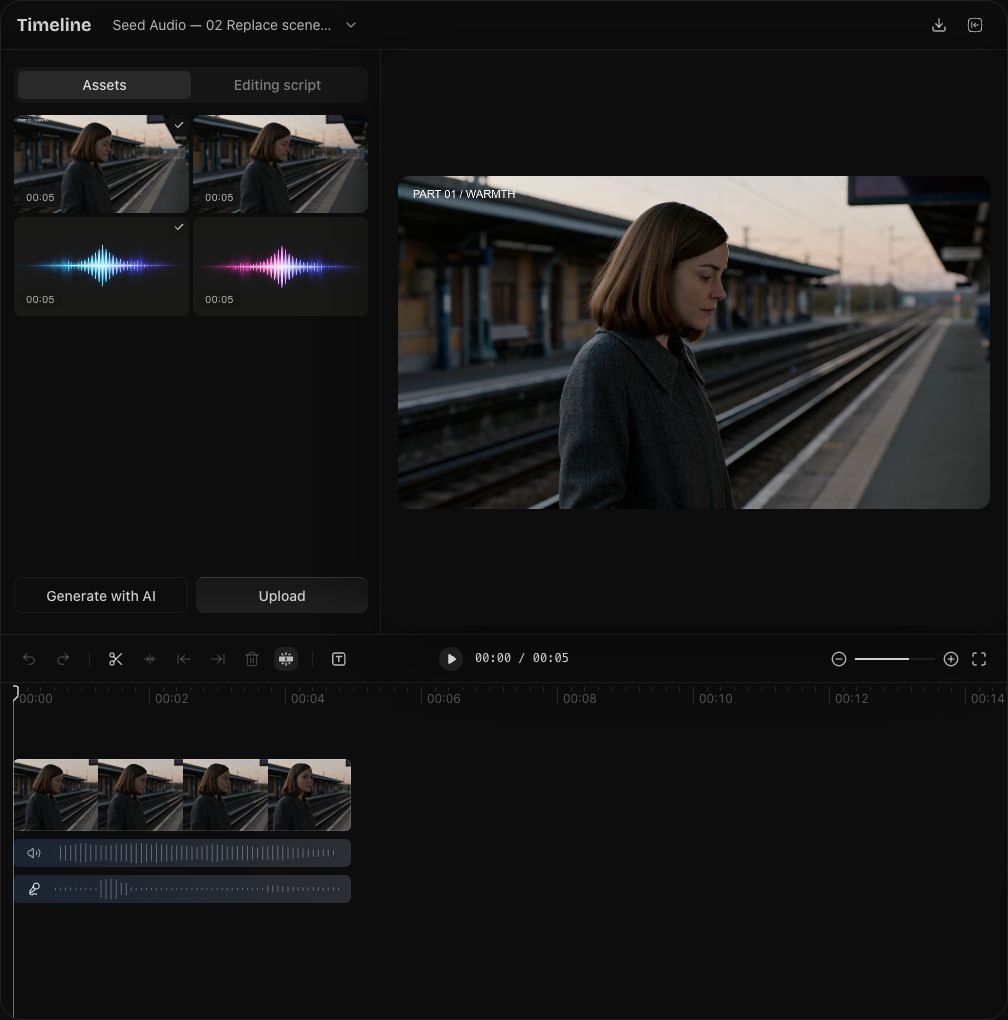
The screenshot above uses Arcloop as an example: keep the five-second video clip on the upper track, mute its original audio track, and place the complete scene audio generated by Seed Audio on the track below so the new dialogue, ambience, and score take over together. Slide the audio clip until the line and character reaction line up, then play it back in full to check the transition.
If you generated background-only music or ambience, simply add a new audio track. Keep the dialogue and original sound you need in the video, place the new audio underneath, and adjust its start/end points and volume. When a character speaks, you can keyframe the volume on the background track: dip it just before they speak, hold it low during the line, and bring it back up after the pause at the end of the sentence.
If you generated a complete scene clip combining background sound and character dialogue, replace the original audio at that exact spot. Detach the original audio from the video, split and mute or remove the old audio across the section being replaced, and align the new audio clip so the same line is not played twice. Keep the original audio intact for the remaining shots.
After replacing the audio, verify that the dialogue lines up with lip movements and reactions, and check for abrupt cuts at the head or tail of the clip; add short fades where needed so the ambience blends naturally. When vocals and music are already mixed into a single file, lowering the overall clip volume will lower the vocals as well; if you need to rebalance their relationship, either regenerate the clip or mix using separate stems.
Open the Seed Audio model page and start with one key moment: decide who says what, how it should sound, and when the background should step back, then place it back under your video to audition.